MDCMS Git Integration Overview
Introduction
MDCMS Git Integration enables seamless integration between Midrange Dynamics MDCMS and popular Git platforms (Azure DevOps, Bitbucket, GitHub, GitLab). This integration automates code deployment, branch management, commit tracking, and pull request workflows, bridging the gap between IBM i development and modern DevOps practices.
Architecture and Components
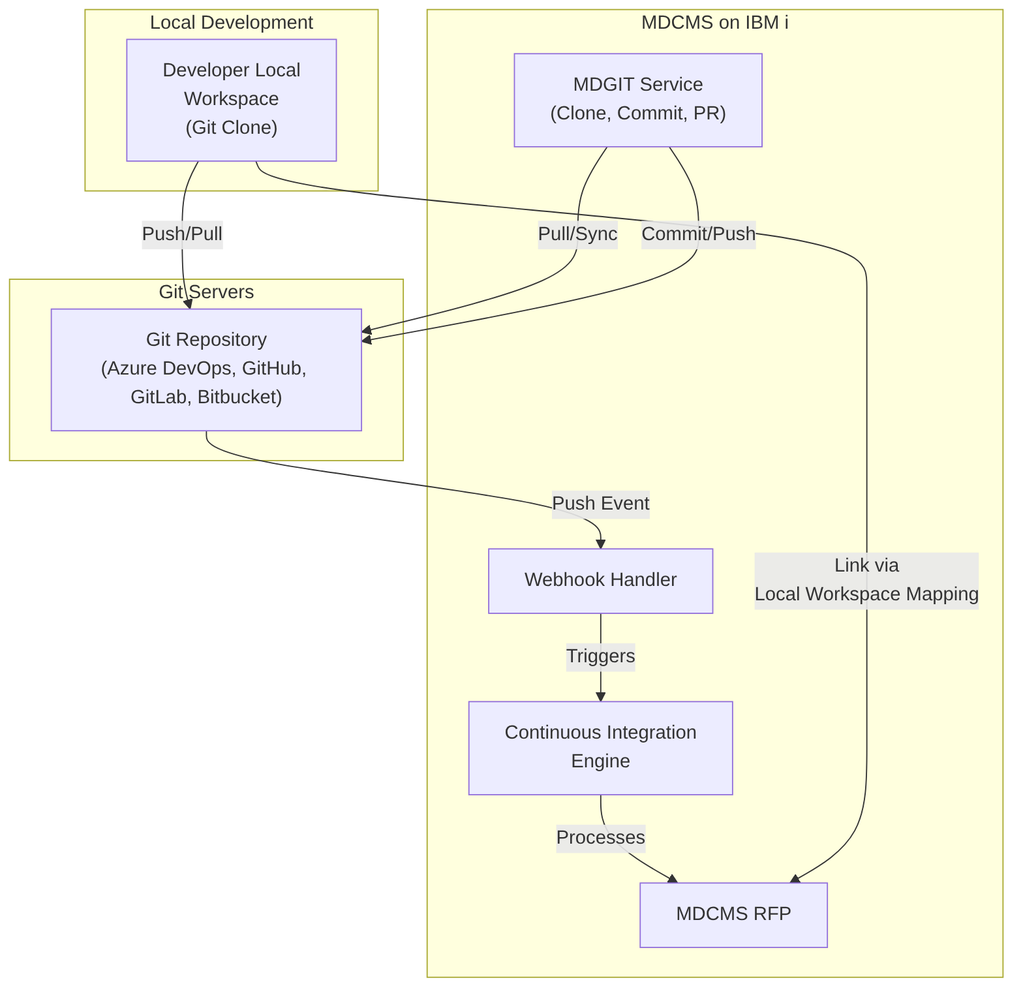
Setup & Configuration Workflow
Before using Git integration, configure the following components in order:
1. Git Credentials
Purpose: Authenticate with the Git server using SSH or username/password.
Key Options: - SSH Authentication — Recommended for production (ed25519 or RSA keys) - User/Password Authentication — Simpler setup, less secure
Configuration Path: Settings → DevOps Settings → Git Credentials → Add
Example:
Credential ID: GITHUB-MAIN
Description: GitHub primary credentials
Auth Method: SSH
SSH Key: github-main-key
Passphrase: [protected]
2. API Servers (Optional but Recommended)
Purpose: Enable advanced features like automated commit/PR creation and webhook registration.
Supported Platforms: - Azure DevOps - Bitbucket Cloud & Data Center - GitHub - GitLab
Configuration Path: Settings → DevOps Settings → API Servers → Add
Benefits: - Automatic commits after RFP deployment - Automatic pull request creation - Direct webhook registration from MDOpen - Access to pull request and commit history
Example Configuration:
Server ID: GITHUB-API
Description: GitHub API for repositories
Server Type: GitHub
API URL: https://api.github.com
User: your.email@company.com
Token: ghp_xxxxxxxxxxxxxxxxxxxx
3. Git Repositories
Purpose: Define the connection to each Git repository and configure MDGIT jobs.
Configuration Path: Settings → DevOps Settings → Git Repositories
Key Parameters: - Repository ID — Unique identifier for the repo - URL — HTTP(s) or SSH clone URL - Git Type — Azure DevOps, Bitbucket, GitHub, GitLab, or Other - Credentials — Link to configured credentials - API Server — Link to API server for advanced features - MDGIT Jobs — Primary/secondary/tertiary job numbers for high availability - Main Branch — Primary branch (main, master, develop)
Example:
Repository ID: MYAPP
URL: git@github.com:myorg/myapp.git
Git Type: GitHub
Credentials: GITHUB-MAIN
API Server: GITHUB-API
MDGIT Jobs: 1, 2 (for high availability)
Main Branch: main
Attribute Mapping: The Foundation
Purpose: Map Git file paths and names to MDCMS attributes for proper deployment.
Configuration Path: Git Repositories → [repository] → Attribute Mapping
Attribute mapping is critical for determining: - How files are deployed (IBM i source vs. IFS vs. Remote) - Where files are deployed on the IBM i - Which MDCMS attribute to use
Mapping Resolution Order for Source Objects:
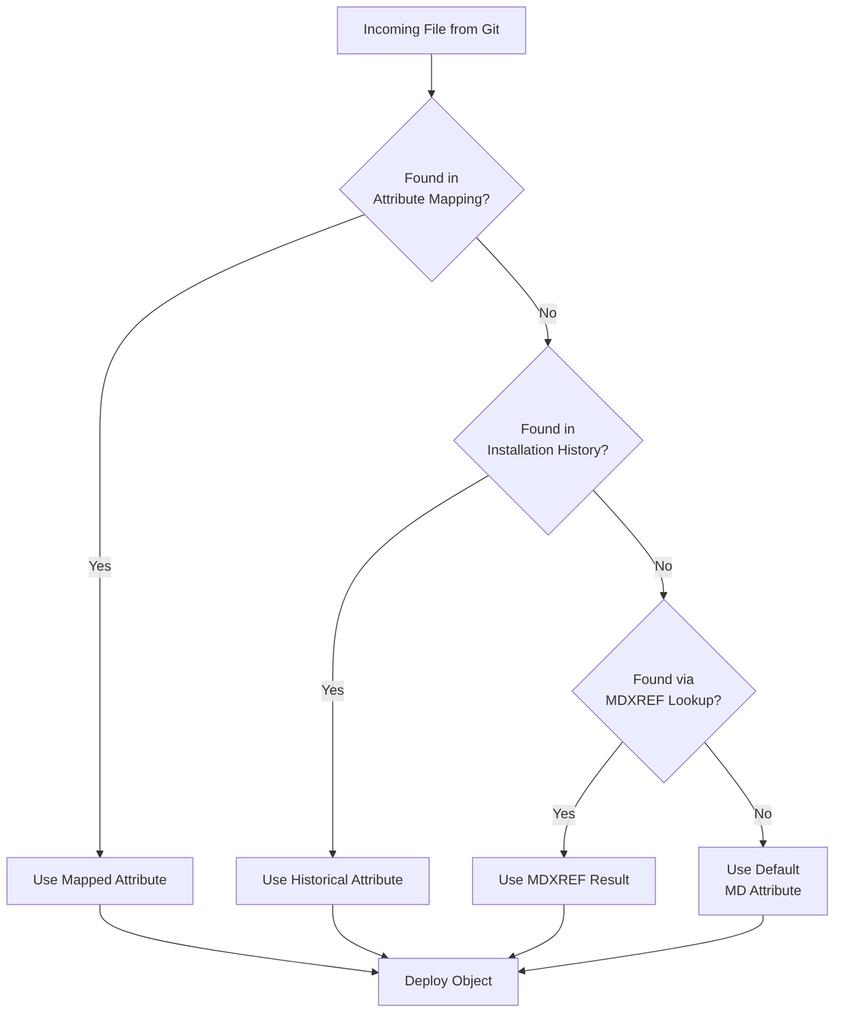
Example Attribute Mapping Table:
| Application | Path | File Pattern | MD Attribute | Purpose |
|---|---|---|---|---|
| MYAPP | /src/rpg | *.rpgle | RPGLE | RPG ILE source |
| MYAPP | /src/dds | *.dspf | DSPF | Display file source |
| MYAPP | /src/sql/tables | *.sql | SQLTAB | SQL table source |
| MYAPP | /deployment | * | IFS | IFS deployment files |
| MYAPP | /test | * | *NONE | Exclude test files |
Continuous Integration: Automated Code Deployment
Purpose: Define how Git pushes trigger automatic code deployment in MDCMS.
Configuration Path: Settings → DevOps Settings → Continuous Integrations
CI Definition Workflow

CI Definition Parameters:
Branch & Path Filtering: - Main Branch Only — CI on primary branch only - Not Main Branch — CI on feature branches only - Branch Pattern — release-*, feat-*, hotfix-* - Specific Branch — Exact branch name - Path Filter — /src/rpg/*, /src/dds/*, etc.
Target Deployment: - Application — Where objects deploy - Level — Which environment (DEV, TST, QA, PROD) - Level is Target of Merge — For PR-triggered deployments to non-checkout levels
What to Request: - Checkout: Diffs — Only changed files - Checkout: Contents — Complete folder contents - Request IFS/Remote Objects — Deploy to IFS/remote servers - Request Source for IBM i Objects — Deploy to IBM i source
Example CI Definition:
Repo ID: MYAPP
Branch Opt: Branch Naming Pattern
Branch Pattern: feat-*
Path: /src
File Pattern: *.{rpgle,sql,dds}

Application: MYAPP
Level: 1 (DEV)

Checkout: Diffs
Request IFS/Remote Objects: false
Request Source for IBM i Objects: true

Default MD Attribute: RPGLESRC
Default User: ADMIN
Mapping & Assignment Configuration
User Mapping
Purpose: Map Git user IDs to MDCMS user IDs.
Configuration Path: Git Repositories → [repository] → User Mapping
Use Cases: - Git username differs from MDCMS username - CI-generated requests need proper attribution - Different user repositories (GitHub vs. Azure DevOps)
Example:
Task Type Mapping
Purpose: Route deployments to different applications/levels based on task type.
Configuration Path: Git Repositories → [repository] → Task Type Mapping
Example:
Task Type: FEATURE
Target Application: MYAPP
Target Level: 110 (DEV branch 1)

Task Type: BUGFIX
Target Application: MYAPP
Target Level: 100 (DEV trunk)

Task Type: HOTFIX
Target Application: MYAPP
Target Level: 199 (DEV emergency)
Branch Management
Git Branch Creation Rules
Purpose: Automatically create Git branches when tasks reach specified statuses.
Configuration Path: DevOps Settings → Git Branch Creation Rules
Benefits: - Prevents naming inconsistencies - Eliminates manual branch creation errors - Enforces naming conventions
Example Branch Creation Rule:
Project: MYPROJ
Task Type: FEATURE
Repository ID: MYAPP
Branch Name: feat-++PRJTSK++
Create from: develop
Automatic Creation: true
Minimum Status: 3 (In Progress)
Generate for Subtasks: true
This creates branches like feat-MYPROJ-123.1 for task MYPROJ-123, subtask 1.
Branch Naming Placeholders:
| Placeholder | Example | Description |
|---|---|---|
| ++PRJ++ | MYPROJ | Project code |
| ++TSK++ | 123 | Task number |
| ++PRJTSK++ | MYPROJ-123 | Project-Task |
| ++PRJTSKSUB++ | MYPROJ-123.1 | Project-Task.Subtask |
Commits & Pull Requests
Git Commit Templates
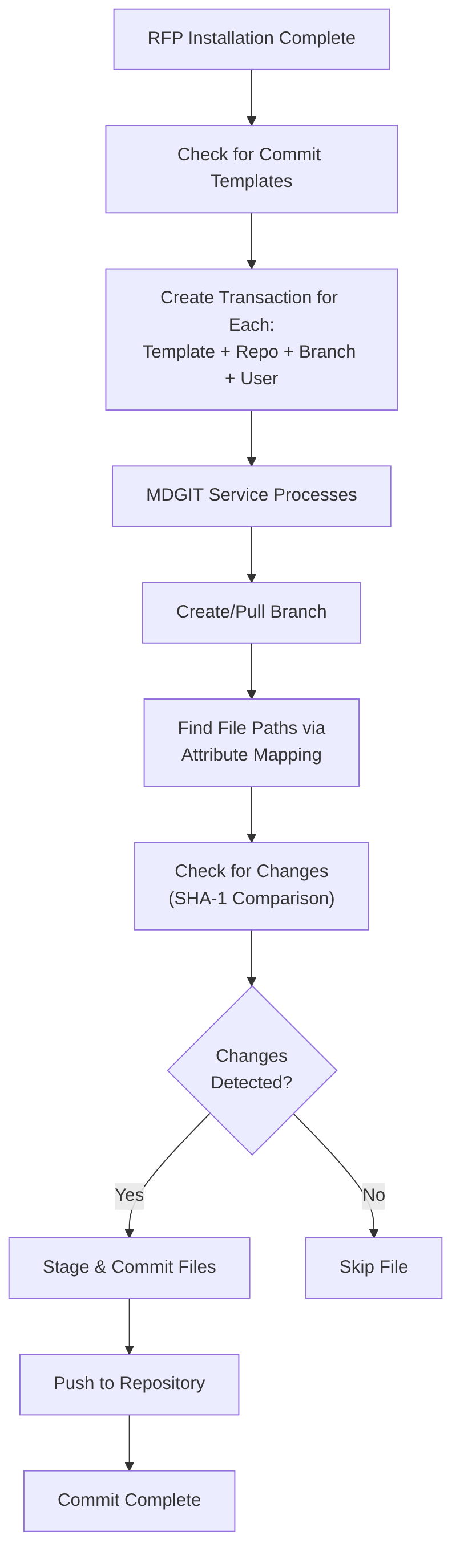
Purpose: Automatically commit IBM i code changes back to Git after RFP deployment.
Configuration Path: Settings → Template Settings → Git Commit
Key Features: - Auto-commit on RFP installation - GPG signing support - Customizable commit messages - Branch-based or fixed-branch commits
Example Commit Template:
Template ID: AUTOCOMMIT
Repo ID: MYAPP
Commit to CI Branch: true
Branch Name: feat-++PRJTSK++
Commit Message: Deploy ++PRJTSK++ via RFP ++RFPNBR++
Committer Name: *USER
GPG Signing: true
End of Line: LF
Auto-Link to Local Workspace: true
Commit Process:
Pull Request Levels
Purpose: Define automated pull request creation at deployment levels.
Configuration Path: Settings → DevOps Settings → Pull Request Levels
Workflow: - When RFP deploys to a level with a PR Level defined, MDCMS automatically creates a PR - PR merges changes from feature branch to target branch - Target branch merge can trigger higher-level CI
Example PR Configuration:
Application: MYAPP
Level: 1 (DEV Feature Branch)
Repository: MYAPP
PR Target Branch: develop
PR Title: Feature ++PRJTSK++ deployed via RFP ++RFPNBR++

---

Application: MYAPP
Level: 2 (QA)
Repository: MYAPP
PR Target Branch: release
PR Title: Release ++PRJTSK++ ready for production
Create from Branch: develop
Local Workspace Integration
Purpose: Link developer's local Git clone to MDCMS for editing code in preferred IDEs.
Configuration Path: Settings → DevOps Settings → Local Workspace Mapping
Benefits: - Edit code in VS Code, IntelliJ, etc. - Leverage AI code assistance - Maintain MDCMS traceability - Easy sync between local workspace and IBM i
Example Mapping:
Developer Workflow with Local Workspace:

Recommended Git Flows
1. Feature Branch Flow (Recommended for Most Teams)

MDCMS Configuration: - DEV Branch: feat-* → Level 1 - QA Branch: develop → Level 2 - PROD Branch: main → Level 3 (merge target)
Branch Creation Rules:
feat-++PRJTSK++ created when Task status = "In Progress"
Auto-commit to same branch on RFP deployment
Auto-PR to develop on Level 1 deployment
Auto-PR to main on Level 2 deployment
2. Release Branch Flow
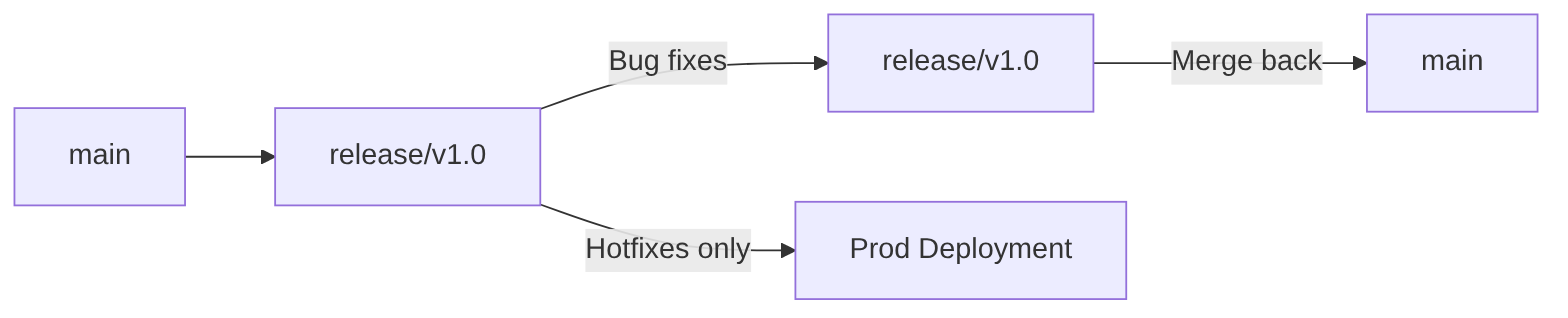
CI Configuration:
3. Hotfix Flow

Branch Rules:
Integration Patterns
Pattern 1: Webhook-Triggered CI

Webhook Registration: - Automatic: Via API Server in MDOpen - Manual: Configure on Git server (Azure DevOps, GitHub, etc.)
Pattern 2: Commit Back to Git

Pattern 3: Export IFS to Git

Use Cases: - Initial code migration from source files to Git - Bulk IFS file updates - Repository seeding
MDSRC2IFS: Source to IFS Conversion
Purpose: Convert IBM i source members to IFS files for Git-friendly format.
Command: MDSRC2IFS
Parameters: - LIB — Source library - FILE — Source file containing members - PATH — Target IFS parent path - CCSID — Character encoding (default: UTF-8) - REPL — Replace existing files (Y/N)
Example:
Output Structure:
/myapp/src/rpg/
├── PROGRAM1.rpgle
├── PROGRAM2.rpgle
├── QRPGLESRC.subfolder/
│   ├── MODULE1.rpgle
│   └── MODULE2.rpgle
Complete Setup Example
Company: TechCorp
Scenario: Migrating RPG application to Git with MDCMS CI/CD
Step 1: Create Credentials
Step 2: Create API Server
Step 3: Create Repository
ID: CRMDEMO
URL: git@github.com:techcorp/crmdemo.git
Credentials: TECHCORP-GH
API Server: GITHUB-MAIN
MDGIT Jobs: 1, 2
Main Branch: main
Step 4: Attribute Mapping
/src/rpg/*.rpgle      → RPGLESRC (RPG ILE)
/src/rpg/*.bndrpg     → BNDRPG (Binding)
/src/dds/*.dds        → DDS (Display files)
/src/sql/*.sql        → SQLSRC (SQL)
/sql/procedures/*.sql → SQLSPROC (Procedures)
/build/*              → *NONE (Exclude)
/docs/*               → *NONE (Exclude)
/deployment/*         → *IFS (IFS deployment)
Step 5: User Mapping
Step 6: CI Definitions
DEV CI:
  Branch: feat-*
  Path: /src
  Level: 1 (DEV)
  Request: Source Objects
  Checkout: Diffs

QA CI:
  Branch: develop
  Path: /src
  Level: 2 (QA)
  Request: Source Objects
  Checkout: Diffs
Step 7: Branch Creation Rules
Rule 1:
  Branch Name: feat-++PRJTSK++
  Create from: develop
  Auto-create: when Task status = "In Progress"

Rule 2:
  Branch Name: release-v1.0
  Create from: main
  Auto-create: when Task status = "Release Planned"
Step 8: Pull Request Levels
Level 1 (DEV):
  PR from feat-* to develop
  Title: Feature ++PRJTSK++ via RFP ++RFPNBR++

Level 2 (QA):
  PR from develop to main
  Title: Release ++PRJTSK++ to production
Step 9: Commit Templates
Template: AUTOCOMMIT
  Branch: feat-++PRJTSK++
  Message: "RFP ++RFPNBR++ - ++PRJTSK++"
  Committer: *USER
  GPG Sign: true
Step 10: Local Workspace Mapping
Testing the Integration
Verification Checklist:
- [ ] Repository connection test via "Test Connection" in MDOpen
- [ ] Webhook delivery confirmed in Git server logs
- [ ] Test commit push to feature branch triggers CI
- [ ] Object request created with correct attributes
- [ ] Branch created automatically for test task
- [ ] Commit template creates proper Git commit
- [ ] Pull request created for deployment level
- [ ] Local workspace mapping allows syncing
Troubleshooting:
Connection Issues: - Check MDGIT logs: MDOpen → Git Commits → MDGIT Logs - Verify credentials and permissions - Check firewall/proxy rules
CI Not Triggering: - Verify webhook delivery in Git server - Check CI definition branch/path filters - Review attribute mapping
Commits Not Created: - Verify commit template configured - Check MDGIT logs for staging errors - Validate attribute mapping for relative paths
Best Practices
- Branch Naming Conventions — Use consistent, meaningful patterns
- Attribute Mapping — Define mappings for every application/path combination
- High Availability — Configure multiple MDGIT jobs (Clone 1, 2, 3)
- GPG Signing — Enable for production commits
- PR Reviews — Always review before merging to main/release
- Webhook Security — Allowlist Git server IPs when possible
- Local Workspace — Use for complex development with IDE features
- Test First — Thoroughly test in DEV before QA deployments
- Documentation — Keep mapping and rules documented for team reference
- Regular Sync — Keep local clones updated with remote branches
Security Considerations
- Use SSH keys (ed25519) over username/password
- Enable GPG signing for commits
- Restrict webhook access via firewall rules
- Use separate credentials for each environment
- Rotate credentials regularly
- Audit commit history for changes
- Review API token permissions (minimal required)