Attribute Templates
Attribute Templates are distinct definitions that can be used for one or more Attributes across Applications and Levels.
Attribute Templates are used to configure management of:
- Object Authority
- Source and Object Replication
- Source and Object Search
- Source and Object Deletion from lower Delta environments
- MDRapid usage
- Automated insertion of comments into Source comments
- Automated Code Review
- Automated Testing
- Automated Commits to Git Repositories
- SQL Packages
These templates are accessible from the Setup Menu option 5 or by pressing F4 on the corresponding template field for an Attribute.
Object Authority Templates
An Object Authority Template defines the system object authorities to be applied when:
- Objects are installed into a library, IFS folder or a remote server folder
- IFS source code is installed into an IFS folder
- Developer Libraries and Source Files are created for Developer Library Naming templates
- MDCMS temporary Receive, Install, Rollback and backup libraries
- SQL Packages created using SQL Package templates
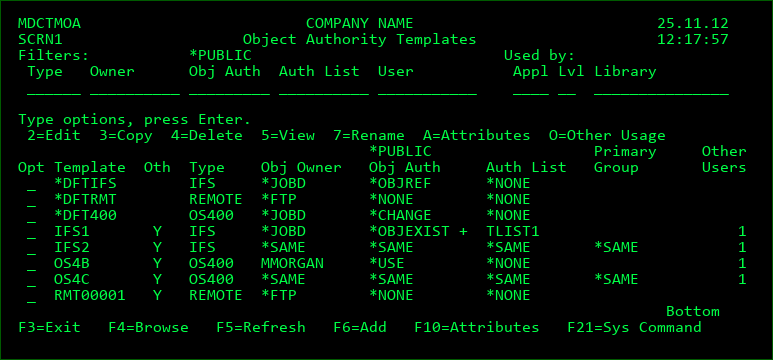
Screen Definitions:
Filters
The entry of values into one or more of the filter fields will result in a subsetted list of records which contain the values of those filters.
Used By
Only templates that are used by attributes for the entered Application, Level or Object Library will be listed.
Options
2 - Edit an existing Template definition
3 - Copy the definition for a Template to a new Template name
4 - Delete a Template definition
5 - Display all details of the Template definition
7 - Rename the Template; all attributes using the template will automatically be updated
A - List all attributes using the template
O - List all usage of the template by elements that aren't attributes
Function Keys
F3=Exit
F4=Browse - Browse the list of valid values for a filter field.
F5=Refresh
F6=Add - Add a new Template Definition
F8=Show Desc/Show Info - toggle the listing between template information and template description
F10=Attributes - List all attributes to be able to view and change the usage of the Templates
Fields
Template
A 10-Character name for the template definition. The templates *DFTIFS, *DFTRMT and *DFT400 are automatically created by MDCMS at installation time with the most common object authority definitions for each type. The definitions may be modified to meet the requirements of the majority of your objects.
Atr
Y - The template is assigned to 1 or more MDCMS attributes
Template Type
IFS - Object Authority definition for objects residing in IFS
REMOTE - Object Authority definition for objects residing on other system than the IBMi
Apply Template
Flag available for OS400 objects to determine when template should be applied to a deployed object.
A - Always apply template
N - Only apply template for new objects. A modified object will retain the same authority as the object it replaced.
Obj Owner
The value entered here is the owner of the objects for the specified Attribute. It may be any valid user profile on your IBMi system. The default value of *JOBD will set the object ownership to be the value of the application level job description 'USER' value.
The value *SAME may also be given. If *SAME is used for a new object the owner is based on user running the compile phase of an RFP for compiled objects or based on the from object for copied objects. If *SAME is used for an existing object, the current object's ownership will be transferred to the object replacing it.
Auth List
If you are maintaining authorities on your system through authorization lists, enter the name of the authorization list here. Otherwise, it may be left blank.
The value *SAME may also be given. If *SAME is used for a new object, the authorization list is based on the compile at install time for compiled objects or based on the from object for copied objects. If *SAME is used for an existing object, the authorization list will be transferred to the object replacing it.
Users with Authority to Object
*PUBLIC - the authority granted to any user that is not specified in the list for the Template
Primary Group - the name of the Primary Group for an OS400 or IFS object. Press F9 from the Template Edit screen to add a Primary Group to a Template definition.
*OWNER - the Owner authority for a remote object
*GROUP - the Group authority for a remote object
Other Users - the IBMi user profiles to be granted specific authority for the Template. Press F6 from the Template Edit screen to add a user profile to a Template definition.
OS400 Authorities
Possible Single Values
| Option / Field | Description |
|---|---|
| *ALL | All authority |
| *CHANGE | Change authority |
| *EXCLUDE | No Authority |
| *SAME | The authority of the existing object is applied for the user to the authority for the object replacing it |
| *USE | Usage authority |
OR
Possible Multiple Values (1 or more in the list applied for the same user)
| Option / Field | Description |
|---|---|
| *ADD | Authority to add entries to Object |
| *DLT | Authority to remove entries from an Object |
| *EXECUTE | Authority to run program or locate the object |
| *OBJALTER | Object Alter Authority |
| *OBJEXIST | Object Existence Authority |
| *OBJMGT | Object Management Authority |
| *OBJOPR | Object Operational Authority |
| *OBJREF | Object Reference Authority |
| *READ | Authority to get contents of an entry |
| *UPD | Authority to change contents of an entry |
IFS Object Authorities
Possible Single Values
| Option / Field | Description |
|---|---|
| *ALL | All authority |
| *NONE | No Object Authority |
| *SAME | The authority of the existing object is applied for the user to the authority for the object replacing it |
OR
Possible Multiple Values (1 or more in the list applied for the same user)
| Option / Field | Description |
|---|---|
| *OBJALTER | Object Alter Authority |
| *OBJEXIST | Object Existence Authority |
| *OBJMGT | Object Management Authority |
| *OBJREF | Object Reference Authority |
IFS Data Authorities
| Option / Field | Description |
|---|---|
| *EXCLUDE | no data or object authority |
| *NONE | no data authority |
| *R | Read authority |
| *RW | Read/Write authority |
| *RWX | Read/Write/Execute authority |
| *RX | Read/Execute authority |
| *SAME | The authority of the existing object is applied for the user to the authority for the object replacing it |
| *W | Write authority |
| *WX | Write/Execute authority |
| *X | Execute authority |
Remote Object Authorities
| Option / Field | Description |
|---|---|
| *NONE | no data authority |
| *R | Read authority |
| *RW | Read/Write authority |
| *RWX | Read/Write/Execute authority |
| *RX | Read/Execute authority |
| *W | Write authority |
| *WX | Write/Execute authority |
| *X | Execute authority |
Other Object Authority Template Usage
Besides Attributes, Object Authority Templates can also be used for:
- Developer Libraries and Source Files are created for Developer Library Naming templates
- MDCMS temporary Receive, Install, Rollback and backup libraries
- Objects deployed to replication libraries as part of an Object Replication template
- SQL Packages created using SQL Package templates
To view/configure other usage of a template, enter option O=Other Usage from the Object Authority template listing.
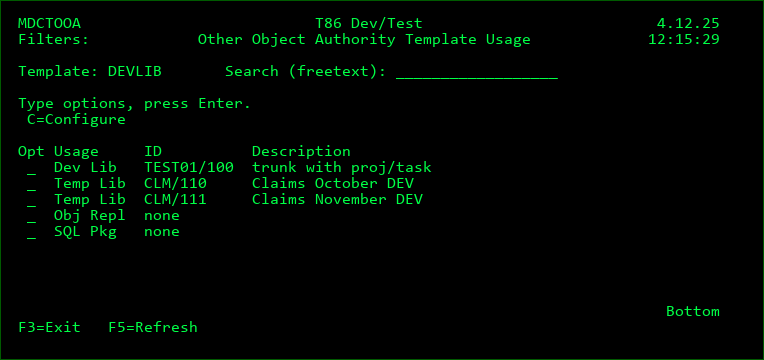
Screen Definitions:
Search (freetext)
The entry of a value in this field with filter all rows so that only those containing the value will be displayed.
Usage
Dev Lib - Developer Library Naming Templates for automatically created developer libraries and source files
Temp Lib - MDCMS temporary Receive, Install, Rollback and backup libraries
Object Replication - Objects deployed to replication libraries as part of an Object Replication template
SQL Pkg - SQL Packages created using SQL Package templates
Options
C - Configure the usage of Object Authority templates for the given usage type.
Object Authority for Temporary MD Libraries
MDCMS creates temporary libraries during the deployment and installation process to:
- Receive objects from another system
- Package objects for installation
- Store prior version of objects
- Rollback objects
The authority applied to the temporary library is based on an Object Authority template and the template used can differ for each promotion level. To assign an authority template to levels, enter option O=Other Usage from the Object Authority template listing and then enter option C=Configure on a Temp Lib usage row.
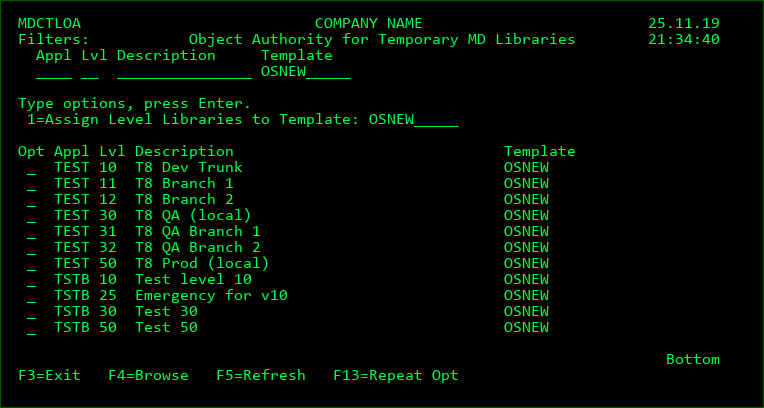
Screen Definitions:
Filters
The entry of values into one or more of the filter fields will result in a subsetted list of records which contain the values of those filters.
Options
1 - Assign Level to Template - enter a valid template name in the field above the list and then place a 1 next to each level that should have that template assigned to it. The Template Type must be OS400.
Function Keys
F3=Exit
F4=Browse - Browse the list of valid values for a filter field or the Template field.
F5=Refresh
F13=Repeat the assign option for all levels
Object Replication Templates
An Object Replication Template defines the list of locations that an object should be deployed to in addition to the location defined for the object's attribute.
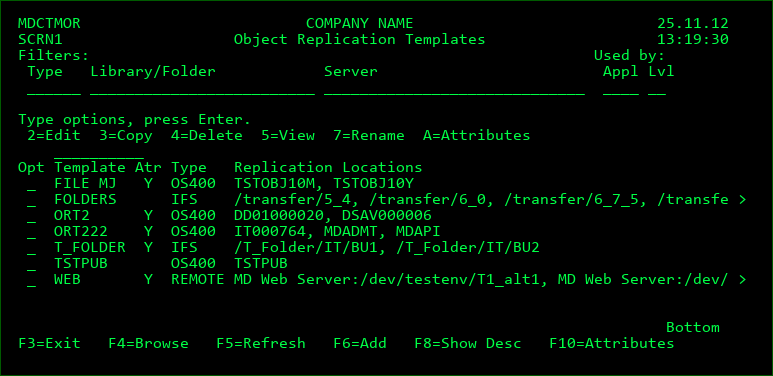
Screen Definitions:
Filters
The entry of values into one or more of the filter fields will result in a subsetted list of records which contain the values of those filters.
Used By
Only templates that are used by attributes for the entered Application or Level will be listed.
Position to Template
A value can be entered into the field above the Template column to position the cursor to the first entry in the list greater than or equal to the value.
Options
2 - Edit an existing Template definition
3 - Copy the definition for a Template to a new Template name
4 - Delete a Template definition
5 - Display all details of the Template definition
7 - Rename the Template; all attributes using the template will automatically be updated
A - List all attributes using the template
Function Keys
F3=Exit
F4=Browse - Browse the list of valid values for a filter field.
F5=Refresh
F6=Add - Add a new Template Definition
F8=Show Desc / Show Info - Toggle listing between the template description and replication info
F10=Attributes - List all attributes to be able to view and change the usage of the Templates
Fields
Template
A 10-Character name for the template definition.
Atr
Y - The template is assigned to 1 or more MDCMS attributes
Template Type
IFS - Object Replication definition for objects residing in IFS
REMOTE - Object Replication definition for objects residing on other system than the IBM i
OS400 - Object Replication definition for standard IBMi or SQL objects
Description
A description of the template
Project/Task
The objects to be replicated to a specific Replication library/folder can be filtered so that they are only included if the object is changed on behalf of specified projects, tasks or subtasks.
When a location is added to a replication template, or if no projects are set in the filter list, then the objects aren't limited to a specific set of projects.
To filter by project, use option 2 to edit the library/folder and press F8 to view/manage the Project Filter list.
If a Project is added to the filter list without a task or subtask, then an object will be included if it was assigned to the project directly or any task or subtask in the project.
If a Project is added to the filter list with a specific task number, but without a subtask, then an object will be included if it was assigned to the task directly or any subtask in the task.
If a Project is added to the filter list with a specific task and subtask number, then an object will be included only if it was assigned to the subtask directly.
There is no limit to the number of Projects, Tasks and Subtasks in the filter list and an object only needs to be assigned to one of the entries in the list to be included.
Library
The list of libraries that OS400 objects will be replicated to at installation time.
*generic* - dynamically include any libraries that match the generic naming pattern.
*ALL - dynamically include all user libraries. This value is only valid for updating existing objects.
When a generic or *ALL value is used, any library beginning with # or Q will be omitted. If a library beginning with # or Q should be replicated to, the library must be specifically defined for the template.
Folder
The list of folders that IFS or REMOTE objects will be replicated to at installation time
Server
The list of servers that REMOTE objects will be replicated to at installation time.
In the case of *IFS attributes, a server name can be stored in this field. The value will then be used by occurrences of the ##SERVER## placeholder by commands and scripts for an IFS file using the attribute.
Add Object by Default
Y - by default, if the object doesn't yet exist in the library, it will be added.
N - by default, if the object doesn't yet exist in the library, it will not be added.
B - by default, if the object doesn't yet exist in the library, it will be added unless the object is a logical file and any of the Based-on files for that logical file are missing in the target library.
The default can be overridden for specific object requests using option O=Object Replication Rules for an object request in the Object Manager
Update Object by Default
Y - by default, if the object already exists in the library, it will be updated.
N - by default, if the object already exists in the library, it will not be updated.
The default can be overridden for specific object requests using option O=Object Replication Rules for an object request in the Object Manager
Run Install Cmd/Script
Y - if any object or attribute pre-/post-commands are defined, they will be repeated for the object in the replication library.
N - if any object or attribute pre-/post-commands are defined, they will not be repeated for the object in the replication library.
Ignore Delete Template
Y - any delete template defined for the attribute will be ignored so that the object remains in the replication location.
N - if a delete template is defined for an attribute to delete from a level used by this replication template, the deletion will also occur for the object in the replication location.
Ignore Errors
Y - if the replication of the object to the target location fails during installation time, a warning condition will be flagged, and the RFP will continue with the installation.
N - if the replication of the object to the target location fails during installation time, the RFP will automatically roll back.
Object Auth. Template
*SAME - the same Object Authority Template for the Attribute library will be used for the replication library.
Template name - the entered Template will be used for the application of Object Authorities to the Replication Library
Reference Libraries to include in LIBL at deployment
Up to 5 Libraries that will be added to the top of the library list when a logical file (including SQL indexes or views) is created at installation time to access the correct physical file libraries for the replication library.
Source Replication Templates
A Source Replication Template defines the list of files that a source member, IFS source or message description should be deployed to in addition to the location defined for the object's attribute.
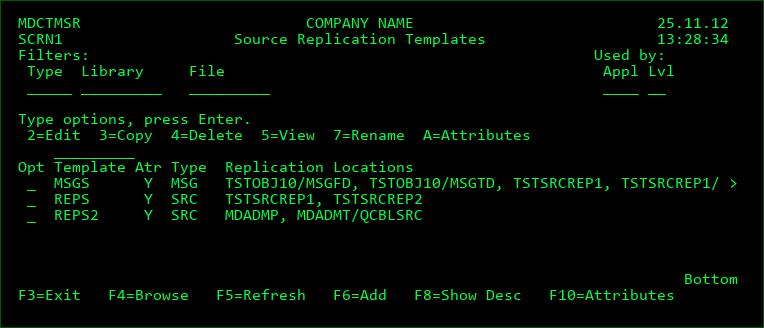
Screen Definitions:
Filters
The entry of values into one or more of the filter fields will result in a subsetted list of records which contain the values of those filters.
Used By
Only templates that are used by attributes for the entered Application or Level will be listed.
Position to Template
A value can be entered into the field above the Template column to position the cursor to the first entry in the list greater than or equal to the value.
Options
2 - Edit an existing Template definition
3 - Copy the definition for a Template to a new Template name
4 - Delete a Template definition
5 - Display all details of the Template definition
7 - Rename the Template; all attributes using the template will automatically be updated
A - List all attributes using the template
Function Keys
F3=Exit
F4=Browse - Browse the list of valid values for a filter field.
F5=Refresh
F6=Add - Add a new Template Definition
F8=Show Desc / Show Info - Toggle listing between the template description and replication info
F10=Attributes - List all attributes to be able to view and change the usage of the Templates
Fields
Template
A 10-Character name for the template definition.
Atr
Y - The template is assigned to 1 or more MDCMS attributes
Template Type
IFS - Source Replication definition for source residing as files in IFS
MSG - Message Description Replication definition for messages in Message Files
SRC - Source Member Replication definition for members residing in Source Files
Description
A description of the template
Project/Task
The source to be replicated to a specific Replication library/folder can be filtered so that they are only included if the source is changed on behalf of specified projects, tasks or subtasks.
When a location is added to a replication template, or if no projects are set in the filter list, then the source aren't limited to a specific set of projects.
To filter by project, use option 2 to edit the library/folder and press F8 to view/manage the Project Filter list.
If a Project is added to the filter list without a task or subtask, then source will be included if it was assigned to the project directly or any task or subtask in the project.
If a Project is added to the filter list with a specific task number, but without a subtask, then source will be included if it was assigned to the task directly or any subtask in the task.
If a Project is added to the filter list with a specific task and subtask number, then source will be included only if it was assigned to the subtask directly.
There is no limit to the number of Projects, Tasks and Subtasks in the filter list and source only needs to be assigned to one of the entries in the list to be included.
Library/File
The list of IFS directories, message files, or source files to replicate to at installation time
Ignore Delete Template
N - if a delete template is defined for an attribute to delete from a level used by this replication template, the deletion will also occur for the source in the replication location.
Y - any delete template defined for the attribute will be ignored so that the source remains in the replication location.
Ignore Errors
N - if the replication of the source to the target location fails during installation time, the RFP will automatically roll back.
Y - if the replication of the source to the target location fails during installation time, a warning condition will be flagged, and the RFP will continue with the installation.
Object Search Templates
An Object Search Template defines the list of libraries or IFS directories that should be searched when checking out an object.
During check-out, MDCMS searches for objects (that don't have a source member defined for the attribute) in the following sequence:
- The target library for the attribute
- If the promotion level is a delta level, the higher levels will be checked in ascending order
- If the level is based on another level, the based-on level and its higher levels are checked in ascending order
- The search libraries in the search template in sequential order
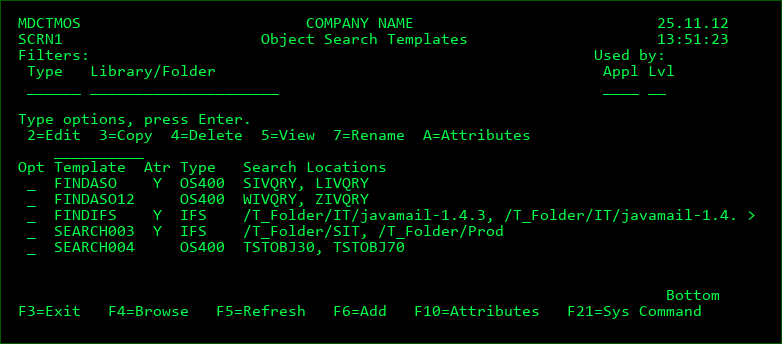
Screen Definitions:
Filters
The entry of values into one or more of the filter fields will result in a subsetted list of records which contain the values of those filters.
Used By
Only templates that are used by attributes for the entered Application or Level will be listed.
Position to Template
A value can be entered into the field above the Template column to position the cursor to the first entry in the list greater than or equal to the value.
Options
2 - Edit an existing Template definition
3 - Copy the definition for a Template to a new Template name
4 - Delete a Template definition
5 - Display all details of the Template definition
7 - Rename the Template; all attributes using the template will automatically be updated
A - List all attributes using the template
Function Keys
F3=Exit
F4=Browse - Browse the list of valid values for a filter field.
F5=Refresh
F6=Add - Add a new Template Definition
F10=Attributes - List all attributes to be able to view and change the usage of the Templates
Fields
Template
A 10-Character name for the template definition.
Atr
Y - The template is assigned to 1 or more MDCMS attributes
Template Type
IFS - Object Search definition for objects residing in IFS
OS400 - Object Search definition for standard IBMi objects
Sort Sequence
A number indicating the sort sequence for the location, in ascending order
Library
The list of OS/400 libraries that will be searched at check-out time
Folder
The list of IFS folders that will be searched at check-out time
Display Warning
If set to Y, MDCMS will always check if the object is in this library, even if found sooner elsewhere, and display a warning screen that the object was found in the location specified by the template.
This provides the ability to warn about an object already in another location when attempting to check it out.
Source Search Templates
A Source Search Template defines the list of source files or IFS directories that should be searched when checking out source.
During check-out, MDCMS searches for source in the following sequence:
- The target source file/directory for the attribute
- If the promotion level is a delta level, the higher levels will be checked in ascending order
- If the level is based on another level, the based-on level and its higher levels are checked in ascending order
- The source locations in the search template in sequential order
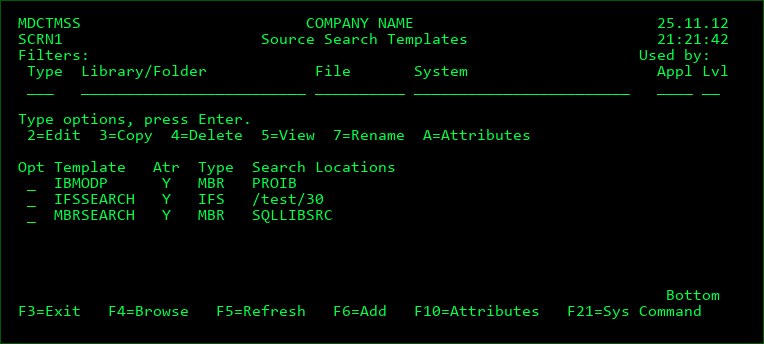
Screen Definitions:
Filters
The entry of values into one or more of the filter fields will result in a subsetted list of records which contain the values of those filters.
Used By
Only templates that are used by attributes for the entered Application or Level will be listed.
Position to Template
A value can be entered into the field above the Template column to position the cursor to the first entry in the list greater than or equal to the value.
Options
2 - Edit an existing Template definition
3 - Copy the definition for a Template to a new Template name
4 - Delete a Template definition
5 - Display all details of the Template definition
7 - Rename the Template; all attributes using the template will automatically be updated
A - List all attributes using the template
Function Keys
F3=Exit
F4=Browse - Browse the list of valid values for a filter field.
F5=Refresh
F6=Add - Add a new Template Definition
F10=Attributes - List all attributes to be able to view and change the usage of the Templates
Fields
Template
A 10-Character name for the template definition.
Atr
Y - The template is assigned to 1 or more MDCMS attributes
Template Type
IFS - Source Search definition for source residing in IFS
MBR - Source Search definition for source members residing in Source Files
Sort Sequence
A number indicating the sort sequence for the location, in ascending order
Library
The name of a Library containing source files
File
The name of a source file
*SRCFILE - the name of the target source file for the attribute
System
The address of the remote system containing the source file to be searched. The addresses are defined in the OS/400 Locations.
*LOCAL - the library resides on the same system partition
Display Warning
If set to Y, MDCMS will always check if the source is in this library, even if found sooner elsewhere, and display a warning screen that the source was found in the location specified by the template.
This provides the ability to warn about source already in another location when attempting to check it out.
Object Deletion Level Templates
An Object Deletion Level Template defines the list of levels containing Delta or Emergency objects that should be deleted when those objects are installed into the current level.
For example, the template could be assigned to attributes in the production level to delete the objects from the development and test levels.
In order for the deletion to occur, the level to delete from must have the Delta Object Level flag set to Y. If the Emergency Level flag is set to Y, and the object is found in the level, it will be deleted regardless of version. If the Emergency Level flag is set to N, the object will only be deleted if the version in the delta level is the same as the version in the level being installed into. This insures that new work in progress won't be deleted from delta libraries.
If an Object Deletion Level Template is assigned to a *DATA attribute, MDCMS will delete the entire file from the delta level if MDCMS also automatically created the file to contain the data and no additional deployments or changes have been made to the file since that creation occurred.
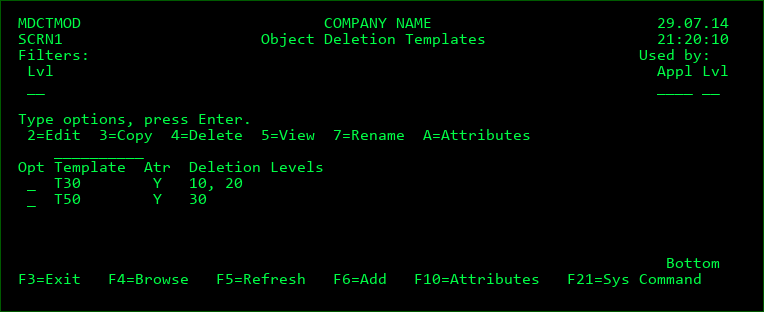
Screen Definitions:
Filters
The entry of a value into the level filter fields will result in a subsetted list of records which contain that level.
Used By
Only templates that are used by attributes for the entered Application or Level will be listed.
Position to Template
A value can be entered into the field above the Template column to position the cursor to the first entry in the list greater than or equal to the value.
Options
2 - Edit an existing Template definition
3 - Copy the definition for a Template to a new Template name
4 - Delete a Template definition
5 - Display all details of the Template definition
7 - Rename the Template; all attributes using the template will automatically be updated
A - List all attributes using the template
Function Keys
F3=Exit
F4=Browse - Browse the list of valid values for a filter field.
F5=Refresh
F6=Add - Add a new Template Definition
F10=Attributes - List all attributes to be able to view and change the usage of the Templates
Fields
Template
A 10-Character name for the template definition.
Atr
Y - The template is assigned to 1 or more MDCMS attributes
Level
The list of levels from which to delete objects
Source Deletion Level Templates
The usage and handling of Source Deletion Level Templates is identical to that of Object Deletion Level Templates described in the previous section.
The one additional feature for Source Deletion Levels is that the deletion level may exist on a remote system. Use *LOCAL as the System value to delete from a level on the local system. Otherwise, enter the OS/400 location to delete the source from that system when the source is installed into the current level on the local system.
MDRapid Usage Templates
An MDRapid Usage Template defines the Job Queue, job priority and number of parallel jobs for the MDRapid batch jobs as well as the default minimum record count needed to require the use of MDRapid for a file or SQL table.
The usage of MDRapid permits all data to be copied from the old format of a file to the new format while the application is still in use, thus substantially reducing the amount of downtime. Once the original records are copied, MDRapid continues to mirror transactions to the new format of the file until such time that the install should occur.
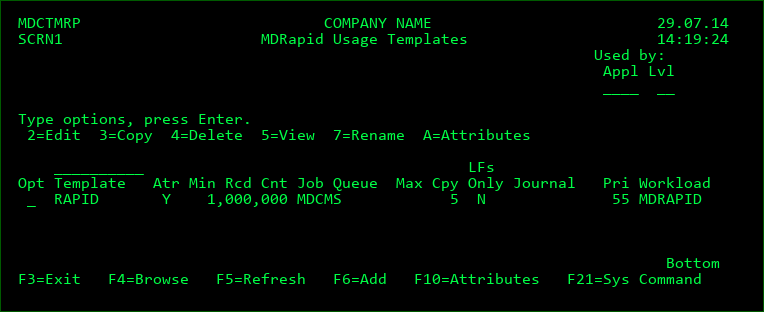
Screen Definitions:
Used By
Only templates that are used by attributes for the entered Application or Level will be listed.
Position to Template
A value can be entered into the field above the Template column to position the cursor to the first entry in the list greater than or equal to the value.
Options
2 - Edit an existing Template definition
3 - Copy the definition for a Template to a new Template name
4 - Delete a Template definition
5 - Display all details of the Template definition
7 - Rename the Template; all attributes using the template will automatically be updated
A - List all attributes using the template
Function Keys
F3=Exit
F4=Browse - Browse the list of valid values for a filter field.
F5=Refresh
F6=Add - Add a new Template Definition
F10=Attributes - List all attributes to be able to view and change the usage of the Templates
Fields
Template Name
A 10-Character name for the template definition.
Atr
Y - The template is assigned to 1 or more MDCMS attributes
Minimum Record Count
The minimum number of records that have to exist in the current version of the file (across all members) in order for that file to be included by default in the MDRapid process. This can be overridden for specific file requests in the Object Manager. The value can be set to 0 to always use MDRapid.
Job Queue
When MDRapid runs, a single monitor job is submitted for the entire RFP and a job is submitted for each target physical and logical file. Enter the name of the job queue that these jobs should be submitted to. It should be a queue that allows a sufficient number of jobs to be concurrently active.
Job Queue Library
The library that Job Queue exists in. If left blank, MDCMS will attempt to retrieve the library from the library list.
Max Parallel Copy Jobs
The data for each physical file in an RFP being copied using MDRapid gets its own copy job to allow for parallel copying to speed up the process. However, data copies are Database- and CPU-intensive processes, so to throttle resource consumption, the maximum number of parallel copy jobs for an RFP can be set. A number between 5 and 10 is recommended, depending on resources available. MDRapid then starts n copy jobs for the files in the RFP in descending order of the number of records in the file so that the largest files start first. Once the copy step is finished for a file, the next pending copy job is started.
If the value for the Max Parallel Copy Jobs is 0, then the default of 5 will be used.
Use for Standalone LFs
If MDRapid should be used for logical files when the physical files they are based on aren't in the RFP. This is useful when the files will be replicated to many libraries in order to speed up the installation of those replications. This flag will be considered for a logical file, if the template is applied to the logical file's attribute for the target promotion level.
Job Run Priority
The run priority can be set for the jobs that are submitted by MDRapid so that they get more or less resource priority than other jobs on the system.
If the value for the Job Run Priority is 0, then the default of 20 will be used.
Workload Group
The name of a Workload Group can be defined for an MDRapid Template. Workload Groups define the maximum number of Processors used by a job assigned to the group. All jobs using the template will be assigned to the Workload Group, if entered.
Use command ADDWLCGRP to add a Workload Group.
MDRapid Journal
A persistent Journal to use when the live version of a table isn't already journaled or when MDRapid needs to journal the new version of the table to track inserts. If blank, MDRapid will automatically create a journal in the RFP temporary install library named MDRAPIDJRN.
MDRapid Journal Library
The library that Journal exists in. If left blank, MDCMS will attempt to retrieve the library from the library list.
Source Comments Templates
A Source Comments Template defines the text that should be automatically inserted into source code when MDCMS deploys the source to a level that allows checkout.
This template is limited to attributes defined to contain source stored as members in source files. The attributes must also be for a level that allows checkout, since MDCMS only allows modifications to source from the lowest level of a migration path.
The 3 examples in the screen below are shipped with MDCMS to help understand some of the common formatting possibilities available.
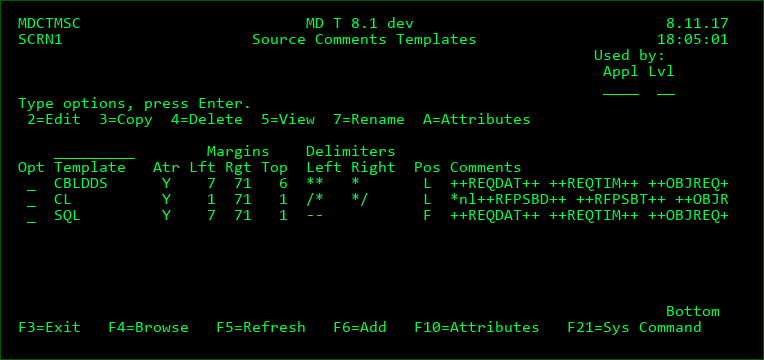
Screen Definitions:
Used By
Only templates that are used by attributes for the entered Application or Level will be listed.
Position to Template
A value can be entered into the field above the Template column to position the cursor to the first entry in the list greater than or equal to the value.
Options
2 - Edit an existing Template definition
3 - Copy the definition for a Template to a new Template name
4 - Delete a Template definition
5 - Display all details of the Template definition
7 - Rename the Template; all attributes using the template will automatically be updated
A - List all attributes using the template
Function Keys
F3=Exit
F4=Browse - Browse the list of valid values for a filter field.
F5=Refresh
F6=Add - Add a new Template Definition
F10=Attributes - List all attributes to be able to view and change the usage of the Templates
Fields
Template
A 10-Character name for the template definition.
Left Margin
The leftmost position in the source code where each row of the text should begin
Right Margin
The rightmost position in the source code where each row of the text should end. If a word doesn't finish when the right margin is reached, the entire word will be placed on the next row.
Top Margin
The earliest possible row in the source code where the comment rows should be inserted
Left Delimiter
The character(s) to use as a comment delimiter on the left side of the text so that the compiler realizes that the row contains comments.
Right Delimiter
The character(s) to use as a comment delimiter on the left side of the text so that the compiler realizes that the row contains comments.
Comment Position
F - Insert the comment at the very first row defined by the Top Margin
L - Position to the Top Margin and continue until a row is encountered that doesn't start with the Left Delimiter and place the new comment there, which is expected to be the last comment in that sequence.
Comments
The text to be inserted into the source.
Placeholders - placeholders are special values delimited by ++ that are replaced at runtime with MDCMS values. Position the cursor and press F7 to insert a placeholder into the comment field.
*nl - special value indicating to skip to the next line
Code Review Templates
A Code Review Template defines the parameters for interacting with SonarQube to perform automated Code Review of source code that has been deployed to the target level for assigned attributes. Code Review templates must be defined using MDOpen, but the list of defined templates can be viewed and selected from by pressing F4 on the Code Review Template field.
Automated Testing Templates
An Automated Testing Template defines the automated testing steps to take for deployed programs and service programs that have been deployed to the target level for assigned attributes. Automated Testing is available in conjunction with the MDTest and TestBench products. Automated Testing templates must be defined using MDOpen, but the list of defined templates can be viewed and selected from by pressing F4 on the Automated Testing Template field.
Git Commit Templates
A Git Commit Template is used to replicate source or IFS objects to a Git Repository when an RFP is installed. The template can also auto-create feature branches and pull requests on the origin server. This feature is useful for keeping a copy of source/objects in Git, triggering a pipeline from Git, or ensuring that changes that originated in Git are synced back to the origin server when modifications are made to the code directly on the IBM i.
Git Commit templates must be defined using MDOpen, but the list of defined templates can be viewed and selected from by pressing F4 on the Git Commit Template field.
SQL Package Templates
SQL Package Templates manage the location and existence of SQL Packages for Programs and Service Programs containing embedded SQL statements.
SQL Package Templates are applied to *MODULE and *PGM attributes to ensure the correct target library value is used for the SQL Packages on the CRTSQL* commands.
SQL Package Templates are applied to *PGM and *SRVPGM attributes to automatically create and delete SQL Packages during RFP deployment of the programs/service programs.
During the RFP Installation phase for a program or service program attribute assigned to an SQL Package Template:
- When requested for deletion, all SQL Packages for that program will be deleted.
- When requested for modification or recompile, all SQL Packages for the replaced program will be deleted and an SQL Package for each bound module containing SQL statements will be created.
All SQL Package activity is logged in the RFP Deployment Log and if a create or delete fails, the RFP and the Log Entry will be flagged as a warning, and the RFP will continue.
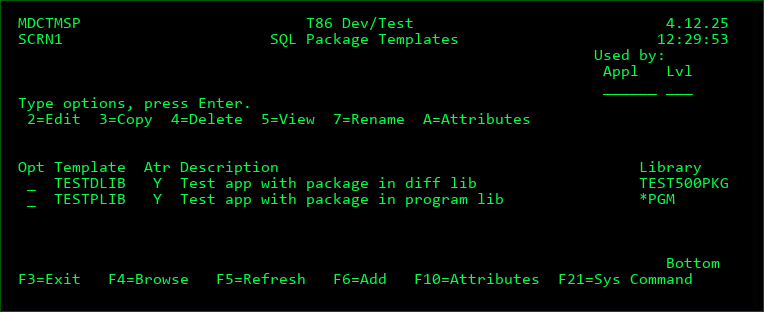
Screen Definitions:
Used By
Only templates that are used by attributes for the entered Application or Level will be listed.
Position to Template
A value can be entered into the field above the Template column to position the cursor to the first entry in the list greater than or equal to the value.
Options
2 - Edit an existing Template definition
3 - Copy the definition for a Template to a new Template name
4 - Delete a Template definition
5 - Display all details of the Template definition
7 - Rename the Template; all attributes using the template will automatically be updated
A - List all attributes using the template
Function Keys
F3=Exit
F4=Browse - Browse the list of valid values for a filter field.
F5=Refresh
F6=Add - Add a new Template Definition
F10=Attributes - List all attributes to be able to view and change the usage of the Templates
F21=Sys Command - provide a system command line
Fields
Template Name
A 10-Character name for the template definition.
Atr
Y - The template is assigned to 1 or more MDCMS attributes
Description
A description of the SQL Package template.
SQL Package Library
The name of the library that the package should be defined to reside in when the module or program is created.
MDCMS will replace or append the SQLPKG parameter to the create command and set this value in it when the compile command is run for the RFP.
*PGM - The library will be the same as the final target library for the module or program.
If the SQLPKG parameter already exists, the library name will be replaced by this name for the RFP compile, but the package name will be retained.
For the compile into a developer library, the library portion of the SQLPKG parameter will be set to *OBJLIB to force it into the same developer library as the module or program to ensure the target environment isn't already impacted.
This processing will occur for MDCMS compile commands with the following names:
CRTSQLCBLI
CRTSQLCI
CRTSQLCPPI
CRTSQLRPGI
Object Auth Template
The Object Authority template used to apply object authority to SQL packages created by the SQL Package template.
*PGM - Use the same Object Authority template that the program or service program attribute uses.
Use Deletion Template
Y - if a deletion template is assigned to the program or service program attribute, then delete the SQL packages for the delta program when the delta program is deleted.
N - don't delete the SQL packages for a delta program, even if it is deleted by a deletion template
Job Desc for Libl
*SAME - the library list will be the same as the library list for the RFP job
Job Description/Library - Prior to the creation of an SQL Package, the RFP will temporarily change the library list for the RFP job to the library list defined in the Job Description/Library field. This is useful if database entities to build the package over reside in other libraries than the standard library list.
Default Collection
The value to use for the Default Collection parameter (DFTRDBCOL) on the CRTSQLPKG command
Query Proc Time Limit
The time limit, in seconds, for Query processing. MDCMS will set this for the RFP job using the CHGQRYA command prior to creating the SQL packages.
*SAME - don't change the limit for the job
*NOMAX - set the time limit to unlimited
Query Proc Stg Limit
The temporary storage limit, in Megabytes, for Query processing. MDCMS will set this for the RFP job using the CHGQRYA command prior to creating the SQL packages.
*SAME - don't change the limit for the job
*NOMAX - set the temporary storage limit to unlimited
End Jobs locking Pkg
Y - if a package to be deleted is locked by other jobs, MDCMS will automatically end those jobs
N - if a package to be deleted is locked by other jobs, MDCMS will flag the entry as a warning and not process the delete/create of SQL Packages for that program.
Warn if no SQL Mods
Y - if the program or service program doesn't contain a module that uses SQL, flag the log entry as a warning (severity 20)
N - if the program or service program doesn't contain a module that uses SQL, log the entry as informational (severity 10).
Maximum # of Retries
If the attempt to create an SQL Package fails, the RFP will retry the creation of the package up to this number of times. If the package still can't be created, the exception is logged and the RFP will roll back.
Delay before Retry
If the number of retries is greater than 0, the RFP will wait this number of seconds before retrying the creation of the SQL Package.
Attributes for Templates
In order to see where templates are used, and to assign templates to many attributes at once, the list of attributes can be displayed for each type of template.
From the maintenance screen for a type of template, press F10 to view all attributes or enter option A for a specific template to see the attributes using that template.
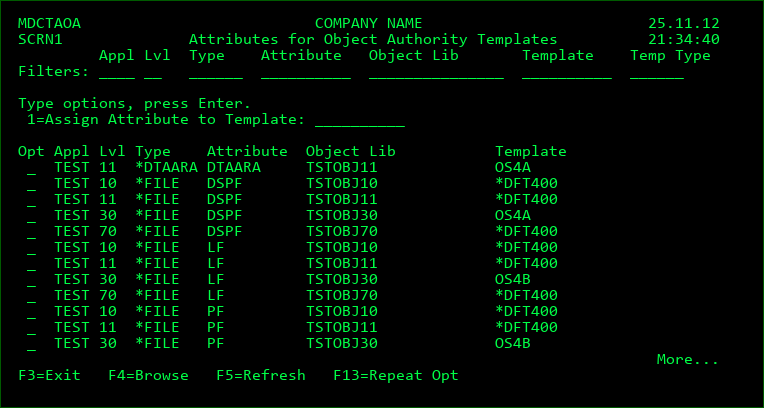
Screen Definitions:
Filters
The entry of values into one or more of the filter fields will result in a subsetted list of records which contain the values of those filters.
Options
1 - Assign Attribute to Template - enter a valid template name in the field above the list and then place a 1 next to each attribute that should have that template assigned to it. The Template Type must be compatible with the object type.
Function Keys
F3=Exit
F4=Browse - Browse the list of valid values for a filter field or the Template field.
F5=Refresh
F13=Repeat the assign option for all compatible attributes