Commands
The Attribute Command displays are used to define the command defaults that are used to compile and manage objects. Each Application Group/Level/Attribute that requires a default command should be defined here. Default commands may also be defined to run for each promotion of objects, regardless of the types of objects in the promotion package.
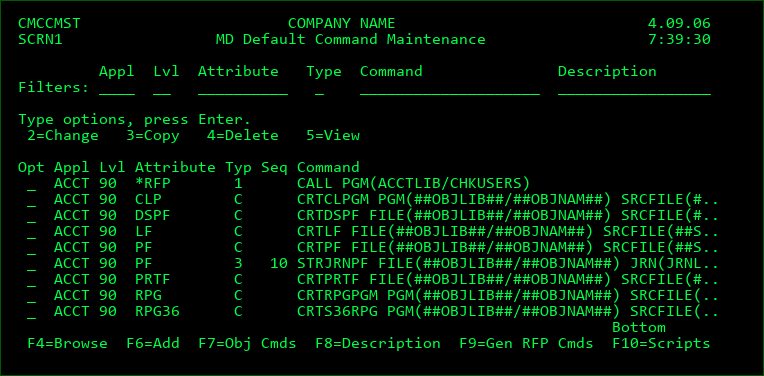
Option 4 Screen Definitions
Filters
Appl/Lvl
Enter a value here to limit the listing to a specific application or level.
Attribute
Enter part or all of an attribute to limit the listing. For example, enter C to list only commands with an attribute starting with C.
Type
Enter a value here to limit the listing to a specific command type. See the next section for detailed information about each type of command available within MDCMS.
Command
Enter a string here to limit the listing to commands containing that string. For example, enter SRC to list only commands containing the string SRC.
Description
Enter a string here to limit the listing to commands with a description containing that string.
Opt
2=Change - Change the text and run-time attributes for the selected Command
3=Copy - Copy a command
4=Delete - Delete a command
5=View - display a command
Function Keys:
F4=Browse - Browse the list of valid values for a filter field.
F6=Add - Add a new Attribute Command
F7=Obj Cmds - List/Manage all commands that are defined to be executed for objects with a specific or generic name. Commands that have been processed during the installation of an RFP, and that have the Reuse Command flag set to Y, will automatically show up in this list. Commands can also be created from here for objects that are not yet requested. Alternatively, option C can be used on an existing Object Request to manage commands for that specific object. Navigate to the Commands/Scripts for Object section for help with the individual parameters.
Object Specific Scripts can be managed by pressing F10=Scripts from with the Object Specific Commands screen.
F8=Description/Command - Toggle the listing between the command to execute and the description of the command.
F9=Gen RFP Cmds - Generate *RFP commands in order to notify users by email when specific events occur. When F9 is pressed, the first screen allows you to select one or more application levels that should contain the commands. The second screen then allows you to select each command type, or exit point, for when the MDMAILF command should run. MDCMS then generates the commands for each selected exit point for each selected level.
Once the commands are generated, further customization can be performed on the commands from the command settings. This is particularly necessary for the Waiting for RFP Approval command type, since the group or user responsible for approving the RFP will need to be entered into the appropriate parameter.
F10=Scripts - Manage scripts that are defined for *IFS and *REMOTE attributes.
Add or Change display
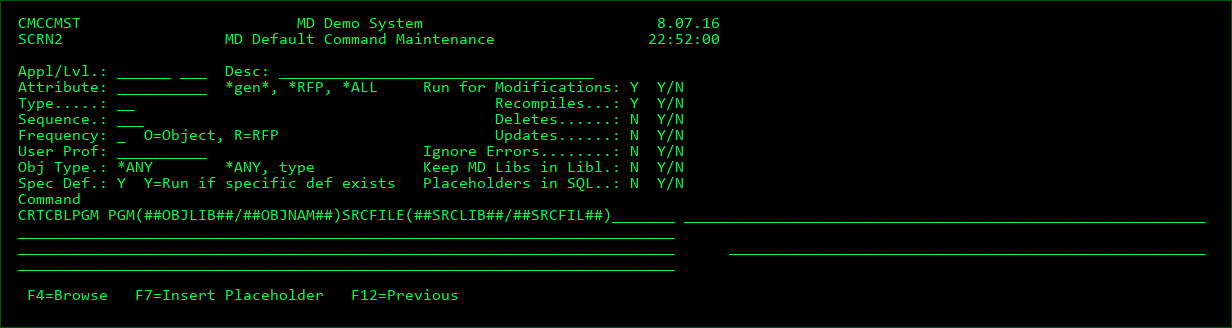
Screen Definitions:
Appl/Lvl
The Application Group and Level that the attribute resides in.
Desc
An optional description of the command
Attribute
This field indicates which MDCMS Attribute(s) defined for the target level that the Command Definition should be applied to.
*RFP - the command will run once each time a promotion is run, regardless of the objects contained in the RFP.
Specific Attribute - The command definition is for a specifically defined MD Attribute, such as CLLE
Generic Attribute - The command definition is for any MD Attribute that matches the generic naming pattern. For example SQL*LE would mean that the command is applied to every attribute starting with SQL and ending with LE.
*ALL - all attributes for the target level are defined to use this command.
When a generic attribute value or the *ALL value is used, the Object Type can be set to a specific type. For example, if the command definition should be applied to every program attribute, then set Attribute to *ALL and Obj Type to *PGM.
Run for Modifications
Flag stating if the command should run for new or changed objects.
Run for Recompiles
Flag stating if the command should run for recompiled objects.
Run for Deletes
Flag stating if the command should run for deleted objects.
Run for Updates
Flag stating if the command should run for updated objects.
Type
The Type value designates when a command should run
| Column 1 | Column 2 | Column 3 |
|---|---|---|
| B | Pre-Object Request Validation | runs when a user or process attempts to request (checks out) an object. Command MDCHKOBJ must be used and this provides an organization with the ability to add custom validation rules before a request can be created. See section MDCHKOBJ API for more information. |
| M | Object Request | runs after an object is successfully requested (checked out) |
| C | Compile | used to compile the object from source code or to create the ILE Program/Service Program |
| D | Data Copy | *FILE attributes - determines how the existing records in a physical file should be mapped to the new format when a physical file is installed. Data Transformation must be disabled for the file in order for MDCMS to consider a Data Copy command. It can be disabled using option F=File Data Transformation from the Object Manager and then pressing F10. The data copy command can use CPYF, in which case the parameters FROMMBR, TOMBR and MBROPT are considered. All other keywords in the CPYF command are ignored. Only 1 command may be defined for *FILE mapping. Other commands, such as RUNSQLSTM or CALL, may also be used for mapping the data in a changed file from the old format to the new format. If such a command is used, it is critical to use the ##OFF placeholders so that MDCMS can correctly provide the location of the old file format. *DATA attributes - determines how and which data records should be copied from one environment to another. All keywords except FROMFILE and TOFILE are then used when the CPYF command is run. Only the CPYF command is permitted for *DATA attributes |
| U | Update | runs during the installation process for updates to existing objects. This command is mandatory for objects requested for update (*UPDATE). An example would be the UPDPGM command to update existing ILE programs without migrating or recreating the object. The Update Command may optionally also be used to update an existing object using the modified source. An example for this would be the CHGPF command to update the format of a physical file for a modified DDS source. In this case, the source would be checked out using the M (modify) option and at installation time, the Update command would be used (as long as a compile command is not defined for the attribute or an update command is defined for the object). |
| L | Object Lock | runs during the compile or installation process when a required object or source is locked. Separate field Wait before Usage specifies the amount of time to wait before executing the command. Multiple commands can be defined in order to have a lock escalation process in place. |
| V | Pre-Submit Validation | runs when user selects to submit an RFP for promotion. Command MDCHKRFP must be used and this provides an organization with the ability to add custom validation rules before an RFP can be submitted. See section MDCHKRFP API for more information. |
| 1 | Pre-Compile | runs prior to compiling objects |
| P | Post-Compile | runs after all object compilations are successfully completed |
| E | Compile Error | runs when the compile phase of an RFP fails to complete successfully. |
| A | RFP Approved | runs after an RFP has been approved for installation |
| J | RFP Rejected | runs after an RFP has been reset from Waiting for Approval status |
| F | MDRapid Waiting to Launch | runs after an RFP has been approved and MDRapid is required for the RFP |
| G | MDRapid Started | runs to indicate that MDRapid has begun copying data for changed files |
| H | MDRapid Completed | runs after all existing records in the changed files has been copied to inform the users that the installation can be started. |
| I | MDRapid Error | runs when the MDRapid Data Copy phase of an RFP fails to complete successfully. |
| IR | RFP Ready to Install | Runs once one of the following situations occurs: Submit and Approval phases are complete and MDRapid isn't necessary and the installation isn't automatic. MDRapid has reached the sync point and installation isn't automatic |
| 2 | Pre-Installation | runs prior to installing objects into the environment |
| 3 | Post-Installation | runs after the installation of objects is complete, but before the application is considered free to use again. If command fails, it can be flagged to roll back the installation. |
| 4 | Installation Error | runs when the installation phase of an RFP fails to complete successfully. This type could be used, for example, to send an email or SMS to the installer if a weekend Installation fails. |
| Q | Installation Archive/Cleanup | Runs when the installation is complete and the application is considered free to use again. When the command is defined at the RFP level, it can be used for post-installation notification or other activities that won't trigger a rollback if the command fails. When the command is defined at the Object/Attribute level, it can be used to perform additional processing on the archived source and objects. For example, command MDCMPPFM can be invoked to generate a comparison report between the prior and new code in source members. |
| W | Installation Warning | runs if an RFP Installation completes, but with warnings. Warnings can occur if data cannot be copied or if a Post-Installation Command fails to run successfully. |
| S | RFP Test Status Accepted | runs if an RFP Test Status is Accepted in MDWorkflow |
| T | RFP Test Status Rejected | runs if an RFP Test Status is Rejected in MDWorkflow |
| CB | Code Review Starting | Runs immediately prior to MDCMS sending source to a code review tool. This occurs during the cleanup phase of an RFP |
| CC | Code Review Completed Clean | Runs once a SUCCESS status is returned to MDCMS from the code review tool |
| CD | Code Review Completed Dirty | Runs once a FAIL status is returned to MDCMS from the code review tool |
| CE | Code Review Technical Error | Runs if a technical error occurs while trying to run a code review |
| TB | Automated Testing Starting | Runs immediately prior to MDCMS initiating automated testing. This occurs during the cleanup phase of an RFP |
| TC | Automated Testing Completed Clean | Runs once a SUCCESS status is returned to MDCMS from the automated testing tool |
| TD | Automated Testing Completed Dirty | Runs once a FAIL status is returned to MDCMS from the automated testing tool |
| TE | Automated Testing Technical Error | Runs if a technical error occurs while trying to run automated testing |
| 5 | Pre-Send | runs prior to sending an RFP to one or more remote systems. It will either run once per send batch or once per target location, depending on the frequency flag. |
| O | Data Copy during Send | Available for *DATA attributes only. Determines which data records should be sent to a remote location based on the INCCHAR and INCREL parameters of the CPYF command. The command is run separately for each target location. Placeholder ##SVFLOC## could, for example, be used to filter by the location ID, if a column in the table contains that value. |
| 6 | Post-Send | runs after an RFP has been successfully sent to one or more remote systems. It will either run once per send batch or once per target location, depending on the frequency flag. |
| 7 | Send Error | runs in case the send of an RFP fails to complete successfully. It will either run once per per send batch or once per target location, depending on the frequency flag. |
| X | All Send Locations Terminated | Runs when all default locations for a sent RFP have terminated either due to an exception or the completion of the installation on the target location. |
| Y | All Dft Send Locations Installed or Ignored | Runs when all default locations for a sent RFP have installed or have been ignored. This is the optimal command type for the MDUPDSTS command to indicate that tasks involved with an RFP are complete. |
| 8 | Post-Receive | runs after an RFP has been successfully received from a remote system |
| 9 | Receive Error | runs in case the receipt of an RFP fails to complete successfully |
| R | Receive Warning | runs in case the receipt of an RFP completes, but with warnings |
| Z | Object Request Deleted | Runs when an object request is deleted (except when normally deployed as part of an RFP). |
Command Types A, E, F, G, H, I, J, L, R, V, W, S, T, X, CB, CC, CD, CE, TB, TC, TD, TE, 5, 6, 7, 8, and 9 are only valid at the RFP Level (Usage Attribute = *RFP).
Sequence
The sort sequence of the command at run time, in case multiple commands for command type are defined. The sequence is used across all levels of specificity such that less specific commands can run before or after more specific commands if the sequence number is lower or higher. See the Spec Def parameter for more information.
Frequency (Command Type 1, P, 2, 3 or 4 when for Attributes)
O - The command will run for every object in the RFP that is assigned to the given Attribute.
R - The command will run for the first object in the RFP that is assigned to the given Attribute and then ignored for any additional objects for the same Attribute.
Frequency (Command Type 5 or 6 when for *RFP)
B - The command will run each time an RFP is sent to a batch of target locations
L - The command will run for each target location that is sent to during a batch run.
User Prof
By default, commands executed during an RFP run under the profile of the user profile defined on the job description of the application level for the RFP. If a specific command should run under the authorities of a different user, that user ID can be entered here. As a safety precaution, the user placing a value in this field must have authority to use that entered user profile in order to save the command definition.
Ignore Errors
Y - Continue with RFP processing even if the command fails.
N - Cease and Rollback RFP processing if the command fails
Will always be ignored unless for 1, C, P, 2, D, U and 3
Obj Type
Only include the command for attributes of the given type (Ignored for *RFP commands)
*ANY - include for any object type
Keep MD Libs in Libl
N - The MD Libraries (MDCMS, MDSEC and MDXREF) are removed from the library list before the command is invoked. This assures that any MD Objects with the same name as your objects are not used.
Y - The MD Libraries are left in the library list. This is necessary when MD Objects, such as interface programs, MDMAIL or MDMAILF, are needed to process the command.
Spec Def
N - The command will not run if a more specific command of the same command type is defined.
Y - The command will run even if a more specific command of the same command type is defined.
Order of Specificity (from most specific to least specific)
- A command defined for a specific object
- A command defined for objects of a generic naming pattern
- A command defined for a specific attribute
- A command defined for attributes of a generic naming pattern
- A command defined for attribute *ALL
Example 1 - A compile command defined at the attribute level will typically be set to N, so that if a compile command is defined at the object level, the attribute level command will not run.
Example 2 - A post-compile command may be set to Y when it is needed for all program attributes, including those with post-compile commands defined for specific objects or attributes.
Placeholders in SQL
N - The SQL member or IFS file used by a RUNSQLSTM command does not contain MDCMS placeholders - no conversion will occur
Y - The SQL member or IFS file used by a RUNSQLSTM command contains MDCMS placeholders - MDCMS will create a temporary copy of the script and convert the placeholders in the copy to the actual runtime values. This flag should also be set to Y when a script is used for any of the MDCMS *SQL type attributes to create those objects, even if a placeholder isn't present, so that MDCMS can automatically qualify the object.
This flag is only relevant for object-related command types using the RUNSQLSTM command. The placeholders embedded in the SQL script may be delimited by ++ instead of ## to avoid code page issues.
Wait before Usage
If the command type is L (Lock Wait for Object), the number of seconds to wait before an object lock condition causes the command to be executed can be defined.
If multiple L commands are defined, each command waits the number of seconds defined for that command after the prior command has completed.
For example:
Command 1 waits 15 seconds before sending an email to the user that submitted the RFP.
Command 2 waits 300 seconds before sending an email to the entire operations group (plus the 15 seconds wait for command 1)
Command 3 waits 3600 seconds before rolling back the RFP (plus the 315 seconds from commands 1 and 2).
Command
The IBM i or user-defined command to be performed. Enter the name of the command and then press F4 to fill in the keywords.
Some placeholder parameter values may be used and are substituted by MDCMS at run-time. The placeholder value may be typed directly into the command or the cursor may be positioned in the command and F7 pressed to insert the value from a list.
For Lock Wait command types, special value *ROLLBACK can be used to automatically roll back an RFP if an Object Lock condition occurs.
Function Keys:
F4=Browse - Browse for values.
F7=Insert Placeholder - Insert placeholder value into command string at the location of the cursor. A list of all fixed placeholder values followed by all placeholders for custom fields will be displayed to select from.
Attribute Command Considerations
This function is directly related to the Source/Object Attribute Maintenance. The commands are used during the RFP compile and Installation processes and the defaults entered for a command will affect the object's attributes.
It is essential that the generic ## names are used within the compilation commands for the object library and name, and source library and name. Otherwise, the installation process will not work properly.
If a command is to run for every RFP for an Application/level and is not based on the installation of a specific object-type, use the attribute *RFP.
If a command is intended to be used only for a specific object or for a specific RFP, then define the command within the Command Override function in the Object Manager or RFP manager.
Fixed Command Placeholder Values
The fixed placeholder parameters are:
| Column 1 | Column 2 | Column 3 | Column 4 | Column 5 |
|---|---|---|---|---|
| Value | Type | Length | Title | Description of Value Origin |
| ##OBJLIB## | CHAR | 240 | Object library | During the compile phase, this is the developer library/folder or temporary RFP build library. During the install phase, this is the Object Library/Folder defined for the Object's attribute/replication template. For SQL entities, this will be the SQL long name for the library. |
| ##SYSLIB## | CHAR | 10 | System Name of an Object Library | The 10-Character System name for an object library, when required for use in a command instead of the SQL long name for SQL entities. |
| ##OBJNAM## | CHAR | 128 | Object name | Name of the requested Object |
| ##SYSNAM## | CHAR | 10 | System Name of an Object | The 10-Character System name for an object, when required for use in a command instead of the SQL long name for SQL entities. |
| ##OBJTYP## | CHAR | 7 | Object type | Object Type for the requested object |
| ##OBJATR## | CHAR | 10 | Object Attribute | The system attribute of the object (not the MDCMS attribute) |
| ##OBJDSC## | CHAR | 50 | Object Description | The object description |
| ##SRCLIB## | CHAR | 240 | Source library | The target Source Library/Folder defined for the Object's attribute/replication template |
| ##SRCFIL## | CHAR | 10 | Sourcefile name | The target Source File defined for the Object's attribute/replication template |
| ##SRCNAM## | CHAR | 128 | Source Name | The name of the source member or IFS file for the requested object |
| ##SRCATR## | CHAR | 10 | Source Attribute | The system attribute, or source type, of the source member (not the MDCMS attribute) |
| ##SRCDSC## | CHAR | 50 | Source Description | The source member description |
| ##APPLIC## | CHAR | 6 | Application code | The Application Code of the RFP |
| ##PROLVL## | INT | 3 | Promotion Level | The Promotion Level of the RFP |
| ##ATTRIB## | CHAR | 10 | Attribute | The MDCMS Attribute code |
| ##REQNBR## | INT | 11 | Request Number | The unique identifier of an object request |
| ##OBJREQ## | CHAR | 10 | Object Requester | The user that has requested the Object |
| ##REQRSN## | CHAR | 6 | Request Reason | MODIFY, DELETE, RECOMP or UPDATE |
| ##REQDAT## | CHAR | 10 | Request Date | The date that the object was checked out, formatted to match system locale including century |
| ##REQTIM## | CHAR | 8 | Request Time | The time of day that the object was checked out in format HH:MM:SS |
| ##MODULE## | CHAR | 2800 | ILE Bound Modules | The list of bound modules for the creation of ILE Programs or Service Programs |
| ##ENTMOD## | CHAR | 23 | ILE Entry Module | The bound module containing the Program Entry Procedure for the creation of ILE Programs |
| ##SRVPGM## | CHAR | 2800 | ILE Bound Service Programs | The list of bound service programs for the creation of ILE Programs or Service Programs |
| ##TGTRLS## | CHAR | 8 | Target Release | The target OS release for the compilation of modules and programs. The value used will be the lowest release defined for the distribution levels for the given Application, unless a specific value is defined for the promotion level. |
| ##OFFLIB## | CHAR | 10 | Old File Format File Library | The name of the library containing the old version of the file when mapping data to the new format for a file |
| ##OFFNAM## | CHAR | 10 | Old File Format File Name | The name of the file containing the old version of the file when mapping data to the new format for a file |
| ##OFFMBR## | CHAR | 10 | Old File Format File Member | The name of the file member containing data for the old version of the file when mapping data to the new format for a file |
| ##FRMLIB## | CHAR | 240 | Object Library to Migrate from | The developer library/folder that the object will be migrated from. Typically used at checkout to handle conversion routines. |
| ##FRMSLB## | CHAR | 240 | Source Library to Migrate from | The developer library/folder that the source will be migrated from. Typically used at checkout to handle conversion routines. |
| ##FRMSFL## | CHAR | 10 | Source File to Migrate from | The developer source file that the source will be migrated from. Typically used at checkout to handle conversion routines. |
| ##OBLLIB## | CHAR | 240 | Level Object Library/Folder | This is the Object Library/Folder defined for the Object's attribute/replication template, regardless of the RFP phase when the placeholder is used. |
| ##SERVER## | CHAR | 50 | Server | The target server address for a *REMOTE object or the server name for a *IFS object. |
| ##RMTRDB## | CHAR | 18 | Remote Relational DB for Alias | The target database of the table or view that an SQL Alias should point to |
| ##RMTLIB## | CHAR | 10 | Remote Library for Alias | The system name of the target library of the table or view that an SQL Alias should point to |
| ##GITBRN## | CHAR | 80 | Git Branch | The name of the Git Branch that an object request originated from. |
| ##GITREV## | CHAR | 40 | Git Revision | The Git Revision hash of the commit that an object request originated from |
| ##GITSVR## | CHAR | 10 | Git Server ID | The MDCMS Git server ID that an object request originated from |
| ##GITURL## | CHAR | 240 | Git Server URL | The Git URL defined for the MDCMS Git Server that an object request originated from |
| ##SVNREV## | CHAR | 11 | SVN Revision | The string representation of the SVN Revision number that an object request originated from |
| ##SVNSVR## | CHAR | 10 | SVN Server ID | The MDCMS SVN server ID that an object request originated from |
| ##SVNURL## | CHAR | 240 | SVN Server URL | The SVN URL defined for the MDCMS Git Server that an object request originated from |
| ##PRIOBJ## | CHAR | 128 | Prior Version of Object Name | The object name of the prior version of the object at archiving time. Used only with the Q command type. |
| ##PRILIB## | CHAR | 240 | Prior Version of Object Library | The library/folder containing the prior version of the object at archiving time. Used only with the Q command type. |
| ##PRISLB## | CHAR | 240 | Prior Version of Source Library | The library/folder containing the prior version of the source at archiving time. Used only with the Q command type. |
| ##PRISFL## | CHAR | 10 | Prior Version of Source File | The source file containing the prior version of the source at archiving time. Used only with the Q command type. |
| ##PRISNM## | CHAR | 128 | Prior Version of Source Name | The source name of the prior version of the source at archiving time. Used only with the Q command type. |
| ##ERRMSG## | CHAR | 240 | Error Message | The message text explaining why the RFP failed |
| ##SYSTIT## | CHAR | 40 | System Title | Title of system defined in System Settings |
| ##RFPNBR## | INT | 7 | RFP number | The Request for Promotion Number |
| ##RFPDSC## | CHAR | 160 | RFP description | RFP description |
| ##RFPPRG## | CHAR | 10 | RFP requester | User assigned to the RFP |
| ##RFPSBM## | CHAR | 10 | RFP submitter | User that submitted the RFP for compile |
| ##RFPSBD## | CHAR | 10 | RFP Submit Date | The date that the RFP was submitted (or scheduled to submit) for the compile phase, formatted to match system locale including century |
| ##RFPSBT## | CHAR | 8 | RFP Submit Time | The time of day that the RFP was submitted (or scheduled to submit) for the compile phase in format HH:MM:SS |
| ##RFPAPR## | CHAR | 10 | RFP approver | User that approved the RFP for installation |
| ##RFPAPD## | CHAR | 10 | RFP Approve Date | The date that the RFP was approved for installation, formatted to match system locale including century |
| ##RFPAPT## | CHAR | 8 | RFP Approve Time | The time of day that the RFP was approved for installation in format HH:MM:SS |
| ##RFPINS## | CHAR | 10 | RFP installer | User that installed the RFP |
| ##RFPIND## | CHAR | 10 | RFP Install Date | The date that the RFP was installed (or scheduled to install), formatted to match system locale including century |
| ##RFPINT## | CHAR | 8 | RFP Install Time | The time of day that the RFP was installed (or scheduled to install) in format HH:MM:SS |
| ##RFPWFU## | CHAR | 10 | RFP Workflow User | The user that confirmed the MDWorkflow acceptance or rejection of an installed RFP |
| ##RFPRCV## | CHAR | 10 | RFP receiver | User receiving the RFP onto the local system |
| ##RFPSND## | CHAR | 10 | RFP sender | User sending the RFP to target locations |
| ##SVFLOC## | CHAR | 10 | Target Location ID of Sent Savefile | The Location ID that an RFP is sent to. This placeholder is only applicable for command type O or 6. |
| ##SVFTGT## | CHAR | 80 | Target Address of Sent Savefile | The Location Address that an RFP is sent to. This placeholder is only applicable for command type O or 6. |
| ##SVFNAM## | CHAR | 80 | Sent Savefile Name | The name of the savefile that has been sent to a location. This placeholder is only applicable for command type O or 6. |
| ##PROJID## | CHAR | 12 | Project ID | The first Project in the list of projects assigned to an object request or to object requests in an RFP. |
| ##PRJTYP## | CHAR | 10 | Project Type | Project Type |
| ##PRJTIT## | CHAR | 80 | Project Title | Project Title |
| ##PRJREQ## | CHAR | 10 | Project requester | Project requester |
| ##PRJAGR## | CHAR | 10 | Assigned Group for Project | the designated user group assigned to carry out the Project |
| ##PRJPRG## | CHAR | 10 | Project programmer | the designated programmer for the Project |
| ##PRJAUT## | CHAR | 10 | Project Authorizer | user that authorized work to be done for project |
| ##PRJAPR## | CHAR | 10 | Project Approver | user that approved the installation of Project |
| ##PRJCLS## | CHAR | 10 | Project Closer | user that closed the Project |
| ##PRJPRI## | CHAR | 1 | Project Priority | The priority of the project from 1 to 5 |
| ##PRJSTS## | CHAR | 1 | Project Status | The current status code of the Project |
| ##PRJEDT## | CHAR | 10 | Project Due Date | The date that the project is expected to complete, formatted to match system locale including century |
| ##PRJHRE## | DEC | 7,2 | Project Hours Estimated | Estimated number of hours to complete the project |
| ##PRJHRA## | DEC | 7,2 | Project Hours Actual | Number of hours entered to date for the Project |
| ##PRJCSE## | DEC | 9,2 | Project Cost Estimated | Estimated cost to complete the project |
| ##PRJCSA## | DEC | 9,2 | Project Cost Actual | Actual calculated cost based on hours entered to date for the project |
| ##PRJTSK## | CHAR | 20 | Project Task String | Complete String of Project/Task ID in format of Project-Task.Subtask |
| ##TASKID## | DEC | 5 | Task ID | the 5-digit ID of the task |
| ##STSKID## | DEC | 5 | Subtask ID | the 5-digit ID of the subtask |
| ##TSKTYP## | CHAR | 10 | Task Type | Task Type |
| ##TSKREF## | CHAR | 20 | Task Ref Code | Internal Reference Code |
| ##TSKDSC## | CHAR | 80 | Task Description | First line of the Task Description |
| ##TSKREQ## | CHAR | 10 | Task Requester | User that created the Task |
| ##TSKAGR## | CHAR | 10 | Assigned Group for Task | the designated user group assigned to carry out the Task |
| ##TSKPRG## | CHAR | 10 | Assigned User for Task | the designated programmer for the Task |
| ##TSKTGR## | CHAR | 10 | Test Group for Task | the designated user group expected to test the results of the Task |
| ##TSKTUS## | CHAR | 10 | Test User for Task | a specific user expected to test the results of the Task |
| ##TSKCLS## | CHAR | 10 | Task Closer | user that closed the Task |
| ##TSKPRI## | CHAR | 1 | Task Priority | The priority of the task from 1 to 5 |
| ##TSKSTS## | CHAR | 1 | Task Status | The current status code of the Task |
| ##TSKEDT## | CHAR | 10 | Task Due Date | The date that the task is expected to complete, formatted to match system locale including century |
| ##TSKHRE## | DEC | 7,2 | Task Hours Estimated | Estimated number of hours to complete the task |
| ##TSKHRA## | DEC | 7,2 | Task Hours Actual | Number of hours entered to date for the task |
| ##TSKCSE## | DEC | 9,2 | Task Cost Estimated | Estimated cost to complete the task |
| ##TSKCSA## | DEC | 9,2 | Task Cost Actual | Actual calculated cost based on hours entered to date for the task |
| ##WFLURL## | CHAR | 80 | MDWorkflow URL | The fixed portion of the URL to connect to MDWorkflow as defined in the Email Settings |
| ##WFLLOC## | CHAR | 10 | MDWorkflow Location ID | The System Location ID of the RFP, used within the URL to link to the RFP details in MDWorkflow |
| ##JIRREF## | CHAR | 20 | Jira ID | The Jira Issue ID for the task or subtask |
| ##JIRURL## | CHAR | 160 | Jira URL | The URL to the Jira Issue for the task or subtask |
| ##SNOREF## | CHAR | 20 | ServiceNow ID | The ServiceNow incident ID for the task or subtask |
| ##SNOURL## | CHAR | 160 | ServiceNow URL | The URL to the ServiceNow incident for the task or subtask |
Special Placeholder Operators
For any placeholder, including custom level or project placeholders, special operators can be included in the placeholder string just before the trailing ## or ++ characters. The following special operators are available to use only a portion of the runtime value for the placeholder:
(position, length) can be used to use only the substring of a value.
For example, placeholder ++PROJID(1,6)++ will result in a value containing only the first 6 characters of the project ID. Or, ++PROLVL(3,1)++ will result in a value containing the 3rd digit of a promotion level.
(TLZ) can be used to trim any leading zeroes from a value.
For example, placeholder ++RFPNBR(TLZ)++ will result in a value containing the RFP number without any leading zeroes.
MDCHKOBJ - Validate Object Request command
The Validate MDCMS Object Request command provides the parameters necessary for MDCMS to invoke a custom validation program prior to the completion of an Object Request.
A custom validation program can be used to provide an info, warning or error message to the developer when attempting to check out an object. To do so, this command must be defined for a specific Object command or for an attribute command using command type B=Pre-Object
Request Validation.
Command MDCHKOBJ doesn't directly invoke a program. Instead, it uses the command parameters to know the name and location of a custom program to be directly called by MDCMS when an object request is performed.
The B command type can be repeated if more than one custom program should be called.
The custom program must contain exactly the following calling parameters with each parameter individually defined:
| Name | Type | Length | Description |
|---|---|---|---|
| Description | Direction | Type | Length |
| MDCMS Application Code | INPUT | CHAR | 6 |
| MDCMS Level Number | INPUT | PACKED-DEC | 3,0 |
| Object Name | INPUT | CHAR | 128 |
| Relative Path of Object | INPUT | CHAR | 240 |
| Object Type | INPUT | CHAR | 7 |
| MDCMS Attribute | INPUT | CHAR | 10 |
| Target Object Library | INPUT | CHAR | 240 |
| Target Source Library | INPUT | CHAR | 240 |
| Target Source File | INPUT | CHAR | 10 |
| User Requesting the Object | INPUT | CHAR | 10 |
| MDCMS Reason. D=Delete, M=Modify, N=New, R=Recompile, U=Update | INPUT | CHAR | 1 |
| Project ID | INPUT | CHAR | 12 |
| Task Number | INPUT | PACKED-DEC | 7,0 |
| Subtask Number | INPUT | PACKED-DEC | 7,0 |
| Message Text containing any information that the user should be notified about in regards to the Object Request. Return blanks if a message shouldn't be displayed. | OUTPUT | CHAR | 360 |
| Message Severity 10=informational message only 20=warning message, but user can continue with the Object Request 30=error message, Object not allowed to be requested | OUTPUT | PACKED-DEC | 2,0 |
| Name | Type | Length | Description |
|---|---|---|---|
| KEYWORD | Description | Type | Length |
| PGMNAM | Program Name - The name of the Custom Program to be invoked in order to provide additional validation of the Object Request beyond what is already performed by MDCMS. | CHAR | 10 |
| PGMLIB | Program Library - Specifies the library where the Custom Program resides. *LIBL - The program library resides in the library list at the time of execution. | CHAR | 10 |
| LIBL | The library list to use during execution to ensure any program dependencies are found. *LVL - the library list of the job description for the target level of the request *CURRENT - the current library list when the request option occurs | CHAR | 8 |
MDCHKRFP - Validate RFP prior to Submission command
The Validate MDCMS RFP (MDCHKRFP) command provides the parameters necessary for MDCMS to invoke a custom validation program prior to the submission of an RFP.
A custom validation program can be used to provide an info, warning or error message to the developer when attempting to submit a specific RFP. To do so, this command must be defined for a specific RFP or for a *RFP attribute command using command type V=Pre-Submit Validation.
Command MDCHKRFP doesn't directly invoke a program. Instead, it uses the command parameters to know the name and location of a custom program to be directly called by MDCMS when an RFP is selected for submission.
The V command type can be repeated if more than one custom program should be called.
The custom program must contain exactly the following calling parameters with each parameter individually defined:
| Name | Type | Length | Description |
|---|---|---|---|
| Description | Direction | Type | Length |
| MDCMS Application Code | INPUT | CHAR | 6 |
| MDCMS RFP Number | INPUT | PACKED-DEC | 7,0 |
| Message Text containing any information that the user should be notified about in regards to the RFP. Return blanks if a message shouldn't be displayed. | OUTPUT | CHAR | 360 |
| Message Severity 10=informational message only 20=warning message, but user can continue with RFP 30=error message, RFP not allowed to be submitted | OUTPUT | PACKED-DEC | 2,0 |
| Name | Type | Length | Description |
|---|---|---|---|
| KEYWORD | Description | Type | Length |
| PGMNAM | Program Name - The name of the Custom Program to be invoked in order to provide additional validation of the RFP beyond what is already performed by MDCMS. | CHAR | 10 |
| PGMLIB | Program Library - Specifies the library where the Custom Program resides. *LIBL - The program library resides in the library list at the time of execution. | CHAR | 10 |
| LIBL | The library list to use during execution to ensure any program dependencies are found. *RFP - the library list of the job description for the target level of the RFP *CURRENT - the current library list when the submit option is requested is used | CHAR | 8 |