Distribution Levels
The Distribution Level Maintenance function defines the target levels for the distribution of promotions or settings to remote systems. Multiple target levels are permitted for a given combination of Application, Level and Location.
The settings for a Distribution Level are inherited from the Location. The following settings can then be overridden per target level:
- Description of Level
- When to Send
- Target Release
- Data Compression
- Target Attribute Rules
Distribution Level Listing
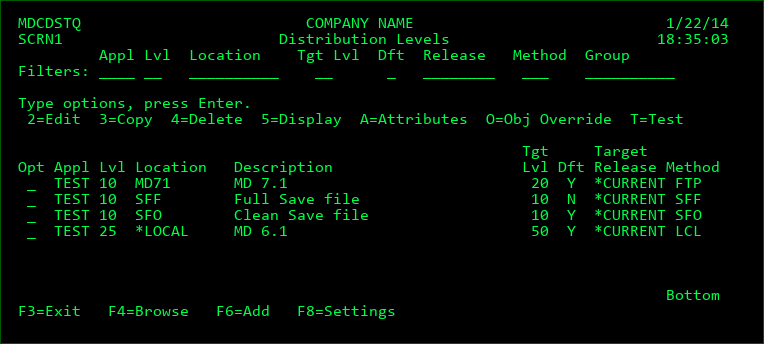
Filters
The entry of values into one or more of the filter fields will result in a subsetted list of distribution levels which exactly match those filters. For example, enter '10' in the lvl filter to see only distribution levels for level '10'.
Editable Fields for a Distribution Level
Most of the fields can be set at the location prior to the creation of the Distribution Level and those values will be automatically attributed to the Distribution Level when it's created. If a field value for the Location is changed after the Distribution Level already exists, that value will not be updated in the Distribution Level. Any Distribution Level that has exceptions to the default location values can be edited here.
Ignore Non-Branch
This field is only set for individual Distribution Levels.
N (default) - Send RFPs from the sending level to the target level, regardless if the RFP originated in the same branch as the sending level or not.
Y - Only Send the RFP to the target level if it originated in the same branch (chain of levels) as the sending level. This provides an automated method to avoid looping between levels when replicating objects between the trunk and branches.
Local Dist Reason
This field is only set for individual Distribution Levels and only appears when the Distribution Method is LCL (local).
S=Standard (default) - the target local level is to be treated as a standard level as when distributing to a remote level.
D=DB Sync - Send any database requests to the target level in order to sync the branch of that level with the database objects and to recompile any existing dependencies over the database objects in the branch.
If development or test branches are defined that contain their own persistent Database libraries, it is recommended to create a Distribution Level from the copy of the production level on the local partition to the lowest level for each of those branches. It is also recommended to set Auto-Send to Y for the production copy level and Default to Send should be set to Y for the distribution level.
When the send occurs, MDCMS will only include object requests for *DTAARA, *FILE (PF-DTA or LF) or any of the *SQL types (except *SQLSCR and *SQLPKG). Additionally, a DB object request will be omitted from the send if the same object is currently checked out for modify or delete in the target level.
When the receipt occurs, MDCMS will automatically add recompile requests for any dependencies that exist in any level of the branch of the target level.
If there are conflicted changes to the DB objects in the target branch chain, MDCMS will require conflict resolution. Otherwise, the Local Auto-Submit flag will be checked and auto-submit the RFP at each level for the branch when true. This keeps the entire process automated unless an error occurs or manual approval or installation is required.
M=Merge with Trunk - the sending level is the top of a Branch and the target level is the bottom of the Trunk. Once the reason is set to M, the source code in any RFPs sent to the Trunk level with be automatically check for conflicts and the target RFP will require that the conflicts are resolved in the MDOpen Compare with Branch dialog before the target RFP will be allowed to be promoted.
N=Non-Git Requests - the sending level may contain object requests that originated in Git along with object requests that didn't originate Git. The send to the target level should only contain those object requests that didn't originate in Git. Those that did originate in Git will be pushed directly to the target level from Git via a Merge from a Pull-Request.
Local Auto-Submit
This field is only set for individual Distribution Levels for the *LOCAL Location ID.
N (default) - When the RFP is locally received, Auto-Submit will depend on the Promotion Level settings.
Y - When the RFP is locally received, and no exceptions exist, the RFP will be automatically submitted, even if auto-submit is otherwise disabled for the promotion level.
Opt
2=Edit - Edit the override parameters for a distribution level
3=Copy - Copy the override parameters of an existing distribution level to a new target level
4=Delete - Delete a distribution level
5=Display - Display the override parameters for a distribution level
A=Attributes - State whether or not each type of source or object is to be sent to the target level.
O=Obj Override - Maintain list of objects that should be sent from a different library/folder instead of the library/folder specified on the attribute when sending to the target level.
T=Test - Test if a connection can be made to the specified level on the target system.
Add Distribution Levels to List
Press F6 from the Distribution Levels listing to add one or many levels at once.
Once F6 is pressed, a list of all defined promotion levels is displayed. This list can be filtered by application, level or level description.
By default, the target level on the remote locations will be the same number as the local level. This can be changed for each individual row by entering a different value for that row, or it can be applied to all filtered rows by entering a value in the Default Target Level field.
Place a 1 in front of each Promotion Level that should have a target level added for it and press Enter.
The 2nd listing displays all locations that have a distribution method defined. This list can be filtered by location, description, address, method or locations belonging to a location group.
Place a 1 in front of each location that should have the promotion levels added to it and press Enter.
The result is a Distribution Level for every combination of select Promotion Level and Location. If a particular combination already existed, it is left as is.
Specifying the Source/Object types to send to a Target Level
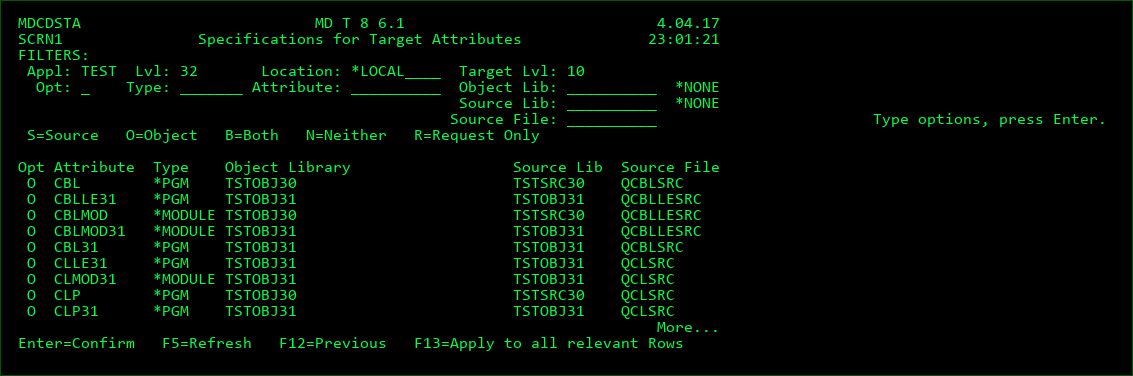
This screen is displayed when option A for Attributes is requested for a Distribution Level. The screen lists each attribute that is defined within MDCMS (Option 3 -Attributes) and what is to be sent to the target level for that attribute.
Filter Fields
Filter the listing, limiting it to rows with matching values. For the Location, Attribute, Object Lib, Source Lib and Source File filters, all rows containing the filter value will be listed.
Opt
S - Send only the source. The target system will compile the source if an object library is defined.
O - Send only the object. The object does not contain source, or the target system does not permit source.
B - Send both the source and the object. The source and object are expected on the target system, but a compile of the source will not occur.
N - Send nothing for this attribute.
R - Request Only. Only send the request record as no source will be migrated to the target system. This option is only valid for *SOURCE Object types (such as copy books or SQL statements). This option is used when source is not permitted on the target system, but the source will be indirectly migrated to the next level on this system once the Request record returns in an RFP for the next level.
Function Keys:
F3=Exit
F5=Refresh - Refresh the listing
F13=Apply to all relevant Rows - Place the cursor on a row with an option to replicate and press F13 to apply that option to all other rows in the list (based on the filters) that would allow the option. For example, if all attributes in the filtered listing need to change from S to O, then put an O on one of the rows and then press F13 while the cursor is on that option - all attributes with an Object Library would then change to O.
Specifying Object Overrides for Target Levels
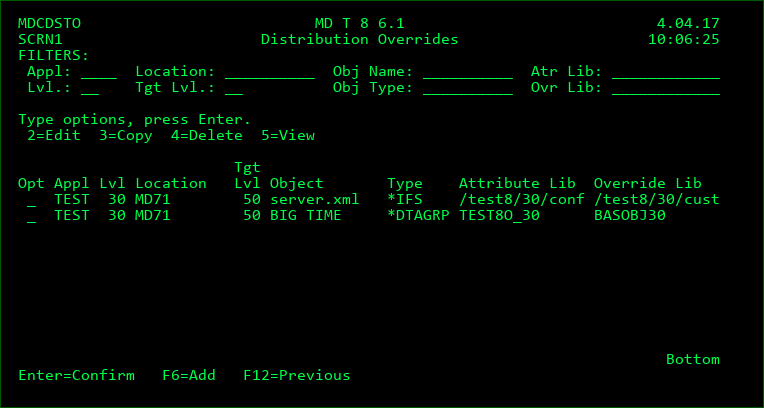
This screen is displayed when option O for Obj Overrides is requested for a Distribution Level. The screen lists each object that is defined to be distributed from a different Library/Folder when sent to a given Target Level.
When an RFP is sent to a target level, each object in the RFP where the attribute is defined to send the Object will be checked against this list.
If the local application, local level, object name, object type and target level match an entry, then MDCMS will check if the object exists in the Override Library/Folder. If it does exist, then that object will be sent instead of the object in the Library/Folder defined for the Attribute. If it doesn't exist, then the standard object will be sent instead.
Examples of when this can be helpful:
- Each location has its own properties file for a web application.
- Each location has its own configuration data for a system application
Filter Fields
Filter the listing, limiting it to rows with matching values. For the Location, Object Name, Attribute Library, and Override Library filters, all rows containing the same prefix as the filter value will be listed.
Object Type
*ALLOBJ - check if object exists for any system object type. The object type defined for the object's attribute will be used.
*SRCIFS - the override pertains to source residing in IFS
*SRCMBR - the override pertains to source residing as a member in a source file
Object Type - the specific object type for the object override. Overrides are not relevant for *REMOTE, *DUMMY, or *MSGD object types. When *SOURCE, use *SRCIFS or *SRCMBR to define the override.
Attribute Library/Folder
The object library or folder defined for attributes where the object is pulled from normally. If the object type is *SRCIFS, then this would be the source folder and if the object type is *SRCMBR, then this would be the source library.
Object Name
*ALL - any object in the RFP that is normally distributed from the Attribute Library/Folder should be overridden, if it exists.
The name of the object (or source) that should be overridden to be distributed from a different location, if it exists.
Distribute from Library/Folder
*NONE - the object request should not be sent to the target level.
The location that should be distributed from instead. If the object (or source) doesn't exist in the location at the time of the send, it will be sent from the normal location instead.
Function Keys:
F6=Add - add a new Object Override entry