Field Procs to Auto Reapply Templates
When a table containing Field-Level Procedures (Field Procs) is modified, MDCMS can automatically apply the Field Proc definitions to the new version of the file. The Field Procs to Auto Reapply Templates define the criteria to use to select which Field Procs should be auto-reapplied.
When one or more Field Procs meet the selection criteria for a table to be deployed, MDCMS will automatically alter the table to set the field proc definitions prior to copying the existing data from the original version of the table. This ensures that the column's data will continue to be manipulated in the same way that it was before.
When used in conjunction with MDRapid, the manipulation (typically for field encryption) occurs while the application is still live so that the downtime window remains as short as possible.
In order to know where Field Procs are currently used in your database, and which programs that they call, you can use the following SQL statement:
SELECT SYSTEM_TABLE_SCHEMA, SYSTEM_TABLE_NAME, SYSTEM_COLUMN_NAME, FIELD_PROC, CAST(PARMLIST AS CHAR(3000)) AS PARMLIST FROM QSYS2/SYSFIELDS
The Field Procs to Auto Reapply templates can be modified from the MDCMS Setup Menu option 5=Templates -> option 22= Field Procs to Auto Reapply.
Field Procs Template Maintenance
Field Procs Templates for Auto Reapply Screen:
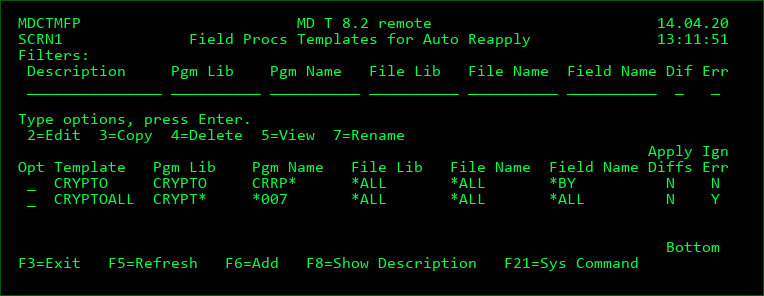
Filters
The entry of values into one or more of the filter fields will result in a subsetted list of records which contain the values of those filters.
Position to Template
A value can be entered into the field above the Template column to position the cursor to the first entry in the list greater than or equal to the value.
Options
2 - Edit an existing Template definition
3 - Copy the definition for a Template to a new Template name
4 - Delete a Template definition
5 - Display all details of the Template definition
7 - Rename the Template
Function Keys
F3=Exit
F6=Add - Add a new Template Definition
F8=Show Description/Show Details - toggle the listing between description and template details
F21=Sys Command - access a command line
Fields
Template
A 10-Character name for the template definition
Description
A 50-Character optional description of the template
Ignore Errors
Y = If the ALTER TABLE statement fails to apply the field procs to the new version of the table, a warning will be placed in the deployment log, but the RFP will continue.
N = If the ALTER TABLE statement fails to apply the field procs to the new version of the table, the RFP will roll back and end.
Automatically Reapply Field Proc when for Program Library
A Field Proc invokes a specific ILE program in a specific library. Use the filter to limit reapplying Field Procs to programs residing in certain libraries.
*ALL - don't filter by program library
*generic* - use the * symbol at the beginning and/or ending of the value to limit to libraries starting with, ending with, or containing the value.
Automatically Reapply Field Proc when for Program Name
A Field Proc invokes a specific ILE program. Use the filter to limit reapplying Field Procs to programs of a certain name.
*ALL - don't filter by program name
*generic* - use the * symbol at the beginning and/or ending of the value to limit to program names starting with, ending with, or containing the value.
Automatically Reapply Field Proc when for File Library
Use the filter to limit reapplying Field Procs to files residing in certain libraries.
*ALL - don't filter by file library
*generic* - use the * symbol at the beginning and/or ending of the value to limit to libraries starting with, ending with, or containing the value.
Automatically Reapply Field Proc when for File Name
Use the filter to limit reapplying Field Procs to files of a certain name.
*ALL - don't filter by file name
*generic* - use the * symbol at the beginning and/or ending of the value to limit to names starting with, ending with, or containing the value.
Automatically Reapply Field Proc when for Field Name
Use the filter to limit reapplying Field Procs to fields of a certain name.
*ALL - don't filter by field name
*generic* - use the * symbol at the beginning and/or ending of the value to limit to names starting with, ending with, or containing the value.
Reapply when Field Length or Type is Different in New Version of File
The parameter list for some field procs may be incorrect, if the length, number of decimals or field type changes. Use this flag to decide if a field proc should be reapplied in the case of such a change.
Y = Apply the Field Proc to the new table, even if the length, decimals or type changes.
N = Do not apply the Field Proc to the new table if the length, decimals or type changes.