MD Service Jobs
The MD Service Jobs list provides an overview of all possible persistent batch jobs that run in the background to carry out MDCMS processes.
The job name for a service is the same as the service name + the environment ID.
The job user is the MD Service User defined in the System Settings.
Press F9 to toggle between listing only active services and listing all services
Special Options
S=Start Jobs - Start the default number of jobs for the service
E=End Jobs - End any jobs running for that service
L=Logs - View the IFS logs for the Services that generate logs
Auto-Start Jobs
Y - the jobs will begin the moment they are needed by MDCMS, if within the Runtime Window.
N - the jobs will be started manually or using the starting command for the service from a scheduled job.
The following services cannot auto-start and require the start command for the service to start:
MDKACE
MDPULL
MDSNOW
The following services can only auto-start if the webhook is defined in the server that they connect to:
MDAZUR
MDGIT
MDJIRA
The following RFP receive services can only auto-start if DDM connectivity is allowed from the RFP sending system to the receiving system:
MDRCVIFS
MDRCVRMT
MDRCVSNA
Default Job Queue
The default job queue name and library to submit the jobs to when started. This value can be overridden when using the starting command for the service.
Start of Runtime Window
The time of day that an auto-start job may begin. Not applicable for a job started manually
*ANY - the job is permitted to start whenever needed
Default End Time
The time of day that a running job will end. This value can be overridden when using the starting command for the service.
*NEVER - don't end automatically. Only end when manually requested.
Default # Parrallel Jobs
MDFTP, MDPULL, MDPUSH and MDSEND can have up to 9 jobs actively running in parallel.
Default Delay Interval
MDRCVIFS and MDRCVSNA allow for setting the number of seconds between RFP checking.
Default SNA User
The default SNADS user id to check for RFPs received via SNA.
F10=More Settings - most services have additional parameters that can be configured. This function is available for those services from the edit screen.
Commands to Start and End MDCMS Services
Some of the services can start automatically. All of the services can be ended automatically at a specified time as well as be started or ended from the MDCMS Services screen.
For those services that must be started manually, or if services should otherwise start or end via a command, the following commands are available that can be used from a command line or from within a job scheduler, etc.:
| Column 1 | Column 2 | Column 3 |
|---|---|---|
| Service | Start Command | End Command |
| MDAZUR | MDCMS/MDSTRAZUR | MDCMS/MDENDAZUR |
| MDCLEAN | MDCMS/MDCLEAN | ends immediately upon completion |
| MDFTP | MDCMS/MDSTRFTP | MDCMS/MDENDFTP |
| MDGIT | MDXREF/MDSTRGIT | MDXREF/MDENDGIT |
| MDJIRA | MDCMS/MDSTRJIRA | MDCMS/MDENDJIRA |
| MDKACE | MDCMS/MDSTRKACE | MDCMS/MDENDKACE |
| MDLOG | MDCMS/MDSTRLOG | MDCMS/MDENDLOG |
| MDMAIL | MDSEC/MDSTRMAIL | MDSEC/MDENDMAIL |
| MDPULL | MDCMS/MDSTRPULL | MDCMS/MDENDPULL |
| MDPUSH | MDCMS/MDSTRPUSH | MDCMS/MDENDPUSH |
| MDRCVIFS | MDCMS/MDRCVIFS | MDCMS/MDENDRIFS |
| MDRCVRMT | MDCMS/MDRCVRMT | MDCMS/MDENDRRMT |
| MDRCVSNA | MDCMS/MDRCVSNA | MDCMS/MDENDRSNA |
| MDSEND | MDCMS/MDSTRSEND | MDCMS/MDENDSEND |
| MDSFTP | MDCMS/MDSTRSFTP | MDCMS/MDENDSFTP |
| MDSNOW | MDCMS/MDSTRSNOW | MDCMS/MDENDSNOW |
| MDXANI | MDXREF/MDSTRXANI | MDXREF/MDENDXANI |
For extensive details about each command, enter it at a command line and press F4 to prompt the parameters and then F1 for help information.
MDMAIL Additional Settings
MDCMS provides the ability to send emails via the MDMAIL java service. In order to configure the SMTP client to send emails directly from the partition, Edit the MDMAIL service with option 2 and then press F10 for more settings.
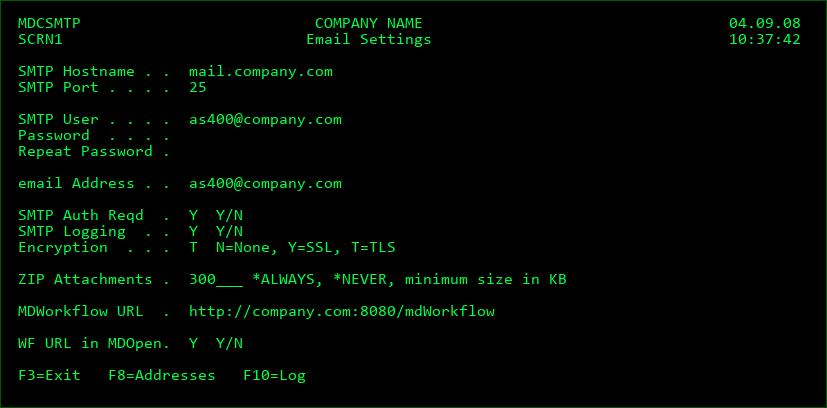
SMTP Hostname
The IP address or domain name of the SMTP server which will send emails to recipients
SMTP Port
The SMTP server Port number, which normally is 25 for SMTP and 465 for SMTPS
SMTP User
The ID of the user to connect to the SMTP server
Password
The password for the SMTP user
email Address
The sender address to use for the system
SMTP Auth Reqd
Y - The SMTP Server requires user authorization to occur
N - The SMTP Server does not require user authorization to occur
SMTP Logging
Y - Detailed debug-level SMTP information will be included in the IFS logs for service MDMAIL
N - Only high-level transaction information will be in the IFS logs for service MDMAIL
Encryption
N - Connect to the SMTP Server in unsecured mode
Y - Connect to the SMTP Server using SSL Encryption
T - Connect to the SMTP Server using TLS Encryption
ZIP Attachments
*ALWAYS - attached files will be always be zipped to reduce the size of the emails
*NEVER - attached files will never be zipped
n KB - an attached file will only be zipped if it is larger than the entered number of Kilobytes
MDWorkflow URL
The context path for links to the MDWorkflow application. This must include http or https, the server address, port number if not 80 and the name of the web application.
This URL is used within MDMAILF email bodies to allow the user to navigate directly to a specific RFP and is used when generating Project, Task or Subtask mails out of MDWorkflow.
URL for MDOpen
Y - A column in the MDOpen Project, Task and Subtask list views will provide the URL icon to be clicked to open a browser to show the given element from within MDWorkflow.
N - The MDWorkflow URL column won't be visible in MDOpen
Email Addresses
The email addresses of the recipients can be maintained by pressing F8 from the Email Settings screen. If DDM connections are defined, the updates will be synced to all locations. The addresses can also be entered directly in the MDSEC user details.
User ID
The user profile of the user. If the user does not have a profile on the system, any other ID of up to 10 characters can be used.
Name
The Name to be recipient to be displayed in the mail header
Address
The email address of the recipient
Email Log
Each time the MDMAIL job is used to send an email, a log entry will be written to MDSEC file MDDEMLL with the following information:
Date, Time, Job, Recipients, Subject, Attachments and Error Message
F10 can be pressed from the Email Settings screen to view/search log entries
Additionally, the MDMAIL service logs information to the IFS which can be viewed from the Services listing.
MDMAIL - Send Text Mail command
This command, which resides in the MDSEC(instance) library, can be used to send a plain text mail to one or more recipients.
MDMAIL Parameters
| Option / Field | Description |
|---|---|
| Email Address of Recipient (ADDR) | A specific email address *NONE - the user group or user parameters are used instead |
| User Group of Recipients (GRPN) | All users belonging to a user group defined in MDSEC that have an email address defined. *NONE - the address or user parameters are used instead *RFP - send the email to all involved groups of the given group type (GRPT) for the projects included in the RFP (RFP). |
| User ID of Recipient (USER) | The email address defined for the MDSEC user will be used as the recipient. *NONE - the address or user group parameters are used instead |
| Message Subject (SUBJ) | The text to display in the subject of the email. |
| Body Text (BODY) | The text string, up to 2000 characters in length, to use as the email body in plain text format. |
| Attachment 1 (ATT1) | The IFS path, including file name, of a file to attach to the email. |
| Attachment 2 (ATT2) | The IFS path, including file name, of a 2nd file to attach to the email. |
| Delete Attachments after Send (DELA) | Whether or not to delete the attachment file(s) once the email is successfully sent. *NO - don't delete the attachment(s) *YES - delete the attachment(s) once sent. If the send fails, the attachment(s) won't be deleted. |
| MDCMS Instance (INST) | Specifies the MDCMS environment that should be used. The ID correlates to the suffix of the MDCMS library name. *SAME - the environment of the current library list will be used *DFT - the default environment will be used. This correlates to library MDCMS. |
| Application (APPLIC) | The MDCMS Application Group of the RFP, in the situation that GRPN(*RFP) is used. |
| Level (PROLVL) | The MDCMS promotion level of the RFP, in the situation that GRPN(*RFP) is used. |
| RFP Number (RFPNBR) | The MDCMS Request for Promotion number, in the situation that GRPN(*RFP) is used. |
| Group Type of Recipients (GRPT) | When the value of *RFP is used for the User Group of Recipients (GRPN) this value will specify the type of group to send to. Possible values are: a user defined group type *ACCGRP (default) - all Acceptance Groups for all Projects for the RFP *APRGRP - all users participating in the installation approval of an RFP. For levels using MDSEC roles for approval, all users authorized to approve for the level are included. For levels using Object Approval Templates, all users to participate based on the objects involved are included. *TECGRP - all Technical Groups for all Projects for the RFP *TSKASN - all assigned groups/users for all tasks for the RFP *TSKREQ - all creators for all tasks for the RFP *TSKTST - all test groups/users for all tasks for the RFP |
MDMAILF - Send Formatted Mail command
This command, which resides in the MDSEC(instance) library, can be used to send a pre-formatted plain text or HTML mail to one or more users. The mail body to be used must be stored in IFS.
The body may contain placeholder values which are replaced by the actual MDCMS values at runtime. The placeholders within the mail body can be delimited by ## or ++.
HTML body templates for each of the primary RFP exit points are available in IFS folder /MDCMS/MAIL.
MDMAILF Parameters
| Option / Field | Description |
|---|---|
| Email Address of Recipient (ADDR) | A specific email address *NONE - the user group or user parameters are used instead |
| User Group of Recipients (GRPN) | All users belonging to a user group defined in MDSEC that have an email address defined. *NONE - the address or user parameters are used instead *RFP - send the email to all involved groups of the given group type (GRPT) for the projects included in the RFP (RFP). |
| User ID of Recipient (USER) | The email address defined for the MDSEC user will be used as the recipient. *NONE - the address or user group parameters are used instead |
| Message Subject (SUBJ) | The text to display in the subject of the email. |
| Body File including Path (BODY) | The IFS path, including file name, which contains the body to use in the email. |
| Body File Type (BTYP) | The format of the body TEXT - the email body has a plain text format HTML - the email body uses html formatting |
| Attachment 1 (ATT1) | The IFS path, including file name, of a file to attach to the email. |
| Attachment 2 (ATT2) | The IFS path, including file name, of a 2nd file to attach to the email. |
| Delete Attachments after Send (DELA) | Whether or not to delete the attachment file(s) once the email is successfully sent. *NO - don't delete the attachment(s) *YES - delete the attachment(s) once sent. If the send fails, the attachment(s) won't be deleted. |
| MDCMS Instance (INST) | Specifies the MDCMS environment that should be used. The ID correlates to the suffix of the MDCMS library name. *SAME - the environment of the current library list will be used *DFT - the default environment will be used. This correlates to library MDCMS. |
| Use Placeholders (WCRD) | Whether or not to find and replace any placeholders in the email body. Any of the placeholder parameters in this command that are required as specific values must be present on the command definition. At a minimum, it's recommended that the (APPLIC), (PROLVL) and (RFPNBR) are included on the command definition. The email body can include any placeholder, including placeholders for custom fields. The placeholders will be replaced by the runtime value as long as the necessary key parameter(s) are included in order to find the values in the database. |
| Send Phase (SEND) | Whether or not the email pertains to an RFP during the send phase. MDCMS will then use replacement values based on the RFP in the send list rather than in the installation database. |
| Application (APPLIC) | The MDCMS Application Group represented by the placeholder value of ##APPLIC##. |
| Level (PROLVL) | The MDCMS Application Promotion Level represented by the placeholder value of ##PROLVL##. |
| RFP Number (RFPNBR) | The RFP number for this promotion represented by the placeholder value of ##RFPNBR##. |
| Object Request Number (REQNBR) | The MDCMS Object Request number represented by the placeholder value of ##REQNBR##. This is necessary when placeholders for a specific object request are necessary. If not included, the first object in the RFP will be used. |
| Project (PROJID) | The Project ID represented by the placeholder value of '##PROJID##'. |
| Task Number (TASKID) | The MDCMS Project Task number represented by the placeholder value of ##TASKID##. |
| Subtask Number (STSKID) | The MDCMS Project Subtask number represented by the placeholder value of ##STSKID##. |
| Object Library (OBJLIB) | The Object Library represented by the placeholder value of '##OBJLIB##'. |
| Source Library (SRCLIB) | The source library name represented by the placeholder value of ##SRCLIB##. |
| Source File (SRCFIL) | The source file name represented by the placeholder value of ##SRCFIL##. |
| Error Message (ERRMSG) | The error text explaining why an RFP failed. This is represented by the placeholder value of ##ERRMSG## |
| Group Type of Recipients (GRPT) | When the value of *RFP is used for the User Group of Recipients (GRPN) this value will specify the type of group to send to. Possible values are: a user defined group type *ACCGRP (default) - all Acceptance Groups for all Projects for the RFP *APRGRP - all users participating in the installation approval of an RFP. For levels using MDSEC roles for approval, all users authorized to approve for the level are included. For levels using Object Approval Templates, all users to participate based on the objects involved are included. *TECGRP - all Technical Groups for all Projects for the RFP *TSKASN - all assigned groups/users for all tasks for the RFP *TSKREQ - all creators for all tasks for the RFP *TSKTST - all test groups/users for all tasks for the RFP |
MDUPDEMLA - Update Email Address command
This command, which resides in the MDCMS(instance) library, can be used to systematically add or change the email address for a user. If DDM connections are defined, the updates will be synced to all locations.
MDUPDEMLA Parameters
| Option / Field | Description |
|---|---|
| User ID (USER) | Specifies the user ID under which to store the name and email address. The user ID does not have to be defined in MDSEC and can be any value of up to 10 characters. |
| User Name (NAME) | Specifies the name of the user that will be used as the recipient name when emails are sent to the user ID. |
| Email address (MAIL) | Specifies the Email address that will be used for the recipient when emails are sent to the user ID. |
| Environment ID (ENV) | The name of the MDCMS instance (or suffix) - *DFT refers to MDCMS being used in library MDCMS. For a different library suffix, this would be entered for the environment ID. |
MDFTP - MDCMS FTP Client command
The MDCMS FTP Client (MDFTP) command provides the ability to connect to a remote server in order to perform FTP, SFTP or FTPS transactions.
The MDFTP service jobs are used to perform the FTP and FTPS transactions.
The MDSFTP service jobs are used to perform the SFTP transactions.
Ensure that either at least 1 MDFTP or MDSFTP job is set to auto-start or that the MDFTP/MDSFTP jobs have already started prior to invoking this command. This can be reviewed and edited in the MDCMS Services settings.
MDFTP/MDSFTP transactions are logged to the IFS and can be viewed from the MDCMS Services settings.
MDFTP Parameters
| Option / Field | Description |
|---|---|
| Server Address (LADR) | The address of the FTP server to connect to. This address must be defined in the Remote Server Locations settings. MDCMS uses the connection information stored with the address. Be aware that the address is case sensitive and must exactly match the address in the settings. |
| FTP Action (ACT) | The action to be performed *EXIST - check if a folder or file exists on the remote server *GET - copy a file from the remote server to the local IFS *PUT - copy a file from the local IFS to a remote server *DELETE - delete a folder or file on the remote server *MKDIR - create a folder on the remote server *LIST - list the contents of a folder on the remote server. The result list is written to file QTEMP/MDDFTPF. The format for the file is based on file MDCMS/MDDFTPF. *TESTCONN - test the connection to the remote server |
| MDCMS Instance (INST) | Specifies the MDCMS environment that should be used. The ID correlates to the suffix of the MDCMS library name. *SAME - the environment of the current library list will be used *DFT - the default environment will be used. This correlates to library MDCMS. |
| Local Folder (LFLR) | The path of the local IFS folder |
| Local File (LFIL) | The name of a file in the local IFS folder |
| Remote Folder (RFLR) | The path of a folder on the remote server *LFLR - the path of the remote folder is the same as the local folder |
| Remote File (RFIL) | The name of a file on the remote server *LFIL - the name of the remote file is the same as the local file |