Project Costs
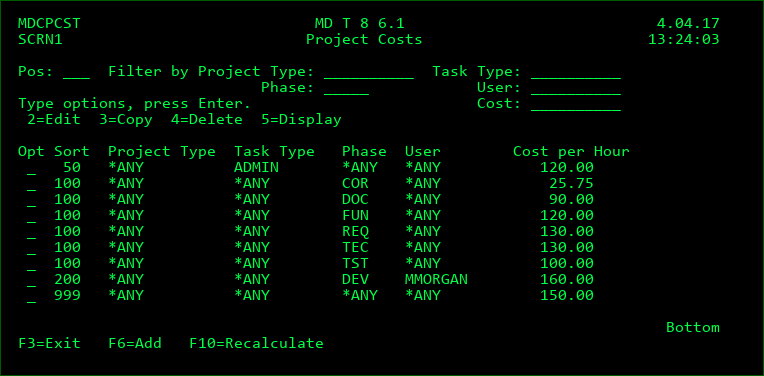
The Project Costs settings provide the rules in order to apply the correct cost per hour to the time entered for Projects, Tasks and Subtasks.
When time is entered, MDCMS compares the project type, task type, phase and user against the cost rules in the sort sequence. The first matching rule is applied as the cost per hour for the time entry in order to calculate the total cost of that entry and increase the cost sum for the impacted project, task and subtask.
Options
2=Edit - edit the cost rule
3=Copy - copy a cost rule to a new rule
4=Delete - delete the cost rule
5=Display - View the cost rule
Sort Sequence
The sequence of the cost rule in relation to other rules in ascending order.
Project Type
If not *ANY, then limit the cost to projects of entered type.
Task Type
If not *ANY, then limit the cost to project tasks of entered type.
Phase
If not *ANY, then limit the cost to time entry records for the entered project phase.
User
If not *ANY, then limit the cost to time entry records for the entered user ID.
F10 - Recalculate - when pressed, existing Time Entry records can be recalculated based on the current rules. A confirmation screen is shown in order to limit the recalculation to a specific date range and to specify if closed Projects/Tasks should be included in the recalculation.