Push Settings Data to Locations
MDCMS and MDXREF settings can be pushed (copied) to any defined Location that allows DDM connectivity. To define and execute the push of settings to another location, select option 17 from the MDCMS Setup Menu.
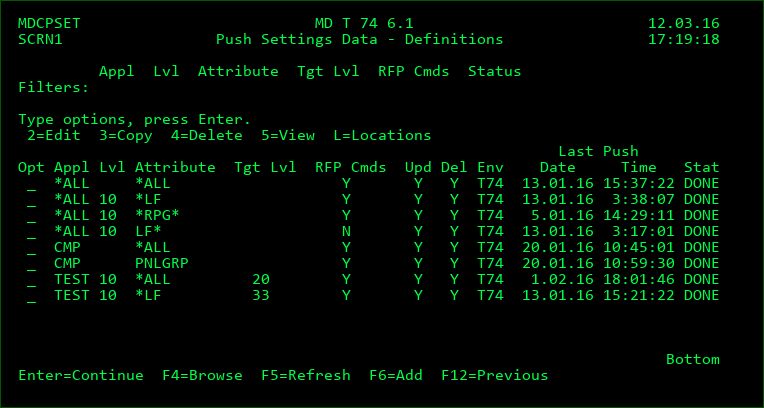
The initial screen lists any existing Push definitions. Use F6 to add a new definition or the standard options to maintain an existing definition.
Definition Parameters
Application
- *ALL - all applications
- an application
Level
- 0 - all levels for all applications or one application
- a level for all applications or one application
Attribute
*ALL - All attributes. When *ALL, any level placeholders will also be pushed
*NONE - attribute settings should not be sent
*generic* - use * as a placeholder to filter the attributes by a name pattern
an attribute
Target Level
- 0 - the same value as the local level
- the level number to apply on the remote system
Include RFP Commands
- Y - any *RFP commands defined for the selected level(s) will be included
Include MDXREF Libraries
- Y - the library list in the MDXREF build screen for the level will be populated
Include Source Libraries
- Y - the source parameters on the pushed attributes will be included
- N - the source library and file values will be removed from the attributes, unless for LF or any of the following MDCMS types: *SQLCST, *SQLFUN, *SQLIDX, *SQLMQT, *SQLPRC, *SQLSCR, *SQLTRG, *SQLUDT, *SQLVAR, *SQLVW
Include Compile Commands
- Y - all compile commands for the pushed attributes will be included
- N - the compile commands for the attributes will not be included, unless for LF or any of the following MDCMS types: *SQLCST, *SQLFUN, *SQLIDX, *SQLMQT, *SQLPRC, *SQLSCR, *SQLTRG, *SQLUDT, *SQLVAR, *SQLVW
Include Scripts
- Y - all pre- and post-install scripts for the pushed attributes will be included
- N - the pre- and post-install scripts for the attributes will not be included
Include Auth Templates
- Y - the definition of each Object Authority Template used by one or more of the pushed attributes will also be pushed
- N - the template definition won't be pushed, but will still be assigned to the attribute, even if it doesn't exist on the target location.
Include Replic Templates
- Y - the definition of each Source and Object Replication Template used by one or more of the pushed attributes will also be pushed
- N - the template definition won't be pushed, but will still be assigned to the attribute, even if it doesn't exist on the target location.
Include Search Templates
- Y - the definition of each Source and Object Search Template used by one or more of the pushed attributes will also be pushed
- N - the template definition won't be pushed, but will still be assigned to the attribute, even if it doesn't exist on the target location.
Include Delete Templates
- Y - the definition of each Source and Object Deletion Template used by one or more of the pushed attributes will also be pushed
- N - the template definition won't be pushed, but will still be assigned to the attribute, even if it doesn't exist on the target location.
Include Rapid Templates
- Y - the definition of each MDRapid Template used by one or more of the pushed attributes will also be pushed
- N - the template definition won't be pushed, but will still be assigned to the attribute, even if it doesn't exist on the target location.
Update Existing Data
- Y - any matching entries already on the remote system will be updated with the new values
- N - only new entries will be added
Delete Undefined Data
- Y - if value *ALL is used for the attribute, then all attributes on the target system that aren't on the local system are deleted.
If value Y is used for Include RFP Commands, then all RFP commands on the target system that aren't on the local system are deleted.
Attribute commands that aren't defined locally will be deleted
If all levels are sent, then remote levels that aren't defined locally will be deleted - N - unmatched settings will remain on the target system
Target MD Environment
The instance of MDCMS on the target system.
- *DFT - the instance that doesn't include a suffix for the product libraries is the target
- an MDCMS instance
Once a definition is created, use option L to select one or more DDM Locations to push the information to.
After the locations are selected, press Enter to submit the job to batch. The job queue and library can be modified at the top of the location listing screen.