Receive Settings from Remote System
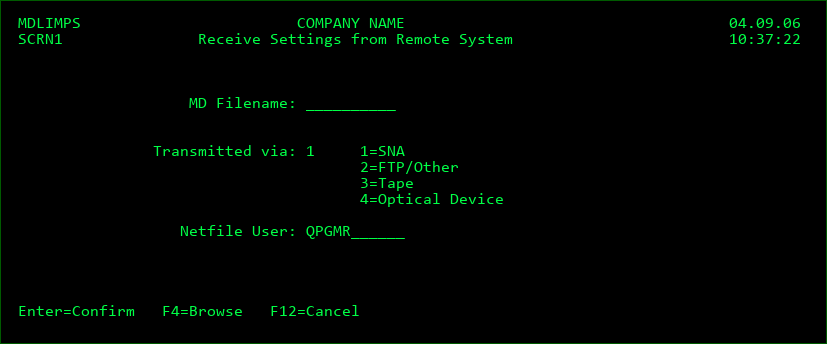
Screen Definitions:
MDCMS settings sent from remote systems are received using the above display, which is option 13 from the MDCMS Settings Menu.
Settings may be sent via SNA, FTP, GoAnywhere, XCOM, tape, or optical device. MDCMS remembers which method was used the last time that a promotion or setting was received. It is best to set the Transmitted via parameter (if incorrect) before entering the other information.
MD Filename
Enter the name of the file containing the Settings. MD setting packages are always named 'MDAS' + the 2-digit Host ID of the sending IBMi + a 4-digit sequence number. Press F4 to browse the list of outstanding setting packages.
Netfile User
If the setting package was sent via SNA, a specific netfile user was entered (default is QPGMR). The same user id must be entered here to receive the settings.
If the setting package is transmitted via tape or optical device, you will also be prompted for the Device Description. It is required for receiving the setting package or for browsing the MD setting packages that exist on the medium.
Function Keys:
Enter=Confirm
F4=Browse - Browse the list of valid values for a field
F12=Cancel
Select Application/Level for Receipt of Attributes
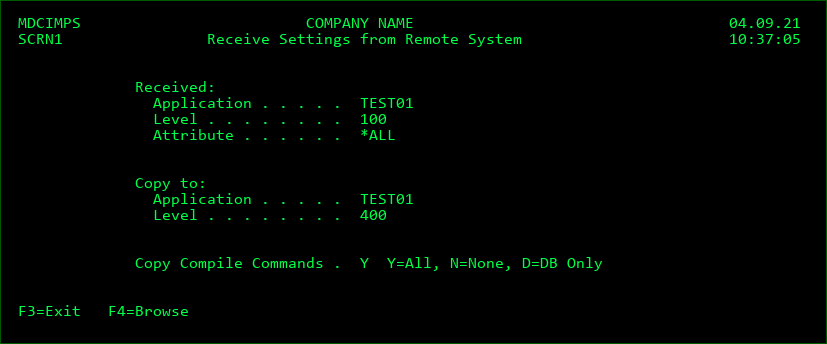
Copy to Application
Enter the application code or press F4 to select from a list. If all attributes were sent, a new application code may be entered.
Copy to Level
Enter the application level or press F4 to select from a list. If all attributes were sent, a new application level may be entered.
If the attribute(s) already exist in the selected Application and Level, they will be overwritten with the information received from the remote system.
Copy Compile Commands
Y - all compile commands for the sent attributes will be received into the target level
N - none of the compile commands for the sent attributes will be received into the target level
D - only compile commands for Database objects will be copied. These include PF, LF and any *SQLxxx attributes.
Press Enter to continue.
Specify Application/Level Definitions for Received Settings
If the Application or Level on the local system does not yet exist, and all (*ALL) attributes were sent from the remote system, then the user will be prompted for the descriptions of the Application or Level as well as the name and location of the Job Description.
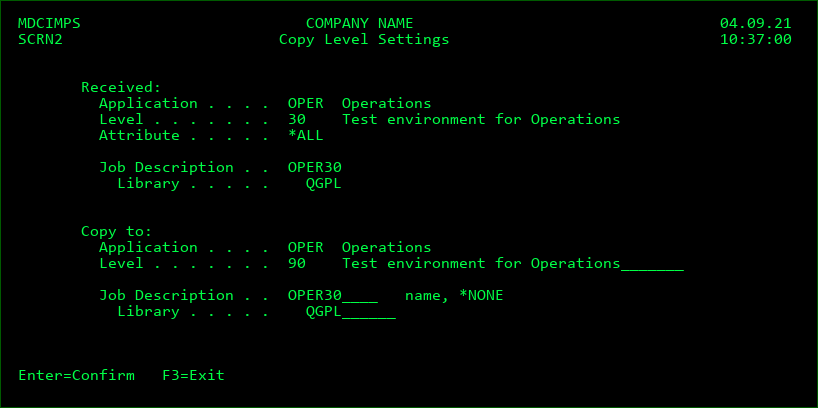
If the Application is new, the default description may be modified.
The description for the Level may be modified.
The name and library of the job description to be used for the local Application/Level can be modified. If *NONE is specified, the Job Description will not be copied.
Press Enter to copy the definitions, or press F3 to cancel the receipt of the settings.
Specify Library Names for Copied/Received Attributes
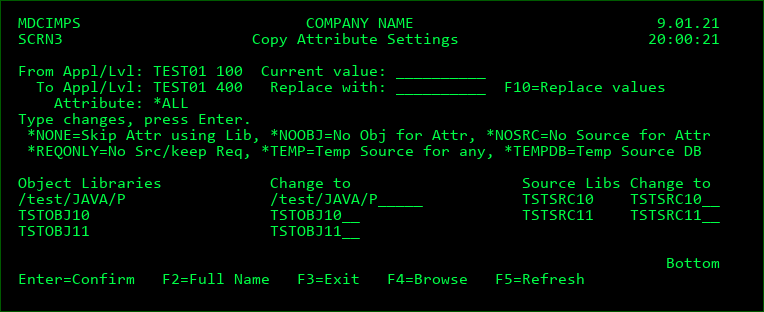
When a level is locally copied or is received from another location, the above screen is displayed to prompt for the library/folder names to be used in the new Level.
The left column for the Object Libraries lists the name of each distinct Object Library specified in the copied Attribute(s).
The Change to column allows the user to modify the name of the Object or Source Library to be saved in the attribute(s) for the target level.
If a find/replace naming pattern is possible to mass update all libraries/folders, the current value and replacement value can be entered at the top and then changed by pressing F10.
Special Object Library values:
*NONE - do not copy the attributes using the object library
*NOOBJ - change the Object Type to *SOURCE for attributes containing a source and object library. Do not copy the attributes containing only the object library.
Special Source Library values:
*NONE - do not copy the attributes using the source library
*NOSRC - remove the Source Library definition for attributes containing a source and object library. Do not copy the attributes containing only the source library.
*REQONLY - remove the Source Library definition for attributes containing a source and object library. Change source file to *REQONLY for *SOURCE attributes.
*TEMP - temporarily migrate source for compiles, but don't keep the source in the target environment. Typically used for production environments where persistent source isn't allowed.
*TEMPDB - remove the source definition for any non-database attributes and set the source library to *TEMP for database attributes.
Function Keys
F2 - display/edit the full name of paths that exceed the length of the prompt field
F3 - cancel the copy of the attributes
F4 - browse the list of Libraries or IFS directories
F5 - reset the library names to their original values
F10 - replace values in list of libraries
Update Attribute Templates for New Level
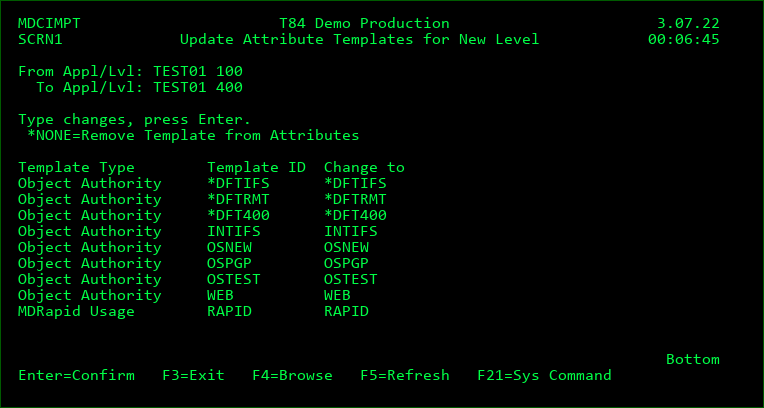
When a level is locally copied or is received from another location, the above screen is displayed to prompt for the templates to be used for the attributes in the new Level.
Each currently applied distinct Template Type and Template ID is listed.
The Change to column allows the user to remove the template or to change the assignment to a different template.
Special Object Library values:
*NONE - remove template from Attribute. This value isn't allowed for Object Authority template types
Function Keys
F3 - cancel the update of the attribute templates
F4 - browse/edit the list of templates for the Template Type
F5 - reset the Template IDs to their original values
Specify Level Placeholder Values for Copied/Received Levels
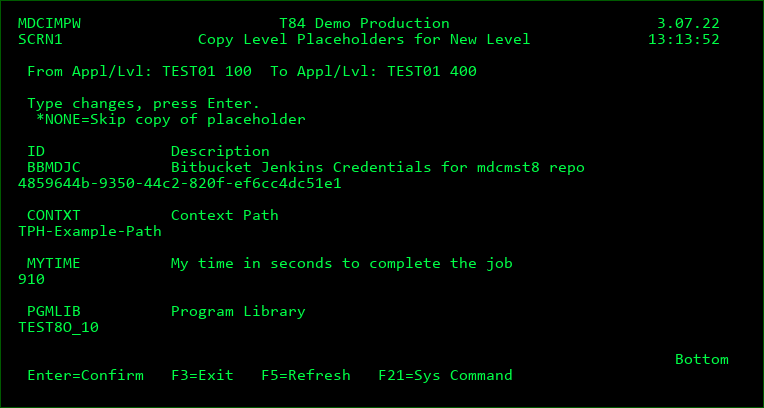
When a level is locally copied or is received from another location, the above screen is displayed to prompt for the placeholders and their values to be copied to the new Level. If the level being copied from didn't contain any placeholders, then this screen will not be displayed.
Special Placeholder values:
*NONE - don't copy the placeholder to the new level
Function Keys
F3 - cancel the copy of the placeholders
F5 - reset the Placeholders to their original values