Scripts
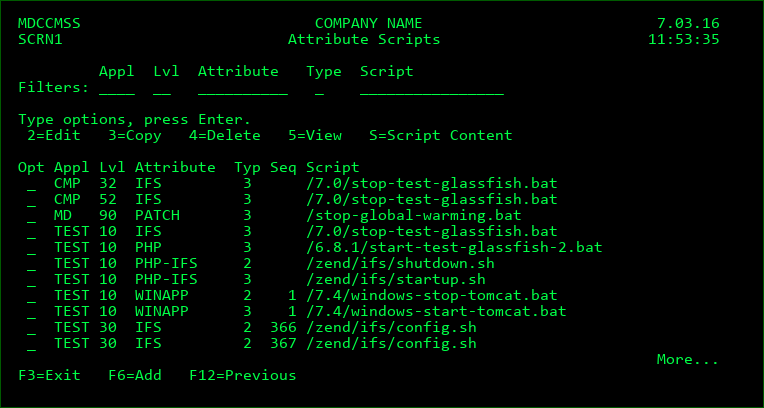
The Attribute Script displays are used to define the scripts that are used for *IFS or *REMOTE attributes. Script Maintenance is invoked by pressing F10 from the Command Maintenance display.
Screen Definitions
Filters
Appl/Lvl
Enter a value here to limit the listing to a specific application or level.
Attribute
Enter part or all of an attribute to limit the listing. For example, enter C to list only scripts with an attribute starting with C.
Type
Enter a value here to limit the listing to a specific script type. See the next section for detailed information about each type of script available within MDCMS.
Script
Enter a string here to limit the listing to scripts containing that string. For example, enter SRC to list only scripts containing the string SRC.
Opt
2=Edit - Change the properties for the selected Script
3=Copy - Copy a script definition
4=Delete - Delete a script definition
5=View - display a script definition
S=Script Content - view the contents of a script. Use MDOpen to edit the contents and an RFP to deploy to script to each level where it should be used.
Function Keys:
F6=Add - Add a new Attribute Script definition
Add or Change display
Screen Definitions:
Appl/Lvl
The Application Group and Level that the attribute resides in.
Attribute
The MDCMS attribute that the script will be tied to.
Only *IFS or *REMOTE attributes may use scripts.
Run for Modifications
Flag stating if the script should run for new or changed objects.
Run for Deletes
Flag stating if the script should run for deleted objects.
Ignore Errors
Y - Continue with RFP processing even if the script fails.
Flag will always be Y for type 3.
N - Cease and Rollback RFP processing if the script fails
Type
The Type value designates when a script should run
| Column 1 | Column 2 | Column 3 |
|---|---|---|
| 2 | Pre-Installation | runs prior to installing objects into the environment |
| 3 | Post-Installation | runs after the installation of objects is complete |
Replace Placeholders
N - The script doesn't contain placeholder values to be replaced by runtime values when executed
Y - Replace placeholder values in the script at run time
Sequence
The sort sequence of the script at run time, in case multiple scripts for the same attribute and type are defined.
Run as User
The user profile that the IFS script will run under within QSHELL
Frequency
O - The script will run for every object in the RFP that is assigned to the given Attribute.
R - The script will run for the first object in the RFP that is assigned to the given Attribute and then ignored for any additional objects for the same Attribute.
Wait for Response
Y - MDCMS waits until the Remote server confirms completion of the script execution
N - MDCMS continues without waiting for a response from the remote server
Submit Job
Y - Submit the IFS Script execution to a separate job. MDCMS will not wait for a response in this case, but instead continue with RFP processing.
N - the ifs script execution runs within this job
Job Name
The name of the submitted job that will process the IFS script
Job Queue
The name and library of the Job Queue to receive the submitted job
Script Subfolder
The relative path of the script, if it isn't directly located in the script root folder.
Script
The name of the script file located in IFS
Function Keys:
F4=Browse - Browse for values.
F12=Previous