Setting up MDCMS
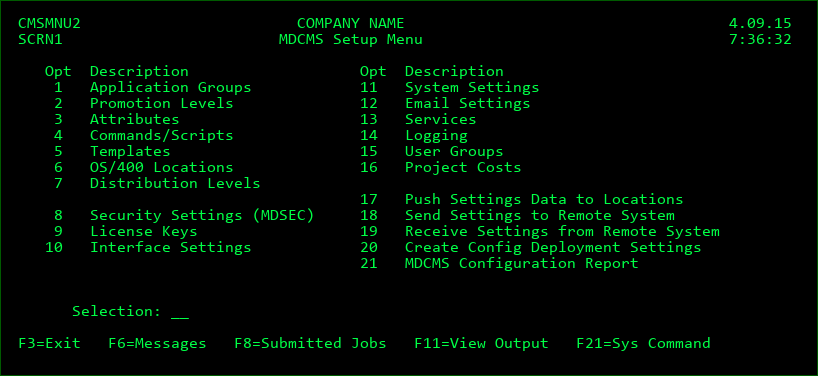
The MDCMS Setup Menu consists of several options that are used to define the overall system environment for MDCMS and options for replicating the environment on remote systems.
Option 1: Application Groups
Defines the name of each business application process within MDCMS.
Option 2: Promotion Levels
Defines the object environments (library list) of the applications including the job descriptions and approval, installation and archiving settings.
Option 3: Attributes
Defines the installation libraries for each source and object type within an Application/Promotion Level.
Option 4: Commands
Defines the default commands per Attribute or Promotion for compiling and installing objects.
Option 5: Templates
Various Templates that can be applied to attributes or other entities.
Option 6: IBMi Locations
Remote Location definitions for communicating over DDM and/or transfering RFPs.
Option 7: Distribution Levels
Defines the target levels on remote locations for the sending of Promotion Packages.
Option 8: Security Settings (MDSEC)
Defines user authority to MDCMS and MDXREF and provides tools to manage authorization lists and DDM security. MDSEC may also be started by typing the command MDSEC on a command line.
Option 9: License Keys
Allows for the update of the MD product license keys in case the previous keys are about to expire or a new MD product license is to be added.
Option 10: Interface Settings
Configure the interface between MDCMS and 3rd-party tools Jira, ServiceNow and Synon/2E and to configure the REST service APIs provided by MDCMS for exchanging information with external tools.
Option 11: System Settings
Defines the system-level settings, such as the title to be displayed at the top of most MD product screens, the ID to identify the system that sends a promotion package, and the naming format to use for temporary libraries. Applied MDCMS patches can be viewed and rolled back from here as well.
Option 12: Email Settings
Defines the connection properties to a SMTP server, email logging and a list of email addresses to be used by the MDMAIL and MDMAILF email APIs.
Option 13: Services
Defines the job queue, start and end times for each of the MDCMS batch services.
Option 14: Logging
Lists each of the log tables in MDCMS and allows the administrator to set the retention period for each log entry type.
Option 15: User Groups
Defines User Groups and Group Types that can be used for email recipients, projects and MDWorkflow test acceptance.
Option 16: Project Costs
Defines the rules for applying the cost per hour to entered time for Projects.
Option 17: Push Settings Data to Locations
Sends some or all settings to a remote IBM i system using a DDM Push connection definition.
Option 18: Send Settings to Remote System
Sends some or all settings for a Promotion Level to a remote IBM i system using a file transfer connection definition.
Option 19: Receive Settings from Remote System
Receives settings for a Promotion Level from a remote IBM i system that had been sent using option 18 on that system.
Option 20: Create Config Deployment Settings
Generate an Application to manage the MDCMS product, including the deployment of new versions, patches, license keys and settings.
Option 21: MDCMS Configuration Report (deprecated) - generate an excel file with a sheet for each configuration file in MDCMS.