System Settings
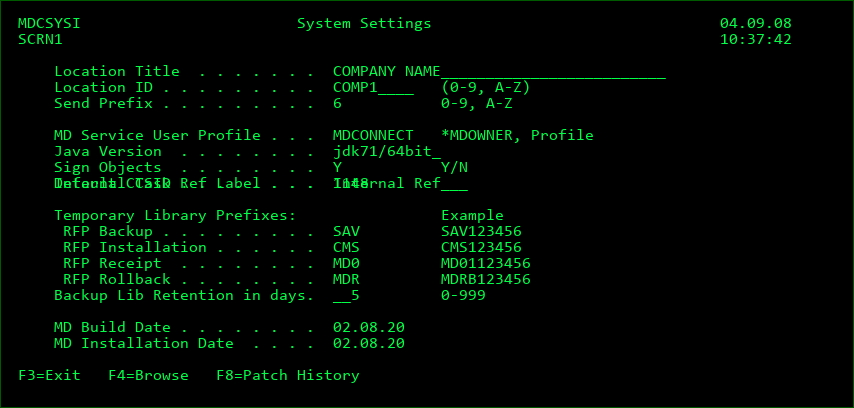
Location Title
The title to be displayed at the top of nearly all MD Product screens to help the user identify which system they are currently working on.
Location ID
A 10-Character ID to uniquely identify this system. The ID for this system must match the ID defined in the OS/400 location settings for any partition that will be connecting to this system.
Send Prefix
A 1-Character ID to uniquely identify distributions from this system. This is used to avoid conflicts in case multiple systems send Promotions to the same remote system. The temporary receiving library on the remote system will use this character in the 4th position of the library name.
MD Service User Profile
The technical user profile on this system to be used to run MDCMS service jobs.
*MDOWNER - use the profile that owns the MDCMS product objects. This is typically MDOWNER.
The user must have at least *JOBCTL and *SPLCTL special authorities and the user must have a valid password.
It is recommended to set the Initial program parameter to *NONE to avoid interactive usage.
If the user profile doesn't have the *ALLOBJ special authority, then the following commands should be run once when there are no locks on the product libraries:
CHGAUT OBJ('/QSYS.LIB/MDCMS.LIB/*') USER(
CHGAUT OBJ('/QSYS.LIB/MDREP.LIB/*') USER(
CHGAUT OBJ('/QSYS.LIB/MDSEC.LIB/*') USER(
CHGAUT OBJ('/QSYS.LIB/MDXREF.LIB/*') USER(
CHGAUT OBJ('/QSYS.LIB/MDCMS.LIB/*') USER(
CHGAUT OBJ('/MDCMS') USER(
Replace
The MDINSSAVF command will automatically run these commands for future updates to the product.
*MDOWNER - use the profile that owns the MDCMS product objects. This is typically MDOWNER.
Java Version
The Java Virtual Machine version to be used by the MDCMS java routines. Press F4 to see the list of installed JVM versions in the QOPENSYS IFS folder. Use option 5 in front of a version and then use option 1 to select either 32bit or 64bit. Minimum allowed is JDK80.
Sign Objects
A hash signature is created for each IFS/Remote file and all source code during the bundle phase of an RFP.
Y - Require Approval to Install if the hash signature differs from what is expected, meaning that manual manipulation has occurred.
N - Do not compare the hash signatures and require approval.
Default CCSID
The Coded Character Set to use by default when communicating with this system using MDOpen or MDWorkflow. This ensures that characters are displayed in the form and order that is expected for the user's locale within those clients. If certain users require a different CCSID, that value can be defined for the user in MDSEC. F4 may be used to browse the list of CCSIDs defined for use in MDCMS.
Internal Task Ref Label
The label to use for the Internal Reference Code field for tasks and subtasks. This label is then used in MDCMS, MDOpen and MDWorkflow.
Temporary Library Prefixes
The prefix string to add to the front of each type of temporary library in MDCMS. The prefix may be changed so that conflicts can be avoided when multiple instances of MDCMS exist on the same system. When temporary libraries are generated by MDCMS, the authority for the library is set based on the Object Authority template applied to the Promotion Level related to the library. See Object Authority templates for more details.
Backup Lib Retention in days
The number of days to retain temporary backup libraries after the deployment of source and objects. Source and objects are archived automatically, but the data in modified tables isn't archived, so it can be helpful in emergency situations to be able to refer back to the prior version of the tables for a period of time.
If days = 0, the temporary libraries will be deleted immediately. Otherwise, the MDCLEAN service will delete them once a minimum age has been reached.
MD Build Date
The date that this version of MDCMS was built by Midrange Dynamics
MD Install Date
The date that this version of MDCMS was installed onto this system
Patch History
Any patches that have been applied to the MDCMS product family since the last full installation of MDCMS can be viewed by pressing F8 from the System Settings screen. Authority to manage the System Settings is required to use this feature.
Status
ERROR - the patch didn't apply successfully - any object changes were automatically rolled back
OK - the patch applied successfully
ROLLBK - the patch has been manually rolled back
Opt
5 - view header details about the patch
O - view the list of objects contained in the patch
R - roll back the objects contained in the patch to the version prior to the patch.