Audit Report of Object Changes outside of MDCMS
Designing/Running Audit Report from Online Generator
To generate an audit report of object changes that have occurred outside of MDCMS, press F8 from the Installation History screen and select option 2 from the report menu. The following prompt screen is then displayed:
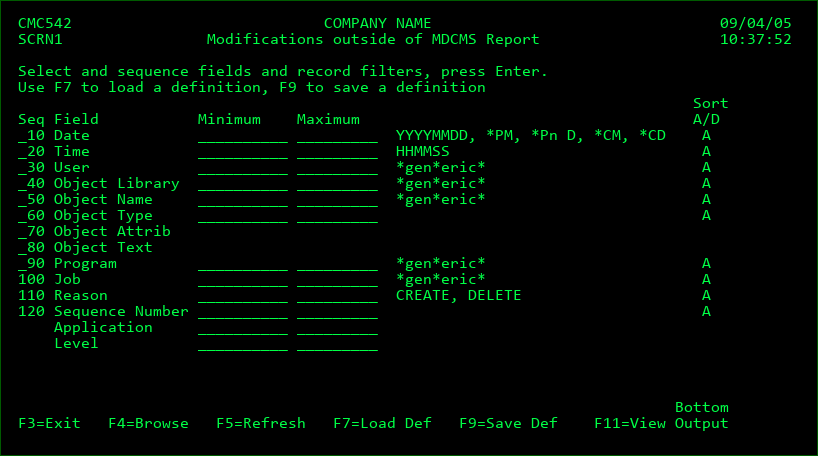
This screen allows you to define your own report. The report may consist of any or all of the listed fields and any or all object changes may be selected and sorted as you choose. The only exceptions are the application and level fields. These fields may not appear in the report, as they are only used as selection criteria. If records are limited to a specific application or level, then only object libraries used by attributes in the application/level are evaluated.
The report configurations may then be saved as definitions and used again in the future from this screen or from a command line.
Seq
Each field with a sequence number > 0 will be included in the report. The columns of the report are ordered by the sequence number. The sorting of the records is also based on the order of the fields.
Minimum
The smallest value that the corresponding field may contain, unless the value is a special value or a generic value.
Special Values:
*PM - all object changes occurring during the previous month (only valid for date fields)
*Pn - all object changes occurring during the previous n (1-9) days (only valid for date fields)
*CM - all object changes occurring during the current month (only valid for date fields)
*CD - all object changes occurring during the current day (only valid for date fields)
CREATE - report only created objects (only valid for reason)
DELETE - report only deleted objects (only valid for reason)
Generic Values:
The wildcard value * may be used multiple times anywhere within a string to limit records to occurrences where the field contains the string. For example, *3XJ* will select all records where the value 3XJ is contained somewhere within the field string. *XJ will select all records where the value XJ is contained at the end of the field string. Wildcards may be used for all alphanumeric fields, except Object Type and Reason.
Maximum
The largest value that the corresponding field may contain. This field must be left blank if a special or generic value was entered in the Minimum field.
Sort
A - Sort this field in ascending (A->Z) order.
D - Sort this field in descending (Z->A) order.
Note: The system attribute and text for an object can be included in the report, but the filtering and sorting features aren't applicable for these 2 columns.
Function Keys:
F3=Exit
F4=Browse - Browse the list of available entries depending upon which field the cursor is positioned.
F5=Refresh - Reset the definition back to the initial settings
F7=Load Def - Load a definition from the list of saved definitions
F9=Save Def - Save the entered configuration as a report definition. The saved definition may then be reused anytime in the future from within MDCMS or from a command line. See the chapter on MDRUNRPT for more information about running reports from a command line.
F11=View Output - Display the MD Output panel and other spool files.
Troubleshooting the Audit Report
In order for the audit report of object changes to be accurate, it is important that the following system settings are in place:
The system value for Auditing control (WRKSYSVAL QAUDCTL) must be set to at least *AUDLVL. It is also recommended that the value *OBJAUD is included.
The system values for Security auditing level (WRKSYSVAL QAUDLVL) must be set to at least *CREATE and *DELETE.
The journal object QAUDJRN must exist and a journal receiver must be attached.
The current chain of journal receivers that exist on the system need to cover the time frame for the desired reporting range.
Objects will only be considered for the report if they reside in libraries or IFS-directories that are designated as Object Libraries in the MDCMS Attributes settings. If a desired library/directory is not reported, then create at least one attribute for that library/directory in the MDCMS Setup Menu option 3. This requirement exists to avoid excessive reporting of temporary libraries and directories.