Create Send Package
Manually Create Empty Send Package for Specific Object Requests
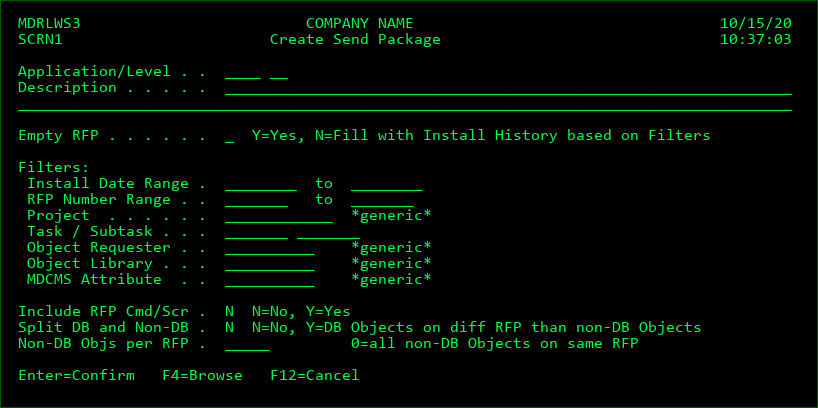
One or more objects may be manually added to a new send package without the prerequisite that the objects are first promoted. This panel is accessed by pressing F6=Add from the Send Promotion to Remote System display.
Application
The local application code of the application to send from
Level
The local application level of the promotion level to send from
Description
The description to apply to the new RFP.
Empty RFP
Y - A new send RFP will be created without any objects in it.
Ignore the remaining parameters on the screen for the use case of a new, empty Send RFP, which will then have specific, individual objects added to it.
Manually Create Send Package from Installed Object Requests
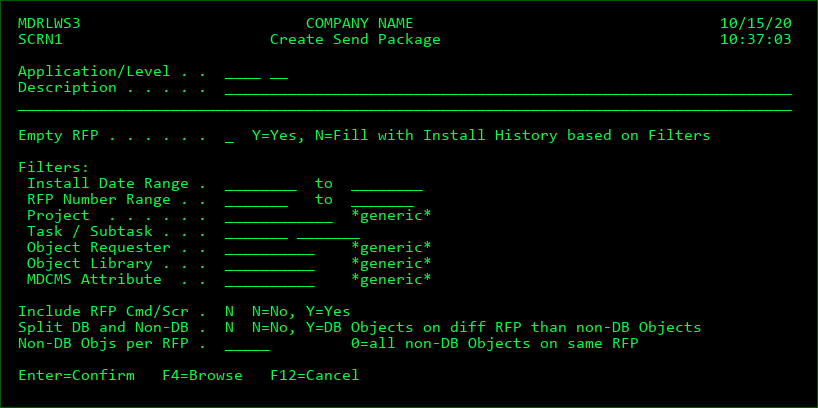
Any amount of installation activity can be combined into a new send package. This panel is accessed by pressing F6=Add from the Send Promotion to Remote System display.
Application
The local application code of the application to send from
Level
The local application level of the promotion level to send from
Description
The description to apply to the new RFP.
If filtering to a specific RFP number, the description can be left blank to automatically use the description from the installed RFP. If splitting into multiple RFPs, the description will be applied + a suffix appended stating the part of the RFP, such as DB or non-DB Part 3.
Empty RFP
N - The new send RFP will be populated with all objects in installation history that match the values of the filter fields.
Install Date Range
The range of dates for installation history to include in the RFP. A blank minimum means no minimum. A blank maximum means no maximum.
RFP Number Range
The range of installed RFP numbers to include in the RFP. A blank minimum means no minimum. A blank maximum means no maximum.
Project
Only include objects that were installed for project matching the name pattern in the filter.
Task
Filter the object requests to those that were installed for a specific task number
Subtask
Filter the object requests to those that were installed for a specific subtask number
Object Requester
Only include objects that were requested by a user matching the name pattern in the filter.
Object Library
Only include objects that installed into a library matching the name pattern in the filter.
MDCMS Attribute
Only include objects that were requested for an attribute matching the name pattern in the filter.
Include RFP Cmd/Scr
Y - any commands that were defined for specific installed RFPs, that contain objects included in the send RFP, will be included in the send RFP.
N- no commands defined for specific RFPs will be added to the send RFP
Split DB and Non-DB
If multiple send RFPs should be created. 1 containing any database objects (Physical files, Logical files, data areas and SQL elements) and at least 1 containing non-database objects.
Non-DB Objs per RFP
The maximum number of non-database objects per send RFP.
For example, if the filtered values would mean there are 500 programs, and the number of non-DB Objects per RFP is 100, then there would be 5 RFPs created to contain them (plus 1 for DB objects, if there are any).
Leave this field blank to place all non-DB objects on a single RFP.
Press Enter once the information is entered.
Systematically Create Send Package from Installed Object Requests using MDCRTSND
Command MDCRTSND, which exists in library MDCMS, can be used to systematically generate a Send RFP from Installed Objects. All of the parameters in the MDCRTSND command are identical to the parameters described in the prior section for manually creating a Send RFP. You can also use F1 on the command or individual parameters in the command for detailed instructions.