MDEXPFILE - Export Data command
The MDEXPFILE command provides the functionality to export the contents of any physical file to an Excel file.
The following screen is displayed to get the parameters.
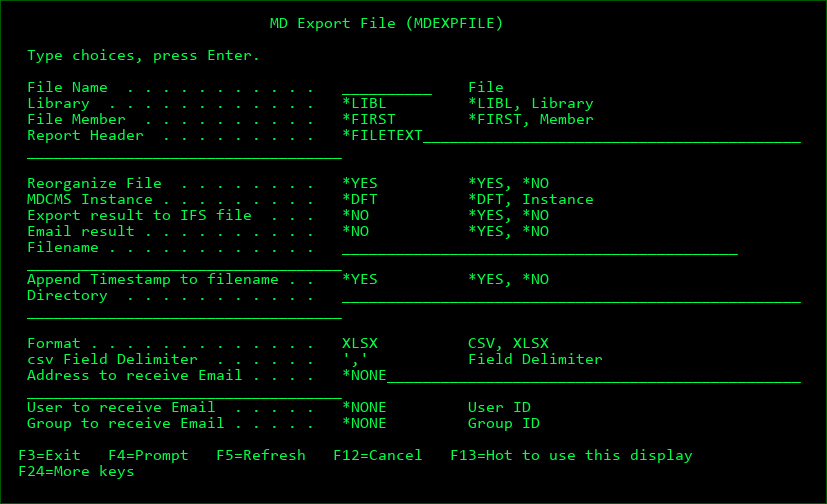
Use F9=All parameters to see all available parameters for command.
File Name
The name of a physical file
Library
The location of the file or *LIBL to search the library list for the file
File Member
The name of the file member or *FIRST to use the first member in the file
Report Header
The title to place in the header of the excel file and in the subject line of the email. *FILETEXT will use the object description for the file.
MDCMS Instance
A 1-4 character string of the suffix for an existing instance of MDCMS or *DFT to use MDCMS
Export result to IFS file
*NO - the resulting report will not be automatically exported to an IFS file
*YES - the resulting report will be automatically exported to an IFS file
Email result
*NO - the resulting report will not be automatically emailed to recipients
*YES - the resulting report will be automatically emailed to recipients
Filename
If the results are to be exported or emailed, this is the name of the IFS file to receive the results. The file type (.csv or .xlsx) will be automatically appended to the end of the name.
Timestamp
*NO - a timestamp will not be appended to the file name
*YES - a timestamp in the format of YYYMMDD_HHMMSS will be appended to the file name
Directory
If the results are to be exported, this is the name of the IFS directory to receive the results. The directory path should begin with the root character "/".
Report Format
CSV - the exported report will be placed in a comma separated value file which can then be opened in Microsoft Excel or similar spreadsheet programs.
XLSX - the exported report will be converted to the excel format. JVM 1.5 or higher is required
csv Field Delimiter
The character to be used to separate fields in a csv file
Address to receive Email
A specific email address to receive the report
User to receive Email
A user id to receive the report - the address for the user will be retrieved from the MDCMS email address table.
Group to receive Email
All users for the entered group id to receive the report - this parameter requires MDWorkflow groups to be present.