MDEXPSPLF - Export Spooled File command
The MDEXPSPLF command provides the functionality to export any spooled file to a text or PDF file.
The following screen is displayed to get the parameters.
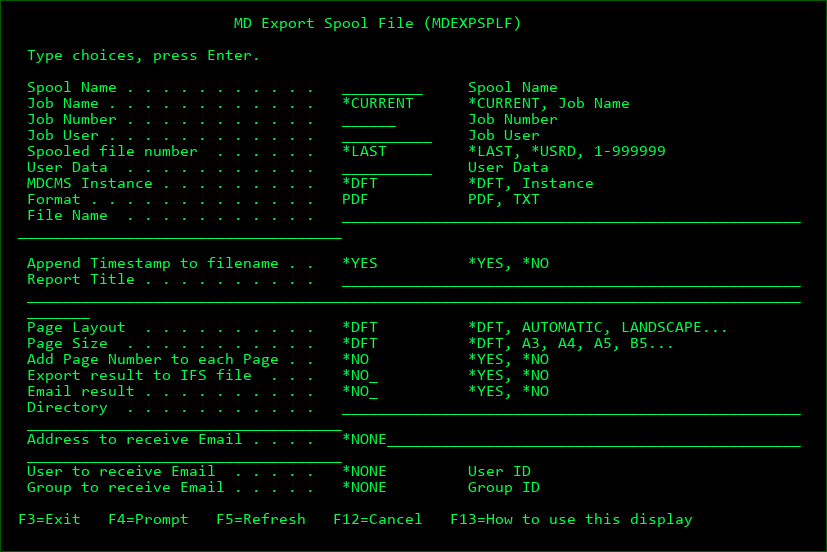
Use F9=All parameters to see all available parameters for command.
Spool Name
The name of a spooled file
Job Name
The name of the job that generated the spooled file or *CURRENT to look for the spooled file in the current job
Job Number
The number of the job that generated the spooled file
Job User
The user profile of the job that generated the spooled file Report Header
Spooled File Number
The number of the spooled file within the job
*LAST - use the most recently generated spooled file of the given name for the given job
*USRD - use the spooled file that has the same User Data value as the value in parameter USRD
User Data
The specific User Data value for the spooled file to select. Only applicable if parameter SPLNBR = *USRD
MDCMS Instance
A 1-4 character string of the suffix for an existing instance of MDCMS or *DFT to use MDCMS
Format
PDF - the spooled file will be converted to the PDF format. JVM 1.5 or higher is required
TXT - the spooled file will be converted to a text file
File Name
If the results are to be exported or emailed, this is the name of the IFS file to receive the results. The file type (.pdf or .txt) will be automatically appended to the end of the name.
Append Timestamp
*NO - a timestamp will not be appended to the file name
*YES - a timestamp in the format of YYYMMDD_HHMMSS will be appended to the file name
Report Title
The title to place in the header of the PDF file and in the subject line of the email
Page Layout
Values for PDF format:
*DFT - the layout defined in data area MDSEC(instance)/MDPDFLOUT
*SPLF - the layout based on the dimensions of the spooled file
AUTOMATIC - the layout is determined automatically based on the width of the spooled file
LANDSCAPE - the paper is rotated so that the wide edge is horizontal
PORTRAIT - the paper is rotated so that the wide edge is vertical
Page Size
Values for PDF format:
*DFT - the size defined in data area MDSEC(instance)/MDPDFSIZE
A3, A4, A5, B5, LEGAL, LETTER
Add Page Number to each Page
*NO - a page number will not be added to each page
*YES - a page number will be added to each page in the bottom right corner
Export result to IFS file
*NO - the resulting report will not be automatically exported to an IFS file
*YES - the resulting report will be automatically exported to an IFS file
Email result
*NO - the resulting report will not be automatically emailed to recipients
*YES - the resulting report will be automatically emailed to recipients
Directory
If the results are to be exported, this is the name of the IFS directory to receive the results. The directory path should begin with the root character "/".
Address to receive Email
A specific email address to receive the report
User to receive Email
A user id to receive the report - the address for the user will be retrieved from the MDCMS email address table.
Group to receive Email
All users for the entered group id to receive the report - this parameter requires MDWorkflow groups to be present.