MDRapid Console
If one or more Files in an RFP are to use MDRapid for copying the data, then option D=Rapid Sts can be used in front of the RFP, or in front of the file request, once the status of the RFP has reached at least CP=Copy Pending. That option brings up the following screen:
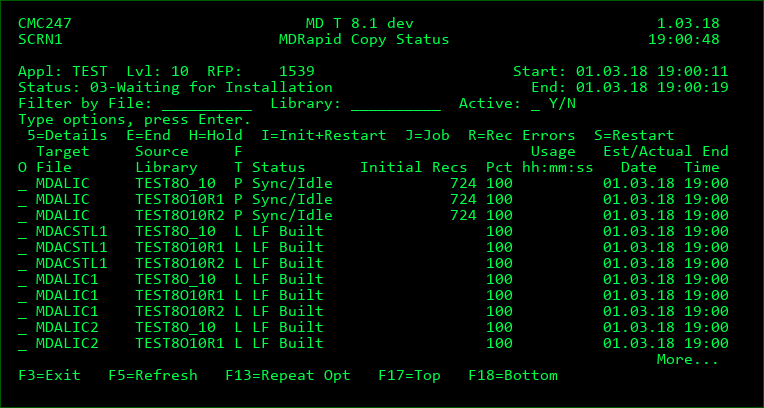
Option
5 - view additional information about the MDRapid process for the file. This is particularly helpful to see:
- the complete error reason if the status for the job is in error
- the number of synced transactions or
- temp library names where the data copying and syncing is occurring so that any analysis and validation of the file contents can be performed.
- If an idle sync point has been reached, the current number of records in the old and new version of the file for comparison.
E - End the MDRapid job for the file
H - Hold the MDRapid job for the file
I - clear all data in the new version of the file and restart the job from the beginning of the copy process
J - view details of the processing job for a physical file or for the MDRapid Monitor
R - view the list of records in the file that failed to get inserted, updated or deleted and choose to copy those records to another file or to allow the file to be installed with the errors in place.
S - restart the job at the point where it left off when last ended
Target File
The name of the file being prepared, or the value Monitor for the MDRapid monitor job
Source Library
The location of the data origin file that the records are being copied from, which is also the library that the file will then be deployed to during the installation phase.
F T (File Type)
I - SQL Index
L - Logical file
M - Monitor job
P - Physical file
T - SQL Table
V - SQL View
Status
| Option / Field | Description |
|---|---|
| Pending | The file hasn't begun processing yet |
| Resetting | A reset to Copy Pending has been requested for the RFP |
| Reset | A reset to Copy Pending has completed for the RFP |
| Launch Err | Error occurred trying to submit the launch of the file for MDRapid processing |
| Copying | The current data in the origin file is being copied to the new version of the file |
| Copying/RE | The current data in the origin file is being copied to the new version of the file, and one or more of the records failed to be copied. Use option R for more details. The errors may potentially be automatically resolved during the sync process. |
| Copy Held | A user has held the copy job |
| Copy Ended | The copy job has ended without reaching completion |
| Copy Error | Error occurred during the copy of data |
| Copy Resume | A user has requested that a copy job resume processing |
| LF Building | A logical file is in the process of getting built over its physical file(s) |
| LF Built | A logical file has finished the build process |
| LF Error | Error occurred during the logical file build |
| Syncing | The copy process is complete and outstanding Journal transactions are in the process of being synced to the new version of the file |
| Syncing/RE | The copy process is complete and outstanding Journal transactions are in the process of being synced to the new version of the file and one or more of the records failed to be copied. Use option R for more details. |
| Sync/Idle | All copying and transaction syncing is complete, will continue to sync new transactions as they occur |
| Sync/IdleRE | All copying and transaction syncing is complete, will continue to sync new transactions as they occur and one or more of the records failed to be copied. Use option R for more details. |
| Sync Held | A user has held the sync job |
| Sync Ended | The sync job has ended without reaching completion |
| Sync Error | Error occurred during the sync of journal transactions |
| Sync Resume | A user has requested that a sync job resume processing |
| Finish Pending | The RFP install job has requested the sync job to finish any outstanding transactions and then end so that the deployment of the files can occur. |
| Sync Comp | The job for the file has completed so that the installation can proceed |
| Running | The monitor job is actively observing the individual file jobs |
| Monitor Held | A user has held the monitor job |
| Monitor Ended | The monitor job has ended |
| Monitor Error | Error occurred |
| Monitor Resume | A user has requested that the monitor job should resume processing |
Initial Recs
The total number of records across all members in the live physical file at the time that the MDRapid job for the file is started
Pct
The percentage of records that have been copied to the new version of the file. 100% will show once all records have been copied and all outstanding journal transactions have been processed.
Usage
The amount of time that has elapsed in order to copy the initial set of records to the new version of the file in hours:minutes:seconds format.
Est/Actual End Date Time
Physical files - If still running, an estimate of when the copy of the initial set of records will complete. Once the copy process is complete, the actual completion date/time is displayed.
Logical Files - The date/time when the logical file was built
Monitor - If still running, and an install window was defined, the start of that window is displayed.
If MDRapid is complete, then the actual date/time when installation began is displayed.