Object History / Archive
Historical information is kept in MDCMS for every object that is promoted. The Installation History / Archive process is used to view the history of installed or deleted objects and to retrieve or rollback prior versions of objects.
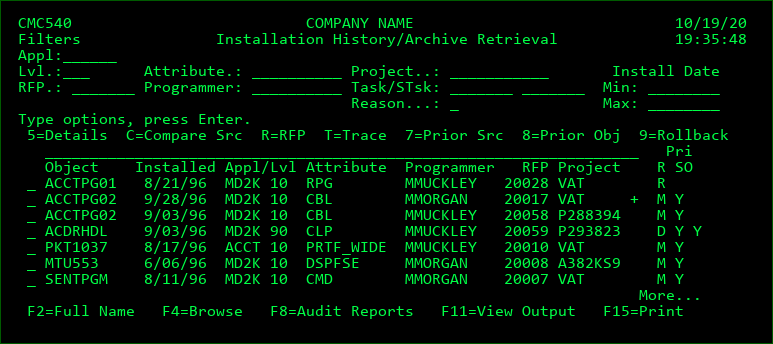
All of the previously installed objects are displayed and subsetted using the filters at the top of the display.
If the promotion of an object results in the change or deletion of previously existing source, the previous version of the source will be archived. Installation History stores between 1 and an infinite number of generations of the source for each object at each promotion level. If an object is not compiled from source code, then the object itself is compressed and archived in the IFS directory MDCMS/ARCHIVE. The number of generations to store is set within the promotion level maintenance function.
Options
5=Details - Display the Installation History Detail.
C=Compare - Place this option in front of 1 entry containing archived source to compare that source to the source that currently exists in the source file for the attribute.
Place this option in front of 2 entries containing archived source to compare those 2 versions to each another.
R=RFP - Toggle to the RFP History, filtered to the selected RFP, in order to view additional information about the RFP or the objects in that RFP.
T=Trace - list the route that an object request has taken as it is deployed to various levels across all partitions. The data includes the date/time of the event as well as the RFP number and user. See the section on Trace Request under Object Manager/Process Request Records for more information.
7=Prior Src - Prompt the user for a location for the archived source to be copied to. The source can be copied to any library that is not managed by MDCMS or to a spooled file.
8=Prior Obj - Prompt the user for a location for the archived object to be copied to. The object can be copied to any library (or folder for IFS objects) that is not managed by MDCMS.
9=Rollback - Rollback selected object and/or other objects for same RFP as selected object.
Filters:
Entering a value into one of the filters fields will cause the list to be re-displayed and subsetted to show only archive records that match the entered filter field values.
Appl -Application.
Lvl - Application Level.
RFP - Request for Promotion number.
Attribute - The object Attribute used for the promotion.
Programmer - The Programmer assigned to the Object Request.
Project - The Project associated with the Object Request.
Task/STsk - The Project Task and/or subtask associated with the Object Request.
Reason - The Reason for the Object Request. Possible values are M=Modify, R=Recompile, U=Update and D=Delete
Installed - the minimum and/or maximum date that the promotion was installed
Position to:
The Position to field appears as above the Object column. Entering a value into the Position to field will position the contents of the subfile to the first record in the current list of archived records that is greater than, or equal to, the entered value.
Function Keys:
F2=Full Name - Displays full name of object when F2 is pressed when cursor is within the Object name field. This can be useful for IFS object names that exceed the length of the Object field within the display.
F3=Exit
F4=Browse - Browse a list of available filter entries depending upon which filter the cursor is positioned to. For example, to browse the RFP list, place cursor on RFP filter field and press F4.
F8=Audit Reports - MDCMS Audit Reports menu. Generate customizable audit reports for what has been installed either within, or outside of, MDCMS.
F11=View Output - Display the MD Output panel and other spool files.
F15=Print - Print a list of promotion records to a spooled file based on filters in current display.