Overview
The MDCMS menu option 2 is a multi-function display that controls the processes required for making and installing modifications of objects.
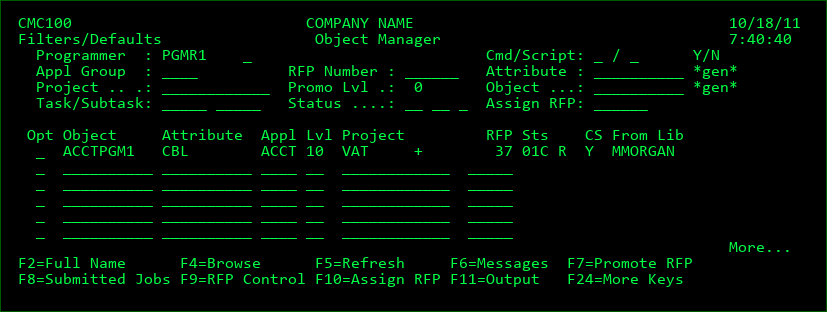
The Object Manager is used for:
- Source/Object request and retrieval.
- Reserving Object names for new objects.
- Grouping objects for installs.
- Identifying modification requests
- Requesting the installation of objects into application environments
Filters / Defaults
Programmer
When an object is requested for modification or a new object name is reserved, it is assigned to a user profile. An entry in this field will limit the listing to objects assigned to the user profile.
Appl Group
An entry in this field will filter by the Application Group that has been entered. An entry here is also the default value for new requests so that the programmer does not need to enter it for each object.
Project
A Project defines the reason, responsible parties, and timeline for work to be done. During the Project process, a request is made to assign one or more Projects to the object. This enables MDCMS to filter and track objects by project. An entry in this field will filter the display to only include objects assigned to the selected Project. An entry here is also the default value for new requests so that the programmer does not need to enter it for each object.
Task/Subtask
The Task, or Subtask, associated with the Project value. Tasks and Subtasks enable the user to further define and subset the work being done for the Project. An Object Request may be assigned to one or more Projects, Tasks or Subtasks. This enables MDCMS to filter and track objects by Project, Task and Subtask. Entries in these fields will filter the display to only include objects assigned to the selected Project, Task and Subtask. An entry here will also be used as the default value for any new requests so that the programmer does not need to enter it for each object.
RFP Number
An RFP is a Request for Promotion. When an object or a group of objects are ready to be installed into an application environment, an RFP is required to track and to group an installation. The RFP is Application Group and Promotion Level specific. The system requires a brief explanation of the promotion request. This explanation is stored in the system and a number is assigned. This number is used to group objects to be installed. An entry in this field will filter the display to only include objects assigned to the selected RFP number.
Promo Lvl
An entry in this field will filter the display by the Promotion Level that has been entered. An entry here is also the default value for new requests. If left blank, the lowest level for the application that allows checkouts will be used by default.
Request Status
The first of 3 status filter fields. As each object is processed through the MDCMS system, a status is applied to the object record to track the modification and installation progress. If this field is left blank, the system will include object records with any active status. An entry is in this field will filter the display to only include objects that match the Status selected.
Status values:
RP - The request for the promotion level is pending MDWorkflow acceptance in the prior level.
UL - The request is currently unlocked so that others can work with the same object.
00 - Object has been requested for modification and a RFP has not been assigned.
01 - An RFP number has been assigned to the requested object.
02 - Approval Pending - an RFP approval is required before the installation process can continue.
CP - File waiting for MDRapid to be launched to copy the data to the new format for the file
CR - MDRapid is currently copying the Data
03 - Installation Pending - The object is ready for installation and requires an RFP installation release.
04 - RFP has been submitted to batch for an installation.
Creation/Copy Status
A value, when applicable, is displayed to the right of the Request Status to indicate the Creation or Copy Status of the object. The value is updated with a creation status when option 8 is used to compile the object into the Developer's library or during the compile and installation of the object as part of an RFP. The value is updated with a copy status when MDRapid is used to copy a file's data from the current format to a new format prior to installation.
Status values:
C - The object was successfully created or copied
E - An error occurred during the creation or installation of the object
L - RFP blocked due to lock on the Object or Source member
00-99 - the maximum % of data that has been copied during the MDRapid process
Additionally, value N can be used in the filter to only list objects for which no creation or copy has been attempted.
Conflict Status
A value, when applicable, is displayed to the right of the Creation/Copy Status to indicate status of Conflict Resolution when multiple versions of an application are managed.
Status values:
O - Conflict Resolution open - other versions have not been resolved
L - Conflict ignored for this level, but will be open again when RFP continues to next level
I - Conflict ignored for all levels for this request
R - Conflict has been resolved for all other versions for request
Additionally, value N can be used in the filter to only list objects for which Conflict Resolution is not necessary.
Cmd
Y - Filter the object requests to show only those requests that contain commands defined for the specific object.
N - Filter the object requests to show only those requests that don't contain commands defined for the specific object.
Script
Y - Filter the object requests to show only those requests that contain scripts defined for the specific object.
N - Filter the object requests to show only those requests that don't contain scripts defined for the specific object.
Attribute
An attribute is the identifier for the handling of each type of object. The attribute is defined in Option 3 of the System Settings and specifies source/object locations, compile handling, etc. An entry in this field will filter the display to only include objects assigned to the selected attribute. An entry here is also the default value for new requests. The wildcard character * can be used as a generic prefix or suffix for the value.
Object
An entry in this field will limit the display to requests for matching object names. The wildcard character * can be used as a generic prefix or suffix for the value.
Assign RFP
The RFP number to use when assigning request records to a promotion grouping.
Using option 'A' in front of individual unassigned object requests, will then immediately apply the Assign RFP value to those requests (if for same Application and Level as RFP number).
Using F10 will assign the RFP number to all unassigned requests in the filtered list for the same Application and Level.