Project Listing
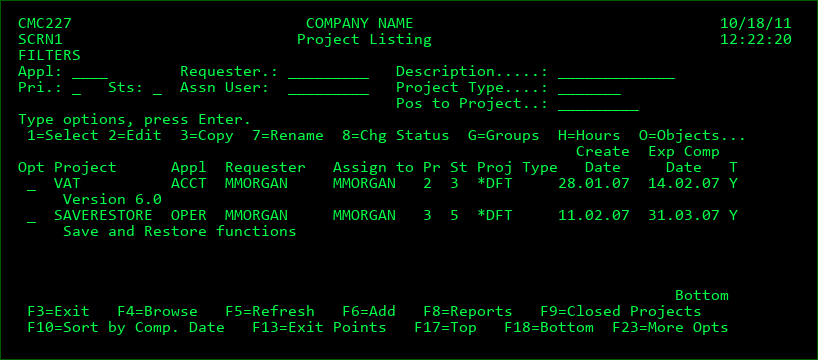
The Project Listing display is accessed from main menu option 6 or by pressing F4 from the Object Manager when the cursor is on a Project field.
NOTE: Not all functions of the Project Management system are available within the 5250 UI. Refer to the MDWorkflow web application documentation for those features available within MDWorkflow or MDOpen.
Filters
The Project Listing is filtered by the fields at the top of the display. If the Status (Sts) filter is left blank, only Projects with an open status will be displayed. Press F9 to display closed Projects.
The description filter will list all Projects that have matching text in the title. For example, enter PRINT to list only Projects with print somewhere in the title. The description filter is not case sensitive.
Options
1=Select - Return the selected Project back to the requesting process. This option will only appear when using F4=Browse in the Project field of the Object Manager panel.
2=Edit - Edit the Project's detail information.
3=Copy - Copy the details of a Project to a new Project ID.
5=Display - View the Project's detail information.
7=Rename - Rename the Project to a new value. When renamed, the Project ID in all related tables for configuration, activity and history are also renamed. The original value is only retained in API logs for audit reasons.
8=Chg Status - Select a new status for the Project from a list of possible status codes, based on authority and current status. NOTE: If the new status closes the Project, a warning will be given if the Project still has open Tasks or Subtasks. The user can bypass the warning by pressing Enter and all Tasks and Subtasks will also be closed.
G=Groups - Acceptance and Technical Groups assigned to project. Option only available when MDWorkflow is licensed.
H=Hours - View and enter hours worked on behalf of the project.
O=Objects - View a list of objects that are or were modified for the selected Project.
T=Tasks - View and manage the tasks for a Project.
Function Keys:
F3=Exit
F4=Browse - Browse list of valid values for the Filter fields.
F5=Refresh
F6=Add - Add a new Project.
F8=Reports - Define or run a Project or Task Report.
F9 - Toggles display between Active Projects and Closed Projects.
F10 - Toggles display between Sort by Comp. Date and Sort by Project.
F11=View Output - Display the MD Output panel and other spool files
F13=Exit Points - View/Manage the Exit Point definitions for when commands should be executed when a project, task or subtask transitions to a new status.
F17=Top - Position cursor to top of list.
F18=Bottom - Position cursor to bottom of list.
F23=More Opts - View additional options available for a Project