Project/Task Hours Used
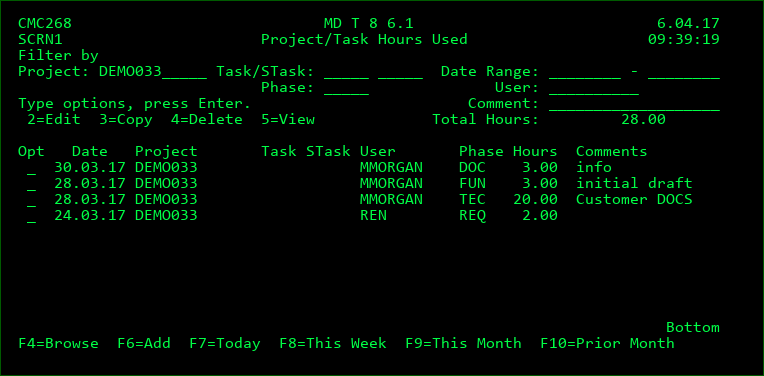
The Project/Task Hours Used listing provides an overview of hours worked based on a variety of filters and provides the means to enter hours worked. This display is accessed is 2 ways:
- Using the H=Hours option for a Project, Task or Subtask. This listing then filters the entries by default to show the hours worked for that Project, Task or Subtaski.
- Pressing F19 from the Object Manager. This listing then filters the entries by default based on the filters used the last time this screen was entered from the Object Manager.
Filters
The Hours Used Listing is filtered by the fields at the top of the display.
The comment filter will list all entries that have matching text in the comment. For example, enter PRINT to list only entries with print somewhere in the title. The comment filter is not case sensitive.
Total Hours
The sum of all records listed based on the filter criteria
Options
2=Edit - Edit the number of hours or Comments for an entry
3=Copy - Copy an existing entry to a new entry
4=Delete - Delete an entry
5=View - View the details of the entry
Function Keys:
F3=Exit
F4=Browse - Browse list of valid values for the Filter fields.
F5=Refresh
F6=Add - Add a new entry
F7=Today - change the date range filters to show only today
F8=This Week - change the date range filters to show only the current week
F9=This Month - change the date range filters to show only the current month
F10=Prior Month - change the date range filters to show only the prior month
Time Entry
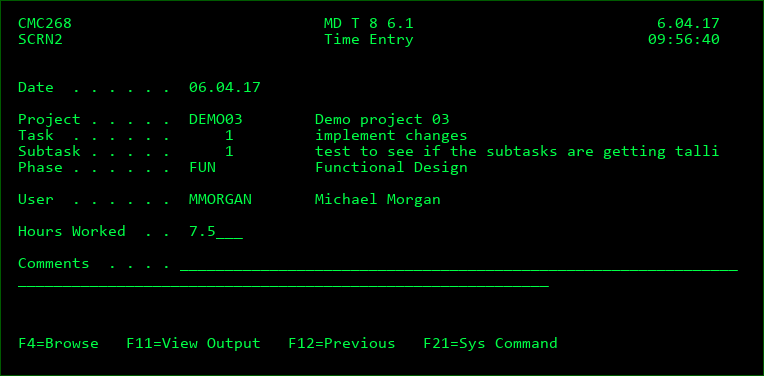
A new time entry can be added or modified from this screen.
Date
The date the work occurred. Required Field.
Project
The project for which the work was performed. Required Field. Enter value or press F4 to select from list of Projects that you are authorized to see.
Task
If work was performed for a task within the project, enter that number here or press F4 to select from a list.
Subtask
If work was performed for a subtask within the project task, enter that number here or press F4 to select from a list.
Phase
The project phase used to categorize the type of work performed. Required Field. Enter value or press F4 to select from the list of Project phases. Also Press F4 on this field in order to create or modify the list of Project Phases.
User
The MDSEC ID of the user that performed the work. Required Field. Enter value or press F4 to select from list of users.
Hours Worked
The number of hours for that day that were worked for the combination of project, task, subtask, phase and user. The number to the left of the decimal point are the number of hours and the number to the right of the decimal point is the percentage of an hour. Required Field.
Comments
Free text to further describe the work performed.