Promoting an RFP
Once 1 or more objects are assigned to an RFP, the Request for Promotion may be submitted. This is done by pressing F7 from the Object Manager or F7 from the RFP Manager.
The list of all RFPs in status 01 (Open, one or more request records assigned to RFP) OR SE (Partially Open, prior submit ended in error) is displayed. The filter and command handling of this list is identical to the RFP Control list.
Enter a '1' for one or more RFP numbers to promote them.
If the RFP status is currently 01, MDCMS then immediately runs an extensive series of checks on the contents of the RFP. If any warnings or errors are found, a screen is displayed detailing the exception and providing some options to correct them directly from the screen. Warnings can be ignored, though some warnings require specific MDSEC authority to be able to ignore. Errors must be resolved be the RFP can be submitted.
For automatically submitted RFPs, the RFP is only checked for error exceptions.
| Option / Field | Description |
|---|---|
| Excp. ID | Description |
| ERROR 1 | Source or Object not found for Recompile requests. For any object with an attribute containing source, MDCMS checks in the target source library, migration chain, based-on levels and source search template for the source. For any object with an attribute without source defined, MDCMS checks in the target object library, migration chain, based-on levels and object search template for the Object. |
| ERROR 2 | Unlocked Object Requests. Every object request in an RFP must be in a locked state in order to submit the RFP |
| ERROR 3 | Object not found for Update requests. MDCMS checks in the target object library, migration chain, based-on levels and object search template for the object. |
| ERROR 4 | Uncommitted Object Requests. For *REMOTE and *IFS requests where the file originates from outside the system, the file must first be committed to MDCMS using MDOpen. |
| ERROR 5 | Incomplete Deletion requests for contents of an IFS Directory that has been requested for deletion. Every folder and file within the requested directory must also be requested for deletion. This can be done recursively by re-requesting to delete the directory and selecting to include contents. |
| ERROR 6 | Object Requests not assigned to a Project. Every object request in an RFP must be assigned to at least one project in order to submit the RFP. |
| ERROR 7 | Requests not Assigned to Approval Template. Object Approval Templates are required for the Promotion Level to approve the RFP for installation, but the listed objects aren't assigned to an Object Approval Template to determine which Approval Groups are involved. If you have authority to MDSEC code 23 for the Promotion Level, you can use option 1=Assign to Template in order to select the template to add the object(s) to. |
| ERROR 8 | MDWorkflow acceptance not granted in prior level for objects in RFP. The submission of an RFP into the next level depends on every RFP containing any of the RFP's objects in the prior level to have been accepted, if MDWorkflow Acceptance is enabled for the prior level. |
| ERROR 9 | Project/Task Status outside Boundary for Action. If Status Boundaries are defined for the target level to limit when and RFP can be submitted, each Project, Task or Subtask (depending on the boundary definition) that is assigned to requests in the RFP must be within the defined range. |
| ERROR 10 | Missing Database Relations for Modified Files. For any modified file, along with logical files over that file, each database relation (LF, index, view, materialized query table) that isn't part of the RFP is listed. |
| ERROR 11 | Unresolved Merge Conflicts. When the RFP is for a level designated as the Trunk and the RFP was received locally from a Branch, then any source code in conflict status must be set to Resolved before the RFP can continue. Resolution is performed in MDOpen using the option Compare with Branch on the RFP. A source member/IFS file is considered to be in conflict if it is different than the source currently in the trunk and the source in the trunk has either not yet reached production or it was installed after the source was checked out in the branch. |
| ERROR 12 | Code Review Quality Gate. If any source code in the prior level requires a Code Review and the Code Review template for the attributes has the Quality Gate parameter set to true, then the next step in the migration path is not permitted until the Code Review has completed with a status of SUCCESS. If you have authority to MDSEC code 58 for the prior level, you can use option O to override the Quality Gate and continue with the RFP submission. |
| WARNING 1 | Missing Dependencies for Modified Files. For any modified file, along with the logical and reference files over that file, each dependency that is not part of the RFP is listed. See the MDXREF manual for more information about the usage codes. If the dependency is a program or module, and that dependant has record-level access to the file, this warning will not be permitted to be ignored, unless MDSEC code 35 is granted to the user for the target level of the RFP. |
| WARNING 2 | Missing Programs for Modified Source Members. For any *SOURCE request, all programs or modules that copy the source (copybook), but aren't requested in the RFP, are listed. |
| WARNING 3 | Missing Programs for Modified Modules. All ILE Programs and Service Programs that bind a requested module, but aren't included in the RFP, are listed. |
| WARNING 4 | Missing Programs for Modified Service Programs. All ILE Programs that require a requested service program, but aren't included in the RFP, are listed. |
| WARNING 5 | Objects to be migrated are older than the existing objects. If a non-compiled object has been requested to be imported, but the source change date on that object is older than the object already in the target application, then the object is listed. This is to help flag when a vendor sends the wrong version of an object. |
| WARNING 6 | Objects already requested for Next Level. The listed objects are already requested for promotion at the next level from the target level of this RFP. The result of continuing with the promotion is that the changes in this RFP will overwrite the changes requested in the prior RFP(s). If the existing requests for the next level are by a different user than the user(s) that requested the objects for this RFP, the user submitting this RFP must be granted MDSEC code 55 (Merge Other Users into RFP) in order to continue. If the existing requests for the next level are for a different project than the projects for this RFP, the user submitting this RFP must be granted MDSEC code 56 (Merge Other Projects into RFP) in order to continue. If the existing requests for the next level are for different tasks than the tasks for this RFP, the user submitting this RFP must be granted MDSEC code 57 (Merge Other Project Tasks into RFP) in order to continue. If authorized, and this RFP is set to create the requests for the next level, the user must choose if the existing RFPs should be automatically merged into this RFP when finished. N=don't auto-merge - the existing RFPs remain active and any objects that were already requested won't be part of this RFP at the next level. Y (recommended)=auto-merge - all existing RFPs that conflict with this RFP will be automatically merged into this RFP for the next level. The existing RFPs will then be automatically closed. |
| WARNING 7 | Objects already requested for next level that won't be overwritten. Lists all object requests that promote from a different level than the target level of this RFP or that are already in the process of being installed. The existing RFPs remain active and any objects that were already requested will be requested in the new RFP for the next level in Unlock Mode. |
| WARNING 8 | Objects already in Send Queue. The listed objects are already requested to be sent to target systems in other RFPs for this target level. The result of continuing with the promotion is that the changes in this RFP will overwrite the changes requested to be sent in the prior RFP(s). If the existing requests in the send queue are by a different user than the user(s) that requested the objects for this RFP, the user submitting this RFP must be granted MDSEC code 55 (Merge Other Users into RFP) in order to continue. If the existing requests in the send queue are for a different project than the projects for this RFP, the user submitting this RFP must be granted MDSEC code 56 (Merge Other Projects into RFP) in order to continue. If the existing requests in the send queue are for different tasks than the tasks for this RFP, the user submitting this RFP must be granted MDSEC code 57 (Merge Other Project Tasks into RFP) in order to continue. If authorized, and this RFP is set to send, the user must choose if the existing RFPs should be automatically merged into this RFP when finished. N=don't auto-merge - the existing RFPs remain active. The objects will be in the old and new RFPs in the send queue. Y=auto-merge - all existing RFPs that conflict with this RFP will be automatically merged into this RFP in the send queue. The existing RFPs will then be automatically closed. If your organization prefers that an auto-merge of RFPs in the Send List should ALWAYS or NEVER happen, the choice can be locked down by application by setting parameter Auto-Merge RFP in Send List to Y for ALWAYS or N for NEVER. |
| WARNING 9 | Objects in process of being Installed. Any compiled object that is being installed at the same time in another RFP (due to recompiles) is listed to indicate that an unintended version of the object may end up in the target object library. |
| WARNING 10 | Objects that have been deployed to an Emergency Level. Each object that was deployed to an emergency level since the last time it was deployed to the target level is listed. This is to keep visibility on the emergency deployments, in case those changes need to be retrofitted into the standard version. |
| WARNING 11 | Dependencies in Linked Apps for Modified Files. Objects that exist in linked applications that depend on files in this RFP. |
| WARNING 12 | Programs in Linked Apps for Modified Copybooks. Objects that exist in linked applications that depend on source copybooks in this RFP. |
| WARNING 13 | Programs in Linked Apps for Modified Modules. Objects that exist in linked applications that depend on modules in this RFP. |
| WARNING 14 | Programs in Linked Apps for Modified Service Programs. Objects that exist in linked applications that depend on service programs in this RFP. |
| WARNING 15 | Recompiles based on Uninstalled Requests. This warning indicates when objects are requested for recompile in this RFP, that are based on source in a different level, but that source hasn't been deployed yet to that based-on level. This usually indicates that the RFP for that level should be installed before continuing with this RFP. |
| WARNING 16 | Objects Installed Since Checkout. Objects are listed that have been installed into the target level between the time that the object on this RFP was checked out in the originating level and now. This is to provide awareness that potentially other project work had passed through this level in the meantime. |
| WARNING 17 | Missing External References for Requested System Objects. Files in a Git Repository, SVN Repository or IFS reference a system object that is requested for modify or delete in the RFP, but external File itself isn't included in the RFP. If you should never be warned about a given External Reference in the list, option I=Ignore can be used to permanently skip the warning for that specific file. If it should ever be important in the future, it can be unignored from the MDOpen External Reference view. |
| WARNING 18 | Missing SQL Routines for Programs. Programs or Service Programs are requested in the RFP for modification or recompile and these programs are invoked by SQL Functions or Procedures, but the routine isn't included in the RFP. This can lead the routine to be dropped by the system if it isn't included with the RFP. |
| WARNING 19 | Locked Source Members. Source members that are to be deployed are currently locked in the developer library. Close the source editor for each member and press F5 to refresh the list. |
If any of the listed conditions are true, a screen will appear for each warning or error allowing for the correction or confirmation of the issue.
Once all errors have been corrected, the following confirmation screen will appear with the default submission parameters, based on the job description for the promotion level.
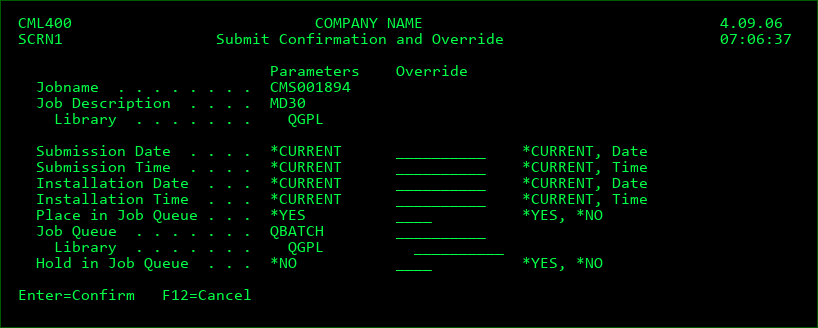
Submission Date
*CURRENT - submit the RFP today
date - schedule the submission for the entered date. If the job is immediately placed in the job queue, be certain that an IPL does not occur between now and the scheduled date
Submission Time
*CURRENT - submit the RFP at this time
time - schedule the submission for the entered time
Installation Date
If the level for the RFP allows for automatic approval and installation, the date and time of the installation can also be controlled when performing the initial submission.
*CURRENT - install the RFP on the same day that the bundling process is complete
date - schedule the installation for the entered date.
Installation Time
*CURRENT - install the RFP as soon as the bundling process is complete
time - schedule the submission for the entered time
Place in Job Queue
*YES - the job will be submitted immediately to the job queue and scheduled for the entered date/time
*NO - the job is intended to be submitted no sooner than the scheduled date/time by the MDSBMRFP process. The status of the RFP is changed to SP for Submission Pending.
Job Queue
The name and library of the job queue to use if placed in a job queue
Hold in Job Queue
*YES - the job will be placed in the job queue in hold status so that something can release the job at a later time
*NO - the job will be placed in the job queue in released status for automatic processing
Delay Delete Prior Obj
*YES - the temporary library holding the prior version of the installed objects will not be deleted until the following day. This allows active jobs to continue using the prior version of programs that were already invoked by those jobs.
*NO - the temporary library will be deleted as soon as the installation is complete