Promotion Objects Display
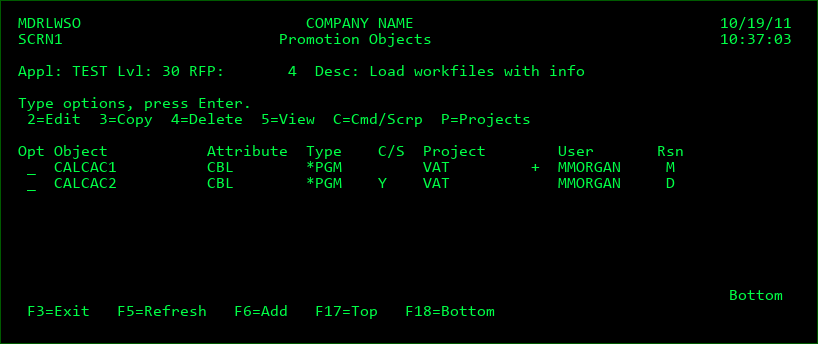
This display, which is accessed by taking option O=Objects against an RFP on Send Promotion to Remote System panel, lists all source or objects within a promotion package that would be sent to a remote system. The reason for the promotion is listed with each entry. The reason may be M for a modification, R for a recompile, U for an Update or D for a deletion.
The following options are available for each entry in the list:
2=Edit - Edit the request parameters for the object. The parameters are equivalent to those that can be changed in the Object Manager - see Section 2 - Edit Request Details in the Object Manager chapter for more information.
3=Copy - add an object request to the RFP using the parameters for selected object as initial values
4=Delete - Remove the object from the promotion package
5=View - View the details of the object
C=Cmd/Scrp - Display and edit the commands and scripts to be sent with the object
P=Projects - Display and edit the projects that the object is assigned to
F3=Exit
F5=Refresh - refresh the list
F6=Add - add an additional object to the promotion package
F17=Top - position cursor to the top of the list
F18=Bottom - position cursor to the bottom of the list