Receive Promotion from Remote System
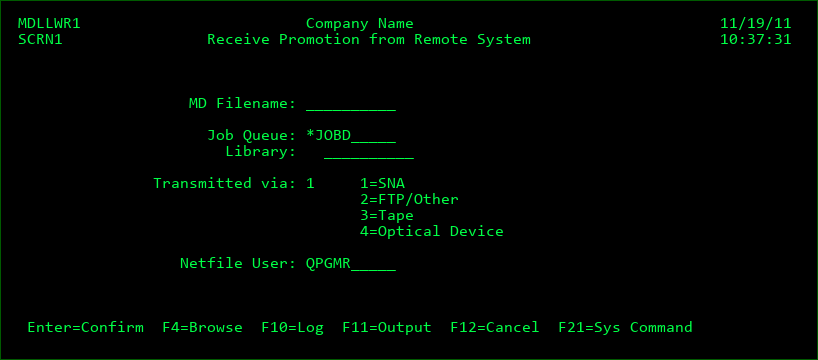
If the automatic receipt of Promotions is not used (see Promotion Level settings and API's MDRCVIFS or MDRCVSNA), then MDCMS promotions sent from remote systems are received using the above display, which is option 9 from the MDCMS Main Menu.
Promotion packages may be received here via SNA, FTP, GoAnywhere, XCOM, tape, or optical device. MDCMS remembers which method was used the last time that a promotion was received. It is best to set the Transmitted via parameter (if incorrect) before entering the other information
MD Filename
Enter the name of the file containing the promotion. MD promotion packages are always named 'MD' and the 1-character Host ID of the sending system and the 6-digit RFP number. Press F4=Browse to browse the list of outstanding promotion packages.
Job Queue/Library
The actual receive job is submitted to batch. The subsystem job queue/library may be specified for the receive job.
Netfile User
If the promotion package was sent via SNA, and a specific Netfile user was entered (default is QPGMR) then that same user id must be entered here to receive the promotion.
If the promotion is transmitted via tape or optical device, an additional parameter for Tape Device and Optical Device will prior to confirmation. These parameters are required for receiving the promotion or for browsing the MD promotion packages that exist on each media.
Press Enter to submit the receive job.
The submitted job creates a temporary library with the same name as the file. All source and objects related to the promotion are placed in this temporary library. After the objects are installed, the temporary library is deleted.
New MDCMS request records are written for the source/objects and a new RFP number is generated for the received items. The Promotion will then be ready to be installed into the lowest level for the application, unless a higher target level was specified when the Promotion was sent.
If Auto-Submit for the Promotion Level is set to Y, then the compilation portion of the installation will begin as soon as the receipt has completed.
Common Receive Exceptions
Promotion Level not defined for the sent application and target level. The Promotion Level will need to be defined (or the settings sent from another system).
The job description assigned to the level is corrupt (missing library, job queue, user, authority, etc.). Verify the parameters of the job description.
If a sent object is already requested on this system, and the object is in the process of being installed (Status 02 or higher), then a new request record will not be written for the object and report MDRCVERR is generated. Receive Error Commands, if defined for the Promotion Level, will be processed.
If the attribute for a sent object is not defined on this system, then a new request record will not be written for the object and report MDRCVERR is generated. Receive Error Commands, if defined for the Promotion Level, will be processed.
If a sent object is already requested on this system from a different RFP, and the object is only in reserved status (Status 00 or 01), then the existing request will be modified to migrate the source/object from the temporary library of this promotion at installation time and a warning will be generated. Receive Warning Commands, if defined for the Promotion Level, will be processed.
If the same RFP is resent to this location and objects from the prior send are already requested in reserved status (Status 00 or 01), then the existing RFP will be deleted entirely and replaced by the resent RFP. A warning will be generated. Receive Warning Commands, if defined for the Promotion Level, will be processed.