RFP Commands
An entry of 'C' for an RFP activates the MD Detail Command Maintenance function for a specific RFP. This function is used to define IBMi commands that can be executed during the processing of the specific RFP.
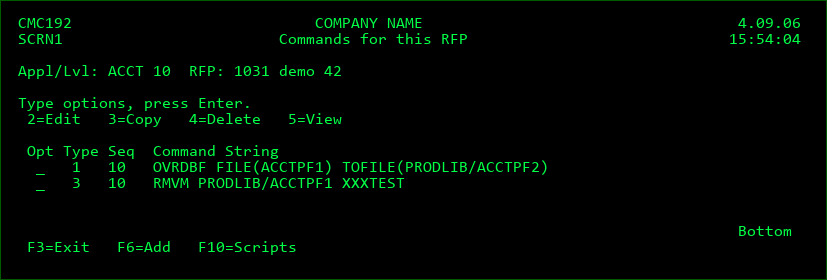
Type
| Column 1 | Column 2 | Column 3 |
|---|---|---|
| L | Object Lock | runs during the compile or installation process when a required object or source is locked. Separate field Wait before Usage specifies the amount of time to wait before executing the command. Multiple commands can be defined in order to have a lock escalation process in place. |
| V | Pre-Submit Validation | runs when user selects to submit an RFP for promotion. Command MDCHKRFP must be used and this provides an organization with the ability to add custom validation rules before an RFP can be submitted. See section MDCHKRFP API for more information. |
| 1 | Pre-Compile | runs prior to compiling objects |
| P | Post-Compile | runs after all object compilations are successfully completed |
| E | Compile Error | runs when the compile phase of an RFP fails to complete successfully. |
| A | RFP Approved | runs after an RFP has been approved for installation |
| J | RFP Rejected | runs after an RFP has been reset from Waiting for Approval status |
| F | MDRapid Waiting to Launch | runs after an RFP has been approved and MDRapid is required for the RFP |
| G | MDRapid Started | runs to indicate that MDRapid has begun copying data for changed files |
| H | MDRapid Completed | runs after all existing records in the changed files has been copied to inform the users that the installation can be started. |
| I | MDRapid Error | runs when the MDRapid Data Copy phase of an RFP fails to complete successfully. |
| 2 | Pre-Installation | runs prior to installing objects into the environment |
| 3 | Post-Installation | runs after the installation of objects is complete, but prior to releasing the application for usage. Command errors can trigger an automatic roll back of the RFP. |
| Q | Installation Archive/Cleanup | Runs after the installation of objects is complete and the application is released for usage to avoid prolonging the downtime window. Typically used for post-installation notifications or other processes that don't require a roll back if they fail. |
| 4 | Installation Error | runs when the installation phase of an RFP fails to complete successfully. This type could be used, for example, to send an email or SMS to the installer if a weekend Installation fails. |
| W | Installation Warning | runs if an RFP Installation completes, but with warnings. Warnings can occur if data cannot be copied or if a Post-Installation Command fails to run successfully. |
| S | RFP Test Status Accepted | runs if an RFP Test Status is Accepted in MDWorkflow |
| T | RFP Test Status Rejected | runs if an RFP Test Status is Rejected in MDWorkflow |
| 5 | Pre-Send | runs once prior to sending an RFP to one or more remote systems |
| 6 | Post-Send | runs once, after an RFP has been successfully sent to one or more remote systems |
| 7 | Send Error | runs in case the send of an RFP fails to complete successfully |
| 8 | Post-Receive | runs after an RFP has been successfully received from a remote system |
| 9 | Receive Error | runs in case the receipt of an RFP fails to complete successfully |
| R | Receive Warning | runs in case the receipt of an RFP completes, but with warnings |
Sequence
The sort sequence of the command at run time, in case multiple commands for the same type are defined.
Ignore Errors
Y - Continue with RFP processing even if the command fails. Flag will always be Y for type 3.
N - Cease and Rollback RFP processing if the command fails
Keep MD Libs in Libl
N - The MD Libraries (MDCMS and MDXREF) are removed from the library list before the command is invoked. This assures that any MD Objects with the same name as your objects are not used.
Y - The MD Libraries are left in the library list. This is necessary when MD Objects, such as interface programs, MDMAIL or MDMAILF, are needed to process the command.
Location to run Cmd
The location that the command should be run, allowing for commands to be run only for certain environments. Enter a valid Location ID or press F4 to select a location from the list.
Otherwise, select from one of the following special values:
*ALL - run the command on every level in the migration path
*LOCAL - run the command on any level on this system
*LOCLVL - run the command only for this level
*REMOTE - run the command on any level everywhere but this system
Run as User Profile
By default, commands executed during an RFP run under the profile of the user profile defined on the job description of the application level for the RFP. If a specific command should run under the authorities of a different user, that user ID can be entered here. As a safety precaution, the user placing a value in this field must have authority to use that entered user profile in order to save the command definition.
Command
The IBM i or user-defined command to be performed. Enter the name of the command and then press F4 to fill in the keywords.
Some placeholder parameter values may be used and are substituted by MDCMS at run-time. The placeholder value may be typed directly into the command or the cursor may be positioned in the command and F7 pressed to insert the value from a list. The full list of values are in this manual in the Attribute Command section.