Send History
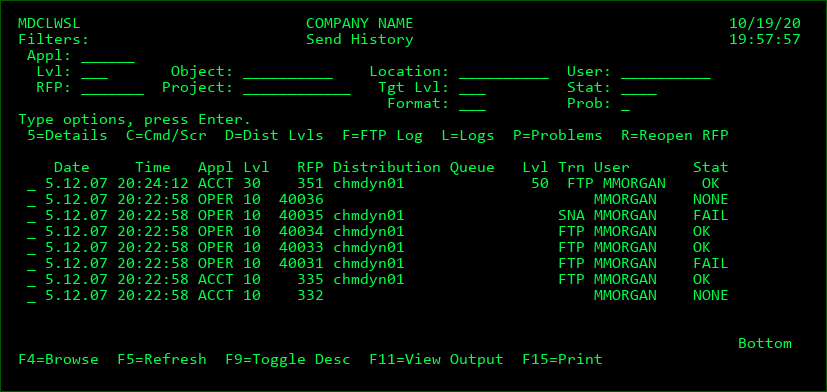
This display will list the promotion send history for all promotions that have been attempted (since the installation of MDCMS version 6.2.4 or higher) plus all promotions that have been removed from the Send List without having been sent.
Filters
Enter a value into a filter field to limit the listing to items matching the filter(s). Possible values may be selected by pressing F4=Browse while the cursor is positioned on the filter field.
Options
5=Details - View complete details of the send, including object and project information
C=Cmd/Scr - display the RFP-Level commands and scripts that were defined for the promotion
D=Dist Lvls - view/manage the settings for the Distribution Levels
F=FTP Log - If the Send was processed using FTP, the FTP log can be displayed in order to analyse and correct any connection problems.
L=Log - view all steps that have occurred during the most recent Send Batch for the RFP. For each step, the job log entries can be viewed for additional information. The steps, the job log, or a combination of both can be exported to an excel report.
P=Problems - display the list of any warnings or errors that occurred during the send or, if available, during the receipt and installation on the target system
R=Reopen RFP - Reopen the RFP so that it can be sent again
Function Keys:
F4=Browse - Browse possible values for a filter field
F5=Refresh
F9=Toggle Desc - Toggle the display between showing/hiding the RFP description
F11=View Output - Display the MD Output panel and other spool files
F15=Print - create a report in MD Output based on the currently entered filters