Overview
What is MDRapid?
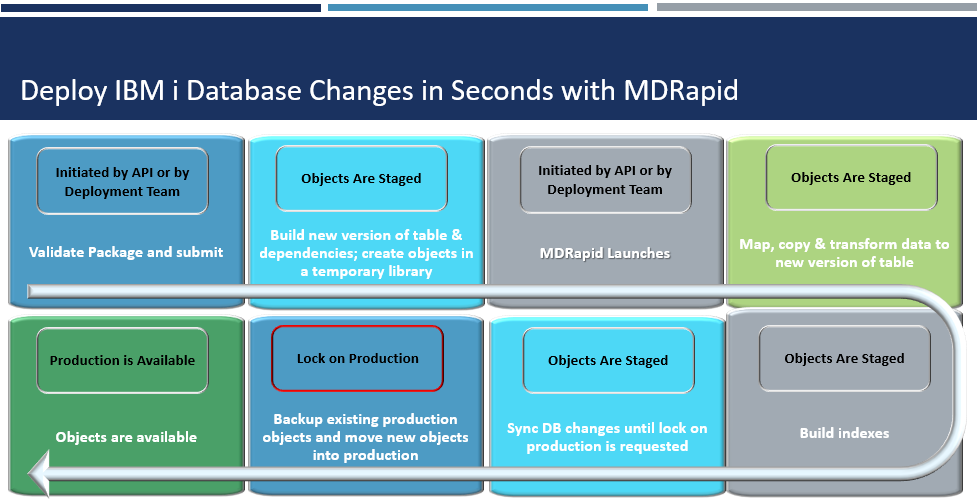
MDRapid is a software product that runs on the IBM i to minimize downtime when making database changes.
The changes are prepared in a copy of the impacted tables. All existing data is transformed and mapped from the live tables to the new version of the tables while the applications are still running. Any database transactions that occur during this time period are also transformed and mapped to the new version of the tables. Any database relations over those tables are also prepared while the applications are still running.
When it is time to deploy the new version of the tables and their database relations into the applications, MDRapid merely has to move them, which requires only fractions of a second per object.
Prerequisites for using MDRapid
- An active MDChange (MDCMS), MDRapid and MDTransform License on each IBM i partition where the product will be used.
- The IBM i operating system must be V7R2M0 or newer.
- The user that will initially install the product must have *SECADM and *ALLOBJ authority. A strong user profile is not required for the actual use of the product.
- Sufficient disk space must be available to allow for a temporary doubling of the disk usage for the table(s) to be modified. MDRapid will not proceed if the disk utilization is projected to exceed 95%.
- The ability to briefly obtain an exclusive lock on the impacted tables during the deployment time window.
- A maximum of 300 tables per database journal per deployment. No limit for the number of journals.
- Journals used to track transactions for the tables must be set to not automatically delete journal receivers so that MDRapid has time to register the transactions. A minimum delay of 4 hours before deleting is recommended.
The MDRapid Process
Launch MDRapid
When MDRapid is launched, a job is submitted to prepare everything for copying/submitting.
The launch job performs the following tasks:
- It creates a temporary library for each distinct target library. The library name will have the same prefix as the temporary install library, then the letters RP, followed by a 5-digit number.
IMPORTANT: If you use a DR product such as Mimix, it is very important to omit all libraries that begin with the temporary install library prefix. The default prefix is MDI, but can be set to a different value in the MDCMS System Settings if it conflicts with other libraries on your system.
If you use the IBM Db2 Mirror for i product, MDRapid automatically omits the temporary libraries for you.
-
For each table that is requested for modification or recompile, the table is copied from the temporary install library to the temporary MDRapid library.
-
For each table that is requested for update (alter), the table is copied without data from the target application library.
-
If the table in the target application library is not currently journaled, MDRapid will create a journal and journal receiver in the temporary install library and start journaling for the table. For this to be successful, MDRapid must briefly be able to get an EXCLRD lock on the table.
-
The MDRapid Monitor job is submitted to the job queue defined on the MDRapid Usage Template for tracking and processing all ongoing tasks.
Journal Tracking Jobs
A journal transaction job is started for each Journal used by the involved tables within the RFP. Each journal job is named Jnnnnnnnzz whereby n is the RFP number number and z is an identifier. It runs for the duration of the copying and syncing process to note any record and member level journal transactions occurring for the table(s) to be deployed.
Each transaction is placed in a data queue in the MDRapid temporary library of the same name as the table. When the table reaches the sync process, it will then process the transactions in the same order as they originally occurred.
As there can be a short delay between the generation of transactions in a journal receiver and the reading of the journal transactions by the MDRapid journal job, it is recommended to retain a prior journal receiver for at least 4 hours before deleting from the system.
Monitor MDRapid
The monitor job is named MnnnnnnnMO whereby n is the RFP number. It runs for the duration of the copying and syncing process to start and monitor the progress of each table’s MDRapid jobs.
The monitor job performs the following tasks:
-
Start the MDRapid jobs for the table with the largest number of records
-
If multiple parallel copy jobs are allowed, based on the MDRapid Usage Template, the next largest table will be started, and so on until max number of parallel jobs are started.
-
Once the copy portion of an MDRapid job is complete, the monitor job will start the MDRapid job for the next table in the queue. This continues until all MDRapid table jobs have been started.
-
Once the copy portion of an MDRapid table job is complete, the monitor job checks if there are any non-unique indexes that are based on the table and submits a job to create them.
-
Update status for a job if it abnormally ends or remains stuck in the job queue.
Copy Phase of MDRapid
A MDRapid Copy and Sync job for a table is named Mnnnnnnnzz whereby n is the RFP number and z is an identifier. 2 or more jobs with this name will run during the copying process and 1 job will run during the syncing process.
The MDRapid table jobs perform the following tasks during the copy phase:
-
Any defined pre-copy commands are invoked and applied to the new version of the table in the MDRapid temporary library.
-
If the table was requested for update, any defined update commands are invoked and applied to the new version of the table in the MDRapid temporary library.
-
Check if any logical files are based exclusively on the table and create them before copying data to ensure any unique constraints are supported and avoid potential for duplicate errors during the syncing process. The logical files will be created in the order listed on the RFP, so if access paths are shared, sequence the files accordingly prior to submitting the RFP for processing.
-
Mark the start time for when the sync phase begins, in order to avoid missing out on any transactions occurring during the copy phase.
-
Copy the rows in the live table to the new version of the table. This is performed in batches of 5,000 rows per copy job. A separate job monitors the copy jobs and updates the status that is visible in the MDRapid console.
-
Any defined post-copy commands are invoked and applied to the new version of the table in the MDRapid temporary library.
Sync Phase of MDRapid
The MDRapid table job performs the following tasks during the sync phase:
-
Read the journal transaction instructions that were written to the data queue for the table by the journal tracking job. For each transaction, map the insert, update or delete of a record to the new version of the table, transforming the column values as defined. If a member level transaction, then add, remove or clear a member in the new version of the table.
-
Once all outstanding journal transactions are processed, enable any check and referential constraints and set status for table to Sync/Idle, indicating that installation of the table can occur.
Install Phase of MDRapid
Once all tables are in Sync/Idle state and all database relations are created, the RFP is set to status 03=Ready for Installation. The RFP will then either automatically install, if defined to do so, or syncing will continue until a user manually requests to start the installation.
The Installation Steps:
-
Run any defined pre-installation commands and scripts, for example to end application jobs.
-
Validate that all MDRapid sync jobs are active, to ensure no final transactions will be missed.
-
Obtain an *EXCLRD lock on the tables in the live application
-
Wait for the MDRapid sync jobs to complete and end
-
Obtain an exclusive lock on all tables, indexes and views that will be replaced by the new versions.
-
Move the current versions to a temporary backup library
-
Move the new versions to the application library
-
Apply journaling and any defined triggers to the new versions
-
Run any defined post-installation commands and scripts, for example to restart application jobs.
Auto-Rollback of Failed Installation
If the installation of the RFP fails, MDCMS will try to put everything back into the MDRapid temporary libraries as they were before. If the Rollback processes normally, you can use the MDRapid console to restart the syncing and monitor jobs from where they left off.
If the rollback failed, or you know that data was modified in the tables while in the install phase, a reset of the RFP to status CP (Copy Pending) and restarting MDRapid from scratch will be necessary.