MDSEC Application Levels for Role
Option A=Authority from the MDSEC User Role Listing: all Application Levels for which the role is authorized.
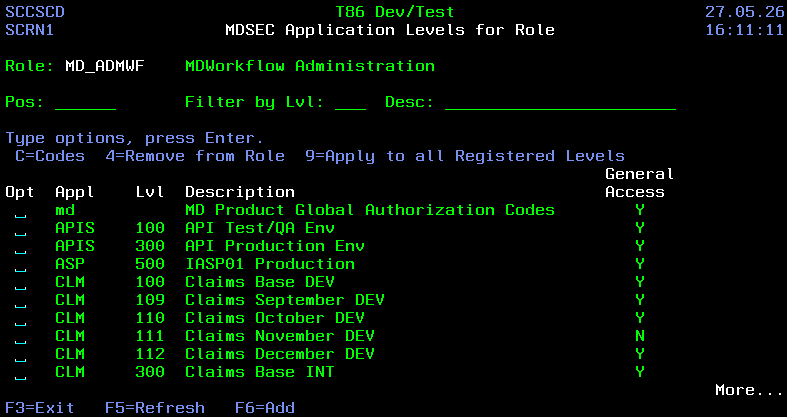
Positioning and Filtering List
| Field | Description |
|---|---|
| Pos | the cursor will be positioned to the first application >= entered value |
| Lvl | only application levels for the entered number will be listed |
| Desc | only application levels containing the entered value in the description will be listed |
Fields
| Field | Description |
|---|---|
| Appl | An application defined either in MDCMS/MDXREF or "md" for the global codes |
| Lvl | A level defined either in MDCMS/MDXREF or "0" for the global codes |
| Description | Description of the application level |
| General Access | If general access (code 0) is granted to the level for the role. This allows for turning off authority for the level without removing codes for the level. |
Options
| Option | Description |
|---|---|
| C=Codes | View/Edit the codes for the selected application level that the role is authorized to. See Security Codes for Role |
| 4=Remove from Role | Remove all authorizations for the application level from the role |
| 9=Apply to all Registered Levels | Replace all code authorizations for the Role in all other registered Application Levels with the codes for the selected Level. If using this Option for application "md", only level-specific code authorizations will be applied. |
Function Keys
- F3=Exit – Return to previous panel
- F5=Refresh – Refresh the panel
- F6=Add – Add 1 or more Levels to the role. Only levels not already registered for the role will be listed for potential selection. If the Apply md Auth to New Levels property for md is set to Y, then all Level-Specific codes registered in md for the role will be applied to the new roles. Otherwise, only general authority will be applied.