Authorization Lists
Option 4 from MDSEC Menu: IBM i Authorization Lists to be managed by MDSEC.
Authorization List Listing
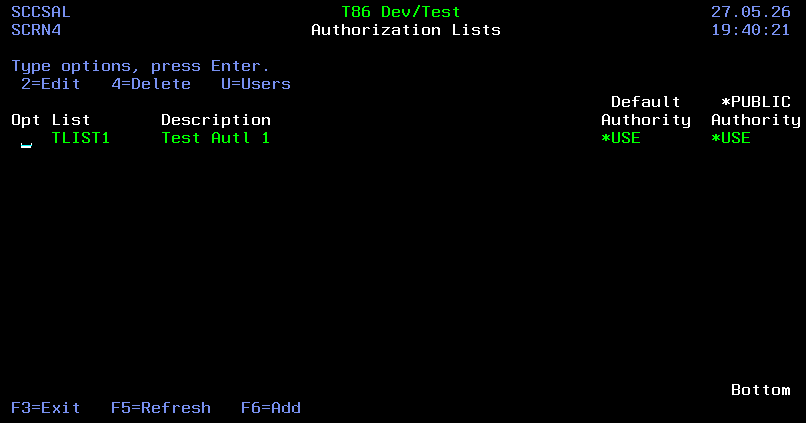
Options
| Option | Description |
|---|---|
| 2 | Edit the properties of the Authorization List |
| 4 | Remove the Authorization List from MDSEC and optionally delete the Authorization List from the IBM i system |
| U | View/Edit the list of users that are members of the Authorization List |
Function Keys
- F3=Exit – Return to previous panel
- F5=Refresh – Refresh the panel
- F6=Add – Add a new Authorization List to MDSEC (and the IBM i system, when new)
- F12=Exit – Return to previous panel
Authorization List Properties
Description: The description of the Authorization List object, which is stored on the IBMi System.
Default Object Authority: The default authority to objects for users. The default value may be applied at any time to all relevant users. The possible values are:
| Value | Description |
|---|---|
*ALL | complete authority to objects |
*CHANGE | update authority to objects |
*USE | objects may be viewed/used, but not changed |
*EXCLUDE | no authority to objects |
*PUBLIC | user not explicitly in list – has public authority. If user is in the List when this value is applied, then the user will be removed from the list. |
*PUBLIC Authority: The authority to objects for users that are not specified in the authorization list.
Set Default value for existing users in Authorization List?: If Y (Yes), then all existing users in the Authorization List will obtain the new default authority.
Set Default value for existing users in MDSEC?: If Y (Yes), then all existing users in the MDSEC User List will obtain the new default authority within the specific Authorization List.
Authorization List Users
Options
| Option | Description |
|---|---|
| 4 | The "Remove from List" option will remove the user from the IBM i Authorization List. The user's authority to objects secured by the list will be limited to *PUBLIC authority. |
Object Authority Values
| Value | Description |
|---|---|
*ALL | complete authority to objects |
*CHANGE | update authority to objects |
*USE | objects may be viewed/used, but not changed |
*EXCLUDE | no authority to objects |
3 Function Keys
- F3=Exit – Return to previous panel
- F4=Browse – Browse the list of possible Authority values
- F5=Refresh – Refresh the panel
- F6=Add – Add a new user to the Authorization List
- F12=Exit – Return to previous panel