Functional Security Codes
Option 3 from MDSEC Menu: all application levels and the authorization codes with the levels.
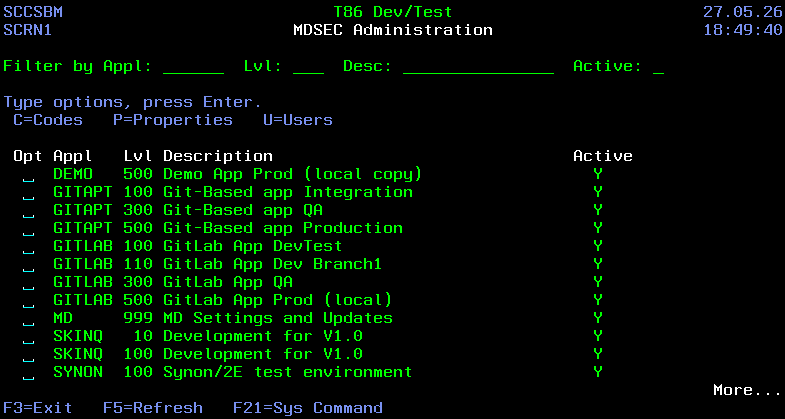
Filtering List
| Field | Description |
|---|---|
| Appl | filter rows by application ID |
| Lvl | filter rows by level number |
| Desc | only levels containing the entered value in the description will be listed |
| Active | filter rows based on following Active values: N – Authorizations for all codes for this level have been disabled. Y – Authorizations for all codes for this level are enabled. |
Fields
| Field | Description |
|---|---|
| Appl | The "md" application containing all codes or an Application defined in MDCMS |
| Lvl | the promotion level of an Application defined in MDCMS |
| Description | Description of the application level |
| Active | N – Authorizations for all codes for this level have been disabled. Y – Authorizations for all codes for this level are enabled. |
Options
| Option | Description |
|---|---|
| C=Codes | List the codes defined in the level |
| P=Properties | View/Edit the properties |
| U=Users | List all users that have authority to the Application Level |
Level Properties
| Field | Description |
|---|---|
| Active | Y = Users authorized to the level or any codes in the level may proceed with functioned secured by those codes. N = All codes for the level are deactivated |
| Apply md Auth to New Levels | only applicable for the "md" global level Y = When a new promotion Level is created, or when a level is added to a User Role, the authority for the md level for the role will be applied to the new level. N = only general authority to the level will be applied. |