MDSEC Report Generator
Option 7 from the MDSEC Main Menu gives the user access to a variety of security reports for Users and Roles.
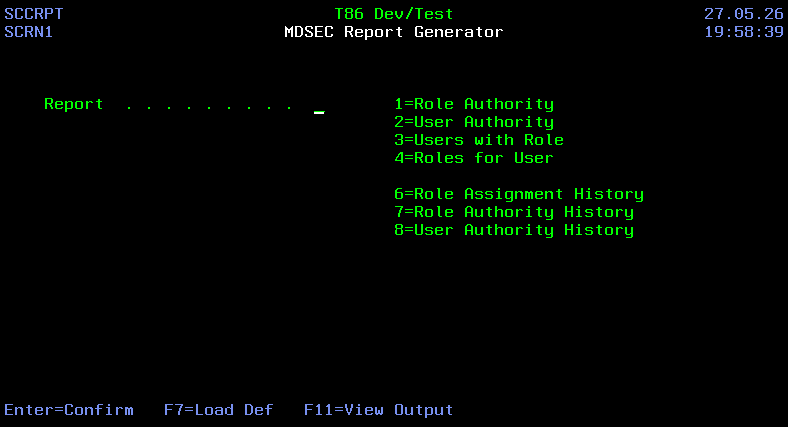
Each report is customizable based on the set of criteria available for User and Role authorities to your application's functions and can be run or scheduled using the MDRUNRPT API. To be able to reuse or schedule a report definition, Press F9=Save Def on the Report Criteria Screen to save the definition with a specific name for the definition.
Reports
1 - Role Authority A list of User Roles and the Functional Security codes that are granted to those roles. This report is grouped by User Role or by Security Code.
2 - User Authority A list of Users and the Functional Security codes that are granted to those users via their membership in 1 or more User Roles. This report is grouped by User or by Security Code.
3 - Users With Role A list of User Roles and the users assigned to each role. This report is grouped by Role.
4 - Role Authority A list of Users and the User Roles that they belong to. This report is grouped by User.
6 - Role Assignment History An audit log of any changes to User Assignment for Roles.
7 - Role Authority History An audit log of any changes to Authority granted to User Roles.
8 - User Authority History An audit log of any changes to Authority granted to Users.
Function Keys
- F3=Exit – Return to previous panel
- Enter=Confirm – Confirm selection of the report and continue to the Criteria screen
- F7=Load Def – Load a saved Report Definition
- F11=View Output – Work with MD Output
Criteria Selection
The following is the complete list of possible critiria fields. Only critiria applicable for the selected report will be displayed.
| Field | Description |
|---|---|
| Include Role/User Desc | Y – include the column for the Role or User Description in the report. N – do not include. |
| Include Level Desc | Y – include the column Level Description in the report. N – do not include. |
| Include Code Desc | Y – include the column Code Description in the report. N – do not include. |
| Sort by Auth Code | Y – the Level/Code is the primary sort for the report. N – the Role or User is the primary sort for the report. |
| User | limit the rows to a user or users matching generic value |
| Role | limit the rows to a role or roles matching generic value |
| Application | limit the rows to an application or applications matching generic value |
| Level | limit the rows to a specific level |
| Code | limit the rows to a specific code |
| Minimum Date | For History Reports, Limit rows to transactions occuring on or after given date. See special values below for other options. |
| Maximum Date | For History Reports, Limit rows to transactions occuring on or before given date. Leave blank if using a special option for the Minimum Date |
Special Values for History Report Date Range
- *CM - current Month
- *CW - current Month
- *CY - current Month
- *PM - prior Month
- *PW - prior Week
- *PY - prior Year