Transfer Requests to a Different User
Option T from the MDSEC User Listing: Transfer Active MDCMS Object Requests in the Object Manager and in the Send List to a different developer.
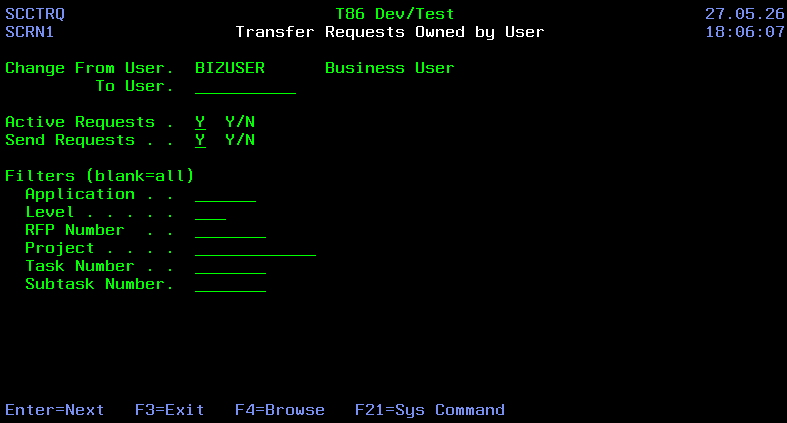
Fields
| Field | Description |
|---|---|
| Change To User | The User ID of a user registered in MDSEC with request authority for at least one level. |
| Active Requests | Transfer active requests (those visible from the MDCMS Object Manager) to the new user. |
| Send Requests | Transfer send requests (those visible from the MDCMS Send RFP to Remote System list) to the new user. |
| Application | Filter the requests to a specific Application. |
| Level | Filter the requests to a specific Promotion Level. |
| RFP Number | Filter the requests to a specific RFP number. |
| Project | Filter the requests to a specific Project. |
| Task Number | Filter the requests to a specific Project Task. |
| Subtask Number | Filter the requests to a specific Project Subtask. |
Use F4 to select any of the field values from a list. Press Enter once the values are correct to continue to the next screen (nothing will be changed yet).
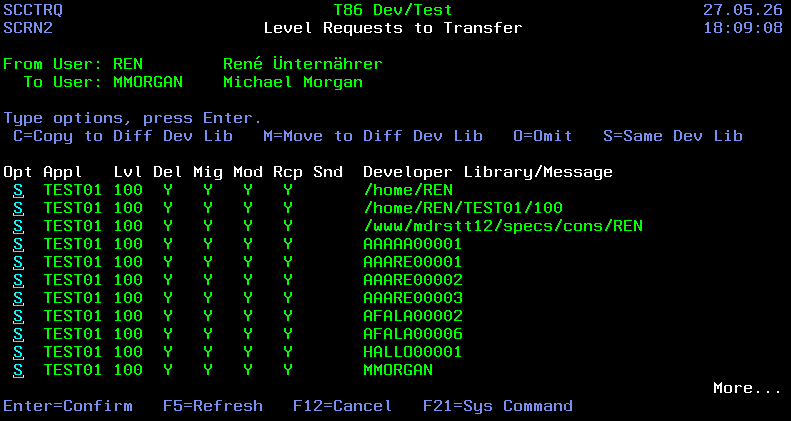
The next screen in the process shows each distinct target Promotion Level and Developer Library/Folder for requests assigned to the current user based on the filters from the initial screen.
Options
| Option | Description |
|---|---|
| C | Transfer the requests to the new user and copy the source and/or object from the current checkout library/folder to a different library/folder for the new developer. You will be prompted for the name of the new library/folder. |
| M | Transfer the requests to the new user and move the source and/or object from the current checkout library/folder to a different library/folder for the new developer. You will be prompted for the name of the new library/folder. |
| O | Don't transfer the requests to the new developer. MDCMS will automatically omit requests for an application/level if: you don't have the authority to change the programmer for that application/level (MDSEC code 32) the new user doesn't have authority to add, modify, delete objects for the level (MDSEC code 28) and such requests exist for the current user the new user doesn't have authority to recompile or update objects for the level (MDSEC code 30) and such requests exist for the current user. |
| S | Transfer the requests to the new user, but leave the source and objects where they are. |
Once the options have been set, press Enter to process the user change for all relevant requests. If any libraries or source files need to be created, you will be prompted for the parameters to do so.