User Roles
Option 1 from MDSEC Menu: all roles that are currently defined within MDSEC.
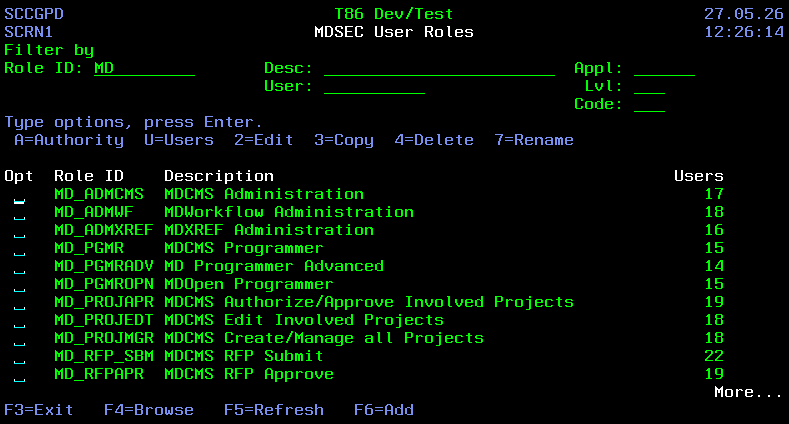
Filters
| Field | Description |
|---|---|
| Role ID | Roles with IDs containing the entered string |
| Desc | Roles with Descriptions containing the entered string |
| Appl | Roles with authorization to at least one code in the entered application will be listed. Press F4 to select from list of values. |
| Lvl | Roles with authorization to at least one code in the entered level number will be listed. Press F4 to select from list of values. |
| Code | Roles with authorization to the entered code will be listed. If application and/or level filter values are also entered, then only roles with the entered combination will be listed. Press F4 to select from list of values. |
| User | Roles assigned to the entered user. Press F4 to select from list of values. |
Fields
| Field | Description |
|---|---|
| Role ID | A 10-Character value identifying a MDSEC Role |
| Description | Description of the role |
| Users | The number of users currently belonging to the role |
Options
| Option | Description |
|---|---|
| A=Authority | View/Edit the applications and codes that the role is authorized to. see Application Levels for Role |
| U=Users | View/Edit the list of users belonging to the role. see Users with Role |
| 2=Edit | Edit the description for the role |
| 3=Copy | Copy the role to a new role. Optionally copy the authorities and/or the user assignments to the new role. |
| 4=Delete | Delete the role from MDSEC |
Function Keys
- F3=Exit – Return to previous panel
- F4=Browse – Browse a list of available values for a field
- F5=Refresh – Refresh the panel
- F6=Add – Add a new role to MDSEC. The role ID can be any 10 character value
- F12=Exit – Return to previous panel