Users
Option 2 from MDSEC Menu: all users that are currently defined within MDSEC.
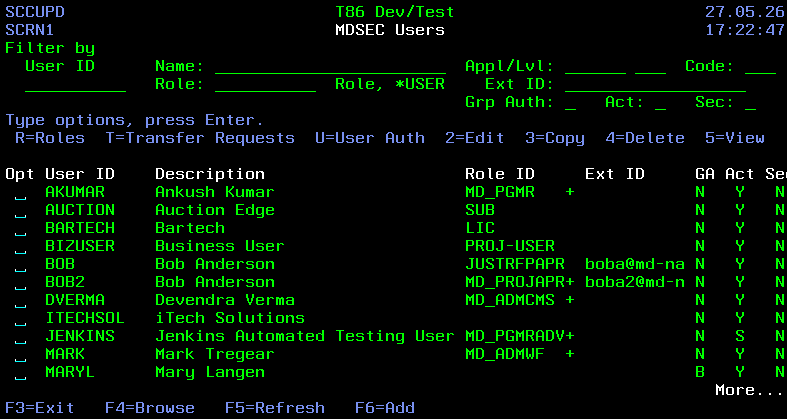
Filters
| Field | Description |
|---|---|
| User ID | only User IDs containing the entered value |
| Name | only User Descriptions containing the entered value |
| Appl | only users with authorization to at least one code in the entered application |
| Lvl | only users with authorization to at least one code in the entered level number |
| Code | only users with authorization to the entered code will be listed. If application and/or level filter values are also entered, then only users with the entered combination will be listed. |
| Role | Only users that belong to the entered role will be listed |
| Ext ID | only users containing the entered value in their External User ID will be listed |
| Grp Auth | Filter the users based on following group authority values: Y – MDSEC Authorities based on Group Profile. N – MDSEC Authorities based on User Profile. B – MDSEC Authorities based on the combination of the Group Profile and User Profile. |
| Act | Filter the users based on the following Active status values: Y – the user is active and the authorizations will be granted. N – the user has been disabled within MDSEC and will not have authority to any codes in MDSEC. |
| Sec | Filter the users based on the following Security Authority values: Y – the user may make changes within MDSEC. N – the user is not permitted to make changes within MDSEC. |
Fields
| Field | Description |
|---|---|
| User ID | The user profile of a user |
| User Name | Name or description of the user, leave blank to retrieve from user profile, if the User ID exists as a *USRPRF object |
| Email Address | Email Address of the user for emailing messages or reports from MD products. Optional field. |
| Role ID | The role that the user belongs to. If the user belongs to multiple roles, a + will be displayed. |
| External User ID | The external ID for the user. This is used for the mapping of LDAP network user ids to the internal system ID when logging into MDWorkflow automatically. An IBMi user profile is not required when logging in over LDAP, but will be used if it exists. |
| Active | If the user profile is active in MDSEC: Y – the user is active and the authorizations will be granted. N – the user has been disabled within MDSEC and will not have authority to any codes in MDSEC. S – the user ID belongs to an automated process rather than an actual user. The ID is then applied as the user for processes invoking MDCMS commands, REST APIs, or as the user granting acceptance from a Pipeline job during the RFP acceptance phase. |
| MDSEC Edit Auth | Edit Authority within MDSEC: Y – the user may make changes within MDSEC. N – the user is not permitted to make changes within MDSEC. |
| Group Profile | The group profile that the user profile belongs to. This is a read-only parameter. If the User ID is a valid user profile but isn't defined in MDSEC, then that user id will have any authorities that the group profile attached to the user profile has within MDSEC. If the User ID is defined in MDSEC and is attached to a group profile, then authority will be based on the Use Group Auth parameter. |
| Use Group Auth | If the User Profile of the User ID is attached to a Group ID, the following values are possible: Y – MDSEC Authorities based on Group Profile. N – MDSEC Authorities based on User Profile. B – MDSEC Authorities based on the combination of the Group Profile and User Profile. |
| Use CurUser Auth | If the User Profile of the User ID doesn't have authority to an MDSEC code, it can be permitted to have the authority checked for the current user of the job, in case a user role-swap is performed. Y – Current User authority checking is permitted in MDSEC when the job user doesn't have authority. N – Current User authority checking is not permitted. |
| CCSID Override | The Coded Character Set to use when communicating with this system using MDOpen or MDWorkflow. This ensures that characters are displayed in the form and order that is expected for the user's locale within those clients. A value is only necessary here if the user requires a different CCSID than the CCSID defined for the system in the MDCMS system settings. |
| Workflow Password | The password to be used for MDWorkflow users that do not have an IBMi User Profile. This password is to be entered together with the MDSEC User ID at the MDWorkflow login prompt. If the user id exists as an IBMi user profile, then the password for the IBMi profile will be used by MDWorkflow rather than this password. |
| Password Expired | N – the password is not expired. Y – the password is expired. The user will be prompted and required to change the password the next time that they login to MDWorkflow. |
Options
A user may edit the user list if their profile belongs to User Class *SECOFR or *SECADM or if the MDSEC Edit Auth flag is set to Y for the user.
| Option | Description |
|---|---|
| R=Roles | View/Edit the list of roles that the user belongs to. see Roles for User |
| T=Transfer Requests | Transfer Active MDCMS Object Requests in the Object Manager and in the Send List to a different developer. See the section Transfer Requests to a Different User for more information. see Transfer Requests |
| U=User Auth | View all authorities for the user, based on all roles that the user belongs to |
| 2=Edit | Edit the properties for the user. The authorities for the user are edited using option R. |
| 3=Copy | Copy the user to a new user. Optionally copy the role assignments to the new user. |
| 4=Delete | Delete the user from MDSEC |
| 5=View | Display the User properties |
Function Keys
- F3=Exit – Return to previous panel
- F4=Browse – Browse a list of valid values for a field
- F5=Refresh – Refresh the panel
- F6=Add – Add a new user to MDSEC. If the user requires access to MDCMS or MDOpen, then the user must be a valid IBMi user profile. If only MDWorkflow access is necessary, then a User Profile does not have to exist for the ID.