Overview of MDVisual
Introduction
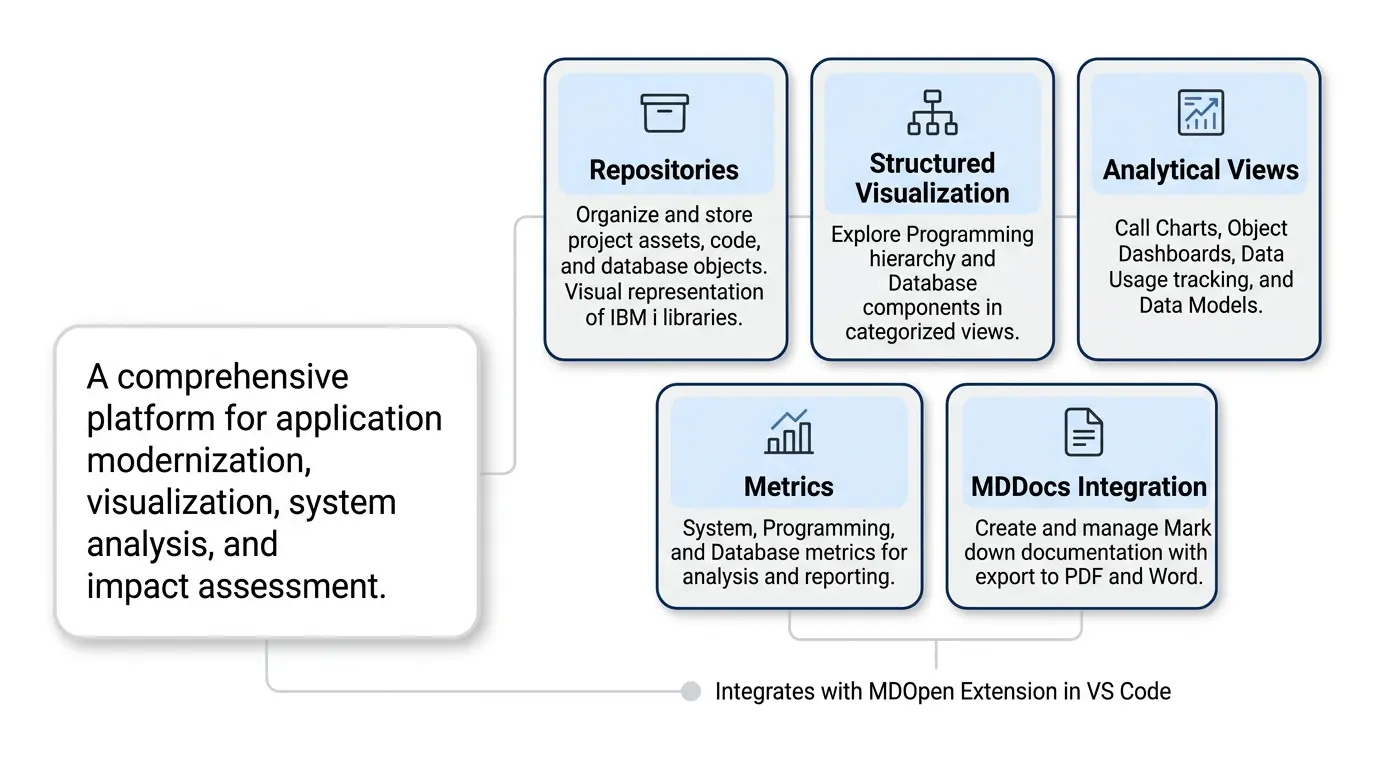
MDVisual is a comprehensive platform designed for IBM i application modernization, visualization, system analysis, and impact assessment. It integrates seamlessly with the MDOpen extension in Visual Studio Code, allowing developers to browse, analyze, and navigate through all program components within their IBM i environment.
The platform supports business users, technical analysts, developers, architects, and administrators by providing deep visibility into application structures, dependencies, and data relationships. MDVisual bridges the gap between source-level detail and enterprise-level understanding, enabling teams to modernize, maintain, and document complex IBM i applications with greater confidence and accuracy.
Core Concepts and Capabilities
Repositories
At the heart of MDVisual are repositories, which serve as containers that organize and store all project assets, including code, database objects, and documentation. A repository acts as a visual and analytical representation of an IBM i library.
By bridging the gap between source-level detail and system-level understanding, repositories provide a complete architectural view to support:
- Application modernization
- Code refactoring
- Impact analysis
- System maintenance
- Knowledge transfer
Structured Visualization
MDVisual provides a highly structured and categorized visualization of development objects across the IBM i ecosystem.
Users can explore comprehensive hierarchies covering:
Programming Objects
- Programs
- Service Programs
- Modules
- ILE Procedures
- SQL Routines
- Copybooks
Database Components
- Physical Files
- Logical Files
- Fields
- Variables
- Relationships
This structured approach enables developers and analysts to quickly understand system organization and navigate complex enterprise applications with ease..
Intelligent Variable Mapping
One of MDVisual’s most powerful differentiators is its intelligent parser technology.
MDVisual parsers analyze both source code and object metadata to create highly detailed variable relationship maps across IBM i applications.
This includes:
- Database fields
- Program variables
- Procedure variables
- Constants
- Device references
- Calling and called parameters
MDVisual captures not only where variables exist, but also:
- Their operational context
- How they interact with other variables and fields
- Data flow relationships
- Cross-program parameter mapping
- Multi-level dependency chains
This enables exceptionally accurate and detailed impact analysis across even the largest IBM i systems.
When combined with MDVisual’s node-edge visualization maps, this contextual understanding provides a powerful foundation for AI-assisted analysis while significantly reducing AI hallucination risks through precise structural grounding.
Advanced ILE Mapping
MDVisual delivers advanced support for modern IBM i Integrated Language Environment (ILE) architectures.
The platform maps call structures between:
- Programs
- Service Programs
- ILE Procedures
- Modules
This includes:
- Program-to-program calls
- Program-to-procedure calls
- Procedure-to-program calls
- Procedure-to-procedure calls
Unlike traditional analysis tools that operate only at the object level, MDVisual provides visibility into the actual logical execution elements within service programs and modular applications.
For example, when a file is updated by a specific ILE procedure inside a service program, MDVisual identifies the precise procedure responsible — not merely the containing service program object.
This enables:
- Highly concise call structures
- Precise dependency analysis
- Accurate file usage tracing
- Granular modernization planning
- Improved AI-assisted understanding
The result is significantly improved application comprehension and far more accurate impact analysis for complex modular IBM i environments.
Extensive Analytical Views
MDVisual supports both high-level overviews and deep technical analysis through a wide range of interactive visualizations and dashboards.
Call Charts
Hierarchical diagrams document the call path from selected root programs or procedures, helping users understand execution flow and system dependencies.
Object Dashboards
Detailed dashboards provide attribute summaries, control flow analysis, dependency information, and related object navigation.
Data & Field Usage / Where Used
Powerful “Where Used” analysis allows teams to trace:
- File usage
- Field references
- Variable interactions
- Program dependencies
- Procedure relationships
across the entire application landscape.
Data Models & Diagrams
Visual database relationship diagrams provide clear insight into data architecture and business logic dependencies.
Metrics and Reporting
MDVisual includes comprehensive metrics and reporting capabilities for both technical and managerial analysis.
Metrics include:
- System Metrics
- Programming Metrics
- Database Metrics
- Object Complexity
- Dependency Statistics
- Code Distribution Analysis
These are presented through:
- Interactive dashboards
- Doughnut charts
- Graphical summaries
- Detailed tabular reports
This enables organizations to identify modernization priorities, technical debt, and architectural risk areas more effectively.
MDDocs Integration
MDVisual integrates with MDDocs, a web-based documentation platform for creating and managing Markdown-based technical documentation.
MDDocs provides:
- File Explorer navigation
- Live preview rendering
- Formatting themes
- Export capabilities (PDF and Word)
- Object-linked documentation
A key advantage of MDDocs is the ability to directly associate documentation with IBM i objects, programs, procedures, and database elements, enabling context-rich technical documentation tightly integrated with system analysis.