Application/Level Selection
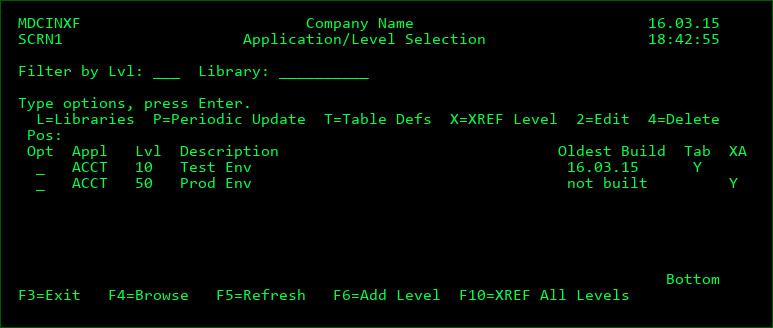
Opt
| Option / Field | Description |
|---|---|
| L | view/edit the list of libraries to include for the Application Level |
| P | create a scheduled job to periodically update all libraries listed with the Application Level. The ADDJOBSCDE command is invoked with the necessary parameters to create the job. The update may be scheduled through this job to occur daily, weekly, or monthly. In order to edit or delete the scheduled job, use the command WRKJOBSCDE. |
| T | view/edit the Table Object Definitions. Table Object Definitions allow for cross-referencing between soft components (table records) and objects |
| X | Perform a one-time build or rebuild of the MDXREF database for all libraries listed within the selected Application Level. You will then be prompted for the job queue and scheduled date/time for the build job. |
| 9 | Link X-Analysis Data Libraries to MDXREF Levels. X-Analysis is an application modelling product from Fresche Legacy. If a link exists, then when MDCMS installs an object into the Application Level, the information for that object will be refreshed in that instance of X-Analysis. This option is only applicable if MDCMS is installed. |
Appl
An Application is an In-House or 3rd party Software Product that resides on the IBMi.
Lvl
A Level is a coherent grouping of libraries, or application environment, that a cross-reference is to be built over. This usually resembles the library list of an application's job at runtime. For example, the application ACCT may have a level 10 for test libraries and 90 for production libraries.
If the relevant application or level isn't in the list, add it from the MDCMS Setup Menu.
Oldest Build
The oldest build date for the list of libraries referenced by the level
Tab
Y=One or more Table Definitions exist for the given Appl/Lvl
XA
Y=One or more X-Analysis Libraries are linked to the given Appl/Lvl
Function Keys:
F4 - Browse list of referenced libraries once cursor is placed on Filter by Library field
F5 - Refresh the list
F6 - Add a new Application Level. If MDXREF is installed as part of MDCMS, the level must be added from the MDCMS Setup menu.
F10 - Submit a single job to refresh the MDXREF information for all libraries defined across all application levels.