Libraries to cross-reference
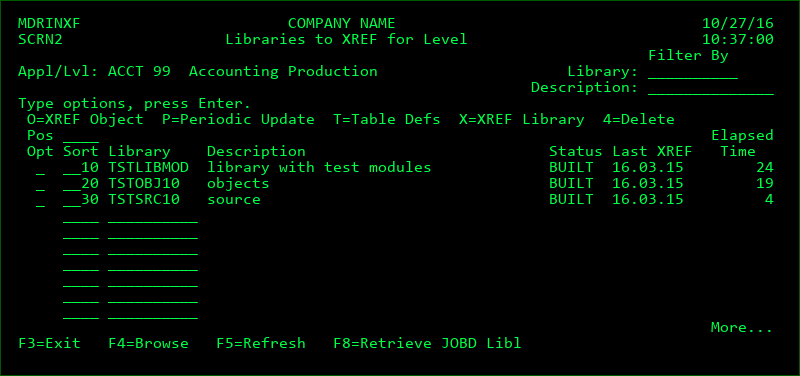
This screen displays the current listing of defined libraries within an Application and Level. It is accessed by option L from the Level listing. It also allows the user to add or remove libraries from the listing if they are authorized to MDSEC Code 4 for the application.
A library should be included for an Application and Level if it is part of the run-time library list for that level.
The same library may be included for many levels, which is common when delta libraries are used. When the library cross reference is selected to be built for one level, that information is automatically updated for all other levels that the library is defined in.
The libraries should be sorted in the same order as the run-time library list for the level.
Opt
| Option / Field | Description |
|---|---|
| O | Build the Cross-Reference information for a specific object in the library |
| P | create a scheduled job to periodically update the library. The ADDJOBSCDE command is invoked with the necessary parameters to create the job. The update may be scheduled through this job to occur daily, weekly, or monthly. In order to edit or delete the scheduled job, use the command WRKJOBSCDE. |
| T | view/edit the Table Object Definitions. Table Object Definitions allow for cross-referencing between soft components (table records) and objects |
| X | Perform a one-time build or rebuild of the MDXREF database for the library. You will then be prompted for the job queue and scheduled date/time for the build job. |
| 4 | Remove the library from the list and delete all cross-referencing information for the library. |
Sort
The 4-digit numerical sequence to sort the libraries within the library list. The libraries should be sorted in ascending order in the same sequence as the libraries at run-time. This ensures that MDXREF selects the correct version of a source or object when it exists in multiple libraries. If F8 is used to load the library list from the job description, the sort sequence will be automatically applied.
Library
A library may be added to the library list by entering the name of the library on a blank line. F4 may be pressed to browse the list of user libraries on the system. Multiple libraries may be simultaneously selected from the browse screen.
*AJSE - Advanced Job Scheduler Job entries can be included in the Cross-Reference database by including library *AJSE.
*GIT - Source that is stored in Git repositories can be directly inspected for SQL and system object references. The definition of the Git repositories and the types of source to inspect are maintained from MDOpen->Settings->Git Repositories.
Having *GIT registered as a library in MDXREF provides a means to have all defined Git repositories re-checked for references on a scheduled or on-demand basis.
*IFS - Build a list of all folders and files in the IFS file system. This information can then be viewed from MDOpen, the MD Plug-in for Eclipse/Rational Developer for i (RDi).
If only the files and subfolders of a specific folder should be refreshed, this can be performed directly from the MDXREF IFS view in MDOpen by right-clicking on a folder and selecting option Refresh.
In addition to building the contents of the IFS folders, referencing from various open-source language files (such as java, php and python) to system objects is also added. Open source files will only be considered if configured for referencing within MDOpen.
*IFSMD - Build a list of all folders and files that are defined as relevant in MDCMS or MDOpen, but ignore all other folders. This is recommended if too many files are defined in the IFS on the system to complete the cross-referencing in a timely manner. The following folders are considered:
- Target Folders for *IFS attributes and attributes with *IFS source in MDCMS
- Replication Folders for *IFS attributes and attributes with *IFS source in MDCMS
- *IFS search template folders
- The /MDCMS folder
- Folders defined in MDOpen to contain open source files to be cross-referenced
*IWS - REST and SOAP Web Services that are deployed to the IBM Integrated Web Services Server can be added to the Cross-Reference database by including library *IWS. This will list each deployed service for each existing IWS Server along with the attribute of REST or SOAP and the reference to the ILE program or Service Program that the service invokes.
*ROBOT - If the Help/Systems job scheduling product, ROBOT/Schedule, is installed on the system, it's jobs can be included in the Cross-Reference database by including library *ROBOT.
*SCDE - Job Scheduled entries can be included in the Cross-Reference database by including library *SCDE.
*SVN - Source that is stored in SVN (Subversion) repositories can be directly inspected for SQL and system object references. The definition of the SVN repositories and the types of source to inspect are maintained from MDOpen->Settings->SVN Repositories.
Having *SVN registered as a library in MDXREF provides a means to have all defined SVN repositories re-checked for references on a scheduled or on-demand basis.
Status
| Option / Field | Description |
|---|---|
| PEND | The Cross-Reference build job has been submitted and will process the library once the prior libraries in the list have been built |
| FAILED | The Cross-Reference build job ended abnormally and should be resubmitted |
| ACTIVE | The Cross-Reference build job is actively cross referencing the library |
| BUILT | The Library has been completely cross-referenced |
Last XREF
The most recent date that a full cross reference build has been performed on the library. If all changes to the library are made by MDCMS, the data will still be accurate even if the build date is quite old.
Elapsed Time
The amount of time in hours:minutes:seconds that MDXREF required to process that library. If the status is ACTIVE, then it is the amount of time that has elapsed so far.
Function Keys:
F4 - Browse list of libraries to select one or more for this Application Level
F8 - Load the library list defined for the job description for the. Any libraries not already in the build list are then added to the end of the list and all libraries are resorted based on the order of the libraries in the job description.