MDRUNRPT - Run MD Report command
Certain reports within MDSEC, MDXREF and MDCMS allow for saved report definitions to be run directly from a command line. This gives the users the ability to schedule reports to be run on a periodic basis and to have the output automatically printed or exported. This is also helpful during Project testing to allow the same parameters to be quickly used after each phase of a test.
The following screen is displayed to get the report run parameters.
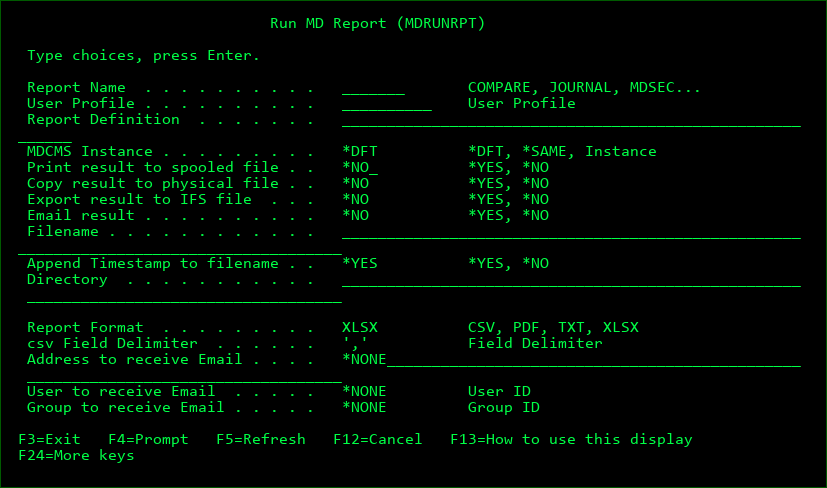
Use F9=All parameters to see all available parameters for command.
Report Name
COMPARE - the MDXREF Data Comparison Report
JOURNAL - the MD Journal Analysis Report
MDSEC - the MDSEC Authorization Report
NOTCMS - the MDCMS Audit Report listing object changes made outside of MDCMS
PROJECT - the MDCMS Project Report
PRJTASK - the MDCMS Project Task Report
RFPHIST - the MDCMS Audit Report listing object changes made within MDCMS
User Profile
The name of the user profile that defined the report definition
Report Definition
The name of the report definition
Print result to spooled file
*NO - the resulting report will not be automatically printed to a spooled file
*YES - the resulting report will be automatically printed to a spooled file
Copy result to physical file
*NO - the resulting report will not be automatically exported to a physical file
*YES - the resulting report will be automatically exported to a physical file (table)
Export result to IFS file
*NO - the resulting report will not be automatically exported to an IFS file
*YES - the resulting report will be automatically exported to an IFS file
Email result
*NO - the resulting report will not be automatically emailed to recipients
*YES - the resulting report will be automatically emailed to recipients
Copy to Physical file
The name of the physical file (table) to contain the detail contents of the report. Each column in the report will be placed in a separate formatted field. If the file already exists, it will be replaced.
Copy to Library
The IBM i library that is to contain the Physical file
Filename
If the results are to be exported or emailed, this is the name of the IFS file to receive the results. The file type (.CSV, .PDF, .TXT or .XLSX) will be automatically appended to the end of the name.
Timestamp
*NO - a timestamp will not be appended to the file name
*YES - a timestamp in the format of YYYMMDD_HHMMSS will be appended to the file name
Directory
If the results are to be exported, this is the name of the IFS directory to receive the results. The directory path should begin with the root character "/".
Report Format
CSV - the exported report will be placed in a comma separated value file which can then be opened in Microsoft excel or similar spreadsheet programs.
PDF - the exported report will be converted to PDF. JVM 1.6 or higher is required
TXT - the exported report will be placed in a text file with the same layout as the on-line report.
XLSX - the exported report will be converted to the excel format. JVM 1.6 or higher is required
csv Field Delimiter
The character to be used to separate fields in a csv file
Address to receive Email
A specific email address to receive the report
User to receive Email
A user id to receive the report - the address for the user will be retrieved from the MDSEC email address table.
Group to receive Email
All users for the entered group id to receive the report - this parameter requires MDWorkflow groups to be present.