Object Library Comparison
Function: To compare the objects in one library to the objects in another library.
The following object differences are listed in the Object Comparison Report:
- Object existence
- Object Attribute
- Object Description
- Files used by the object as well as how the files are used (Input, Output, etc.)
- Objects called or invoked by the object
- Modules bound by ILE or Service Programs
- Field differences in physical or logical files
- Key structure differences in physical or logical files
The following screen is displayed to get the report parameters.
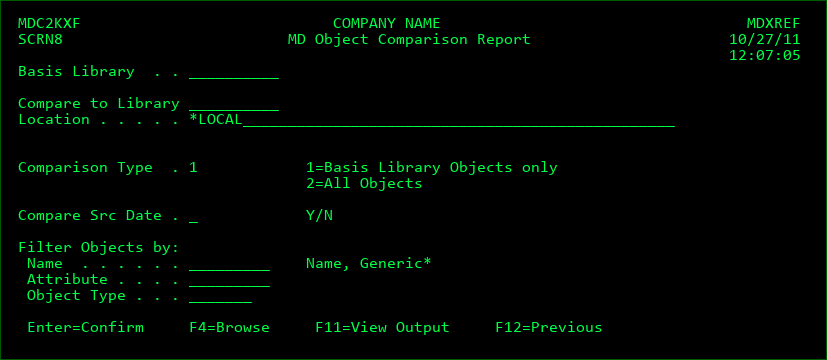
Basis Library
A library on the local system. A current MDXREF build for the library must exist in order for the results to be accurate. Press F4 to select the library from a list.
Compare to Library
A library on either the local system or on a remote system. A current MDXREF build for the library must exist on its system in order for the results to be accurate. A remote library comparison is only possible if MDCMS is also installed. Press F4 to select the library from a list.
Location
The location of the library. *LOCAL indicates that the library is located on the current system. Otherwise the location is a network address defined in the MDCMS Synchronization Settings. Press F4 to select the location from a list.
Comparison Type
- Report only on differences found for objects that exist in the basis library. For example, the basis library could be a product update library received from a vendor with 8 objects in it. The compare to library could then be your production library with 2000 objects in it. Only the 8 objects in the update library would be reviewed and reported upon.
- All objects from both libraries are reported upon.
Compare Src Date
Include comparison, Y/N, for Source Date information of object.
Filter Objects by
Name
Attribute
Object Type
Enter information into one or more of the filter fields to limit the report to objects that match the filters.