Object/Source Search Display
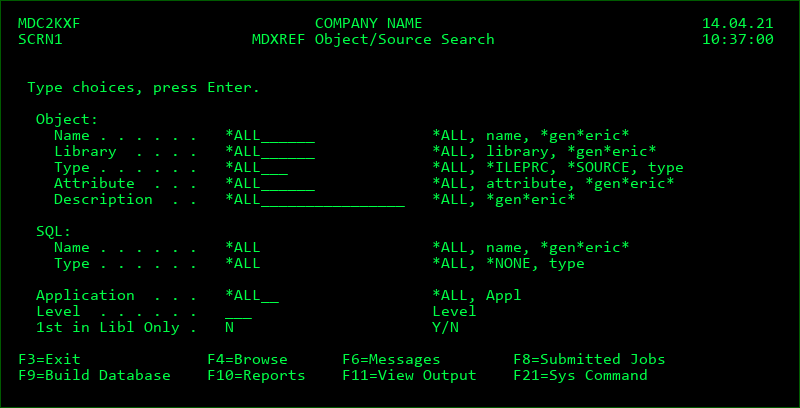
This is the first screen that is always seen when you begin MDXREF. Pressing Enter with the defaults in place will result in the display of all objects in the MDXREF database. Otherwise, change the value of one or more of the entry fields to limit the display.
When the user re-enters the MDXREF display, the prior search criteria is reused.
Building the MDXREF database: Before objects will be available to list, the desired object libraries will need to be added to the MDXREF database. Also, the existing database may be rebuilt at any time. This is recommended if any objects are manually added, changed, or deleted within a library that is included in the database. If MDCMS is used in order to handle object changes, the MDXREF database is automatically updated as changes occur. Press F9 to build or rebuild the MDXREF database. See the section Building the MDXREF Database for further help with this process.
Entry fields on the initial Search Screen
Object Name
The object listing may be filtered to show only objects with a specific system name or, with the use of the wildcard value '*', objects matching a given pattern.
Object Library
The object listing may be filtered to show only objects located in a specific library or, with the use of the wildcard value '*', objects located in libraries matching a given pattern.
Object Type
The object listing may be filtered to show only objects of a specific type. Press F4 to view a list of all object types found within the MDXREF database.
*ILEPRC - use this value to view the list of ILE Procedures (procedures imported or exported by ILE modules or service programs) matching the search criteria instead of listing objects.
*SOURCE - use this value to view the list of source members matching the search criteria instead of listing objects.
Object Attribute
The object listing may be filtered to show only objects of a specific attribute or, with the use of the wildcard value '*', objects with attributes matching a given pattern. Press F4 to view a list of all object attributes found within the MDXREF database.
Object Description
The object listing may be filtered to show only objects with a specific description or, with the use of the wildcard value '*', objects with a description matching a given pattern. The search for object descriptions is not case sensitive.
SQL Name
The object listing may be filtered to show only objects with a specific SQL name or, with the use of the wildcard value '*', SQL names matching a given pattern.
SQL Type
The object listing may be filtered to show only objects of a specific SQL type. Press F4 to view a list of all SQL types found within the MDXREF database.
*NONE - use this value to view only objects that are not created by SQL statements.
Application
The listings may be filtered to show only the object libraries pertaining to a specific application.
Level
The listings may be filtered to show only the object libraries pertaining to a specific level. A blank value indicates all levels will be considered.
1st in Libl Only
N - every occurrence of an object/type combination, or every occurrence of a source name/source member combination, will be listed.
Y - only the first occurrence of an object/type combination, or the first occurrence of a source name/source member combination, will be listed. The order of occurrences is based on the sort sequence of the library list for the application level.
The value of Y is only permitted when a distinct application and level value is entered in the filters.
Function Keys specific to Screen 1
F9 - Build or rebuild the MDXREF database for one or more applications.
See the Building the MDXREF Database section on page 5 for more details.
F10 - Reports. A menu is displayed which provides access to various analysis reports.
See the Report Menu section for more details.