Search for Fields
Function: to search for, and report on, all physical or logical files that contain a specific field or field attribute. Additionally, to inspect source code for the usage of specific fields.
Field Search
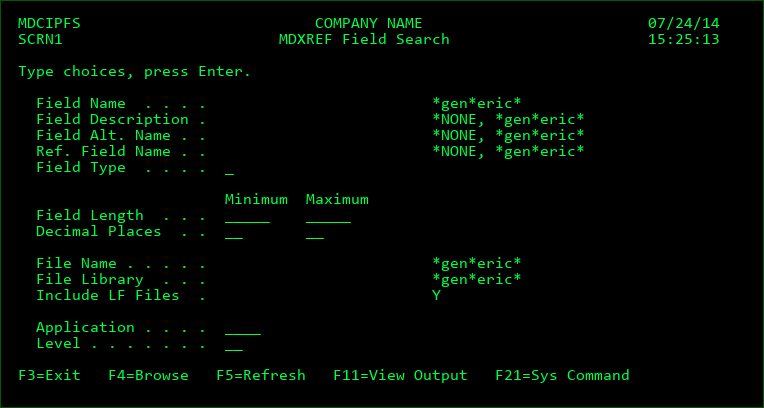
The search screen provides a number of search criteria. When Enter is pressed, all fields that meet ALL entered criteria will be listed.
Field Name
The system name for the field
- may be used as a generic wildcard anywhere within the value
Field Description
The description text for a field
*NONE - include only fields that don't have a description defined
- may be used as a generic wildcard anywhere within the value
Field Alt. Name
The alternate or SQL name for the field
*NONE - include only fields that don't have an alternate name
- may be used as a generic wildcard anywhere within the value
Ref. Field Name
The name of the reference field providing attributes for the field
*NONE - include only fields that don't use a reference field
- may be used as a generic wildcard anywhere within the value
Field Type
The type of field
Options for Field Type:
C=Any Character Type (A, G, H, 5)
N=Any Numerical Type (B, F, S, P)
A=Character
B=Binary
E=DBCS Either
F=Floating Point
G=DBCS Graphic
H=Hexadecimal
J=DBCS Only
L=Date
O=DBCS Open
P=Packed decimal
S=Zoned decimal
T=Time
Z=Timestamp
5=Binary character
Field Length
Enter the minimum and/or maximum lengths of fields to be included in the search results. For packed numeric fields, the decimal length is considered rather than the byte length.
Decimal Places
Enter the minimum and/or maximum number of decimal places that a field must have in order to be included in the search results.
File Name
The system name for the file
- may be used as a generic wildcard anywhere within the value
File Library
The system name of the library containing the files
- may be used as a generic wildcard anywhere within the value
Include LF Files
Y - Include Logical files in the search. Otherwise, only Physical files will be included.
Application
The MDXREF Application containing the files
Level
The MDXREF Level containing the files
Field Search Results
The Field Search Result listing screen displays each distinct Library, File and Field that meet the search criteria.
Opt
1 - Source containing Field - this option causes MDXREF to collect the source for all objects either directly using the file or a logical over the file, along with all copybooks used by dependent programs. It then inspects the code for any non-commented lines containing the field and then presents the results.
Function Keys:
F9 - toggle the display between the field description and the alternate field name
F15 - generate report in MD Output of all field search results