Table Object Definitions
Table Object Definitions provide the ability to describe objects and references defined in Tables. Such Soft Component tables are typically found in 4GLs, Case Tools, Middleware processes and Table-Driven menus.
The values of a field in a table can be identified as an Object and a 2nd field in the same or different table can be identified as the object description. Each Object generated by the definition is presented in the MDXREF screens and reports with object type *RT(table id).
Any number of additional table fields can be identified as object or file references. All tables can be linked by object name or join field values and SQL conditions can be defined.
Table Object Definition Listing
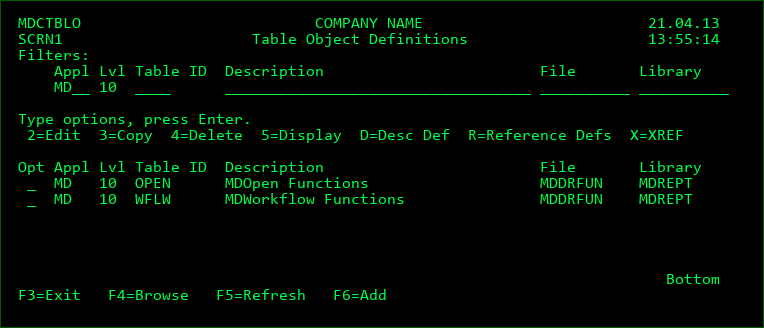
This screen displays the current list of Table Definitions. It is accessed by option T from the Level listing or Library listing. It also allows the user to add, edit or remove definitions from the listing if they are authorized to MDSEC Code 4 for the application.
Filters
The rows that are listed can be limited to those rows that match the values in the filters. F4 can be used to select a value from a list for all except the Description filter.
The Description filter will list a row where the filter value appears anywhere within the Table description.
Opt
| Option / Field | Description |
|---|---|
| 2 | Edit a Table Object definition |
| 3 | Create a new Table Object definition based on the values of the selected definition. If the new Table ID is the same as the existing Table ID, the Description and Reference definitions will also be copied and the library name will be automatically updated. Otherwise, only the Object definition is copied. |
| 4 | Delete a Table Object definition |
| 5 | Display a Table Object definition |
| D | View/Edit the Description definition for the objects |
| R | View/Edit the Reference definitions for the objects |
| X | Build the Cross-Reference information for the specific Table Object Definition |
Function Keys:
F4 - Browse list of valid values for a filter field
F5 - Refresh the list
F6 - Add a new Table Object definition
Table Object Definition Detail
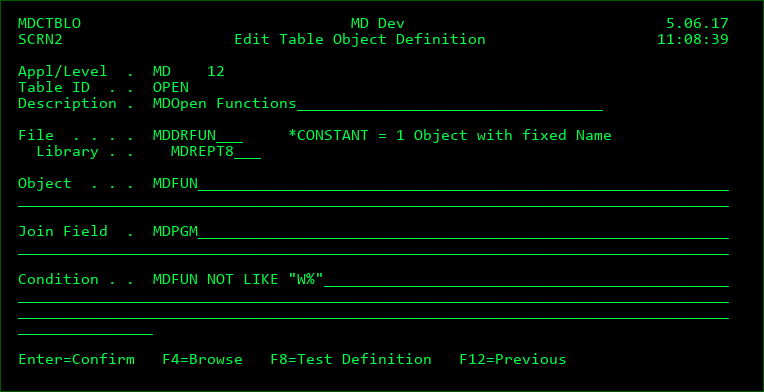
This screen contains the parameters to describe a Table Object.
Application
The MDXREF Application to contain the Table Object definition
Level
The MDXREF Application Level to contain the Table Object definition
Table ID
The Table ID is a 4-character code to uniquely identify the Table Object Definition for the Level. The resulting objects are assigned the Object Type *RT(Table ID) and the Object Attribute RT(Table ID)
Description
A description of the Table Object Definition. If a Description definition is not defined for the Table ID, the description is also displayed in the MDXREF screens for the resulting objects.
File
The File name and Library of the Table that contains the Object names.
*CONSTANT - results in one Object named in the Object field
Object
If a file is defined, this field contains the SQL syntax for the resulting object names of the table objects.
The name can be any combination of field names that exist in the file plus any constants. Use SQL word CONCAT to combine values, function SUBSTR to use a portion of a field, and function DIGITS to convert a numeric value to an alphanumeric value.
Constants should be surrounded by the double-quote (") value.
Any other SQL accepted syntax and functions may also be used here or for any field variable within the Table Definitions configuration.
If *CONSTANT is used for the file, this field contains the name of the object (without quotes).
Join Field
If the Object definition file uses a separate field to join the definition to the file containing the Description definition or Reference Definition, this field (or SQL result column) can be entered here.
Condition
A valid SQL condition (without the WHERE clause) can be defined to limit the records in the file to those matching the condition.
Function Keys:
F4 - Browse list of valid values for a field
F8 - immediately run a test to ensure that the definition produces the expected results
Table Object Description Definition Detail
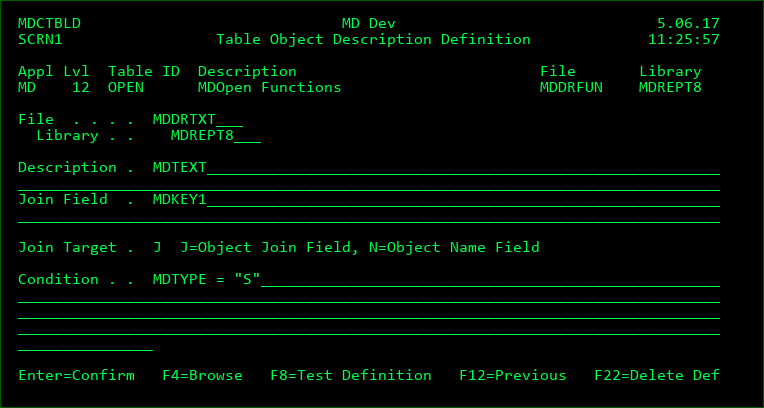
This screen contains the parameters to attach a Description to each object for a Table ID.
If a description definition isn't created, then the description of the table definition itself is used for the resulting objects in MDXREF.
File
The File name and Library of the Table that contains the Object descriptions
Description
The SQL result column that contains the descriptions.
Join Field
The SQL result column used to join the definition to the file containing the Object definition
Join Target
J - The join field for the Description definition is joined to the join field for the Object definition
N - The join field for the Description definition is joined to the Object Name field for the Object definition
Condition
A valid SQL condition (without the WHERE clause) can be defined to limit the records in the file to those matching the condition.
MDXREF takes the Description value from the first row found
Function Keys:
F4 - Browse list of valid values for a field
F8 - immediately run a test to ensure that the definition produces the expected results
F22 - Delete the existing Description Definition from the Table ID
Table Object Reference Listing
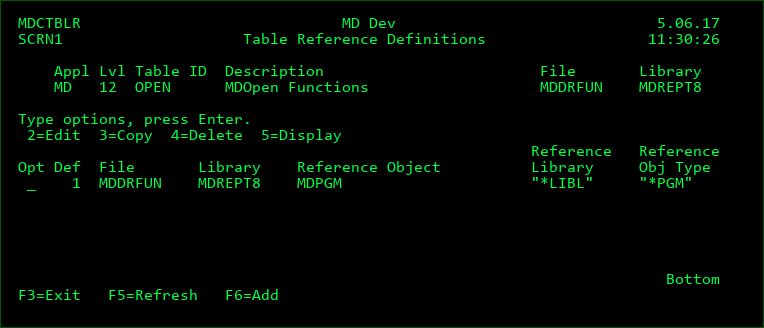
This screen displays the current list of Table Object Reference definitions. It is accessed by option R for a Table ID.
Object Reference definitions provide a way to create references in MDXREF between Soft Components (Table Objects) and actual Library Objects or other Soft Components.
If a resulting Reference Object Type is *FILE, it will be shown in MDXREF as a file used by the Table Object. If the Type is anything else, it will be shown in MDXREF as being called by the Table Object.
Opt
| Option / Field | Description |
|---|---|
| 2 | Edit a Table Reference definition |
| 3 | Create a new Table Reference definition based on the values of the selected definition. |
| 4 | Delete a Table Reference definition |
| 5 | Display a Table Reference definition |
Function Keys:
F5 - Refresh the list
F6 - Add a new Table Object definition
Table Object Reference Definition Detail
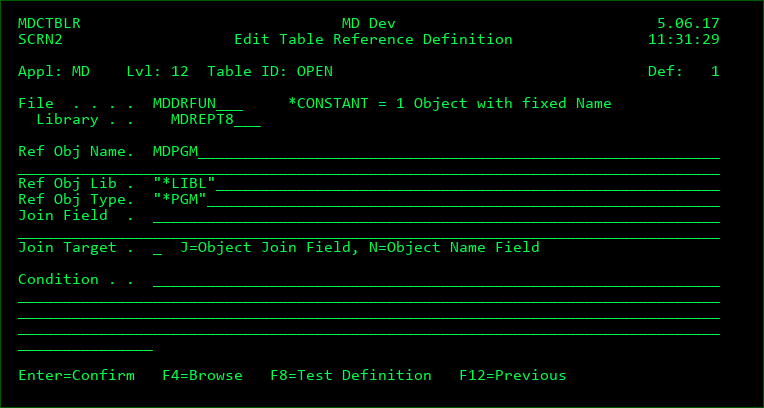
This screen contains the parameters to generate references of each object for a Table ID.
File
The File name and Library of the Table that contains the Object references
*CONSTANT - a single object is referenced for each table object with a fixed name, library and type defined as constants (without quotes) in the reference fields.
Ref Obj Name
The SQL syntax to generate the names of the referenced objects for the table definition.
Ref Obj Lib
The SQL syntax to generate the names of the referenced objects for the table definition.
*CMD - the Ref Obj Name result contains a command string. In this case, MDXREF will parse the command string to extract the object name, library and type.
Ref Obj Type
The SQL syntax to generate the types of the referenced objects for the table definition.
This field should be blank if the Ref Obj Lib is *CMD.
Join Field
The SQL Result column used to join the definition to the file containing the Object definition
Join Target
J - The join field for the Reference definition is joined to the join field for the Object definition
N - The join field for the Reference definition is joined to the Object Name field for the Object definition
Condition
A valid SQL condition (without the WHERE clause) can be defined to limit the records in the file to those matching the condition.
Function Keys:
F4 - Browse list of valid values for a field
F8 - immediately run a test to ensure that the definition produces the expected results