Valid Source Options in MDXREF
The options available for an object differ depending upon the object attribute. To list all options for an attribute, press F4 on the option prompt in front of the object in question.
C - Compare Source Members
Compare the contents of one source member to the contents of a second source member
Place option C in front of one source member and press Enter. The following screen will prompt for the second source member:
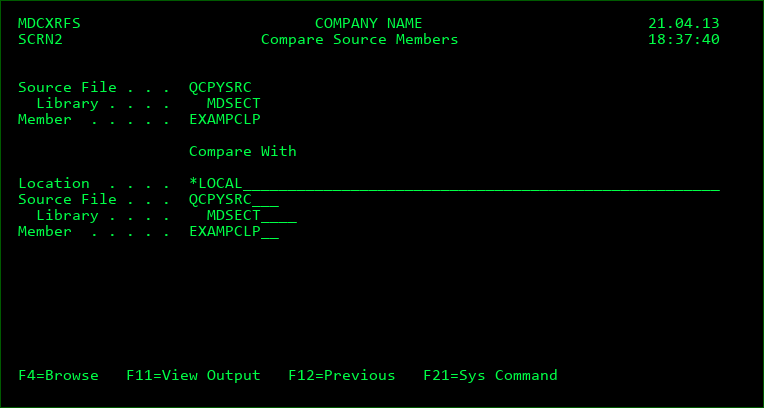
Location
*LOCAL indicates that the source file is located on the current system. Otherwise the location is a network address defined in the MDCMS Synchronization Settings. Press F4 to select the location from a list.
Source File
The name and library of the source file containing the other source member. Press F4 to select from a list
Member
The name of the source member to compare with
If there are differences between the members, the differences will be shown in parallel in a split screen. Press F16 to forward through the source to the next difference and F3 to exit the comparison results screen.
D - Source Member Description
Details pertaining to the source member, including the Attribute, Text, Creation date/time and Change date/time.
P - Programs using Source
List all programs or modules that use the source as a copybook
The primary source for those objects must be managed by MDCMS for MDXREF to be aware of the copybook references.
The primary source used to compile the object is not considered a copybook and is not listed on this screen.
S - View Contents of Source Member
View the source member in SEU