X-Analysis Libraries for Level
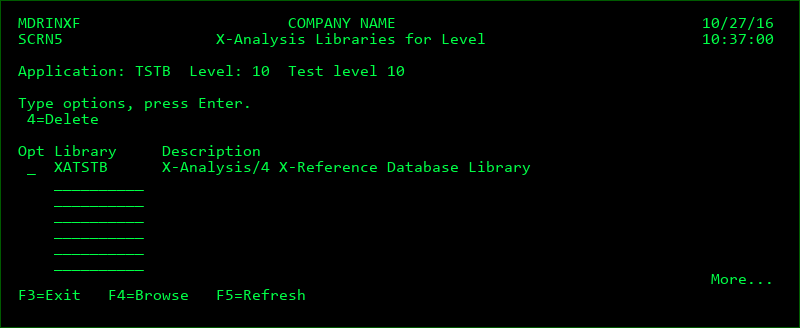
This screen displays the list of defined X-Analysis libraries that are linked to an Application and Level. It is accessed by option 9 from the Level listing. It also allows the user to add or remove libraries from the listing if they are authorized to MDSEC Code 4 for the application.
X-Analysis is an application modelling product from Fresche Solutions and an X-Analysis library is a collection of source/object libraries that it cross-references.
When MDCMS completes the installation of an RFP into the target Application/Level, the MDXANI service will invoke X-Analysis command XREFRESH for each linked X-Analysis library. The XREFRESH command looks for any differences in the library set and updates the information for those differences.
This option is only applicable if MDCMS is installed.
Opt
| Option / Field | Description |
|---|---|
| 4 | Remove the library from the list |
Library
A library may be added to the library list by entering the name of the library on a blank line. F4 may be pressed to browse the list of user libraries on the system. Multiple libraries may be simultaneously selected from the browse screen.
The library should be an X-Analysis library containing the meta-data for an environment.
Function Keys:
F4 - Browse list of libraries to select one or more for this Application Level